4
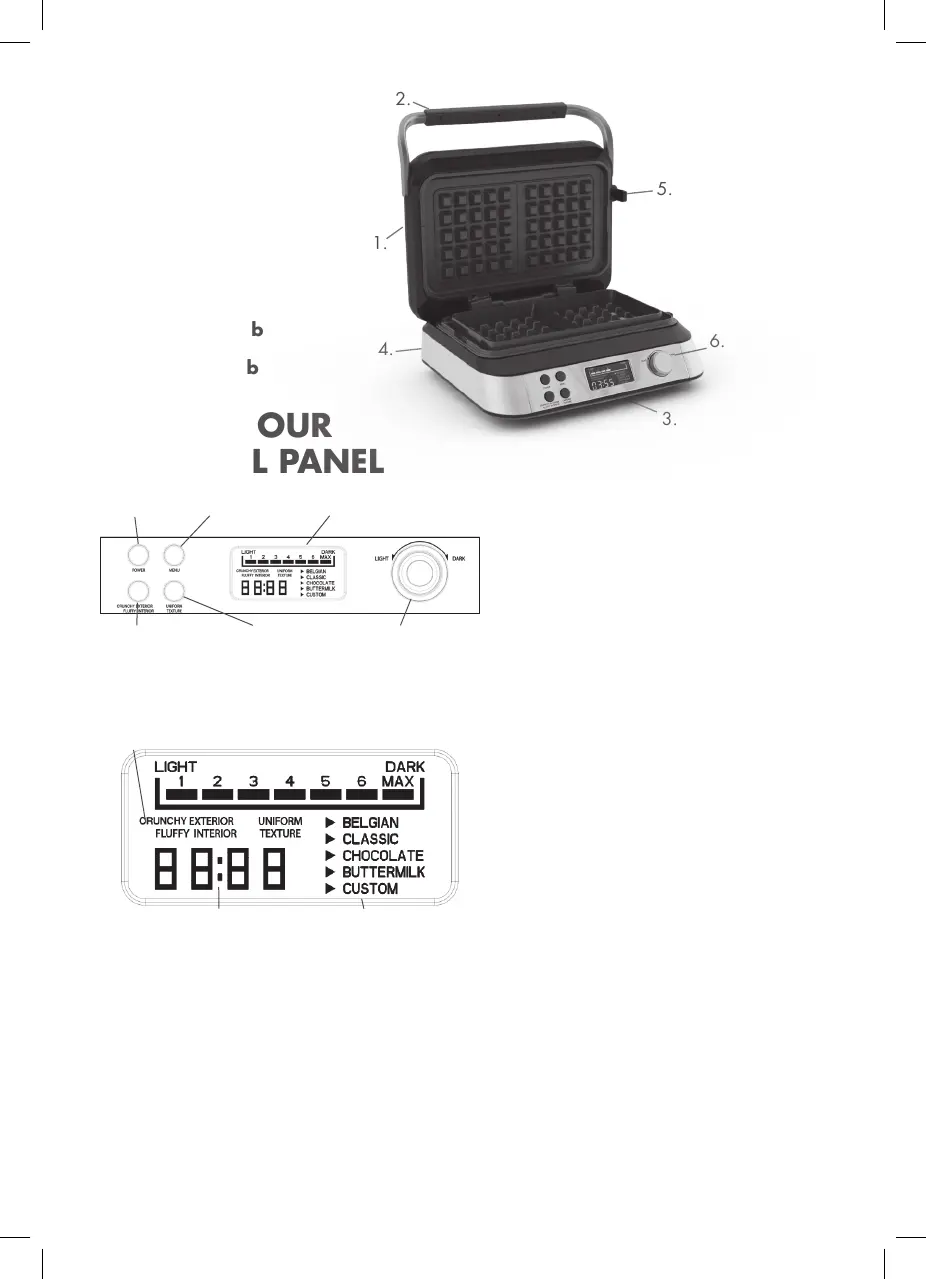
PARTS
1. Upper Body
2. Handle
3. LCD Display
4. Lower Body
5. Release Knob
6. Control Knob
BEFORE FIRST USE
Before using this electrical appliance, carefully read
the instructions below and keep the instructions for
use for future use:
a. Before plugging the appliance into the wall socket,
check that the local electric current corresponds
to the current specified on the appliance’s
rating plate. Always plug your appliance into a
grounded wall socket.
2.
1.
Power LCD Display
Crunchy Exterior
Fluffy Interior
Uniform
Texture
Light/Dark
4.
5.
6.
3.
KNOW YOUR
CONTROL PANEL
LCD DISPLAY
b. Unplug the power cable as soon as you
stop using the appliance and prior to
any cleaning, maintenance or accessory
assembly work.
c. Never place the appliance, the power cord
or the plug in water or any other liquids.
d. The exterior temperature may be higher
when the appliance is running.
e. This appliance is not intended to be
operated using an exterior timer or by a
separate remote control system.
f. If the supply cord is damaged, it must be
replaced by the manufacturer, its service
agent or similarly qualified persons in order
to avoid a hazard.
g. This appliance can be used by children
aged from 8 years and above and by
persons with reduced physical, sensory or
mental capabilities or lack of experience
and knowledge if they have been given
supervision or instruction concerning
use of the appliance in a safe way and
understand the hazards involved.
Children shall not play with the appliance.
Cleaning and user maintenance shall not be
made by children unless they are older than
8 and supervised. Keep the appliance and its
cord out of reach of children less than 8 years.
Menu
Power Texture
Function Timer Display


 To Next Page