The Greenwald Industries digicoin II Remote Programmer is a device designed for configuring and managing the digicoin II coin drop units. This programmer allows users to set various parameters for coin acceptance, pricing, output, and system resets, offering a comprehensive solution for managing coin-operated machines.
Function Description
The digicoin II Remote Programmer facilitates the setup and maintenance of digicoin II coin drops. Its primary functions include:
- Coin Training (TEACH): Allows users to add new coins or tokens to the system. This involves selecting an unused channel, setting the number of pulses the coin should generate, choosing the coin output pin (1 or 2), and then dropping a specified number of coins (typically 6) for the system to learn their characteristics. Once trained, the coin is enabled for acceptance.
- Set Pricing (PULSES): Enables adjustment of the number of pulses generated by accepted coins or tokens, which directly correlates to the price of a service or product. Users can select a specific channel (c1-c16) and then choose a pulse count between 1 and 99.
- Coin Output (COIN OUTPUT): Provides the ability to assign an output pin (1 or 2) to each programmed coin channel. This is useful for directing coin signals to different functions or devices within a machine.
- Adjust Tolerance (TOLERANCE): Allows fine-tuning of the coin/token acceptance criteria to prevent the acceptance of slugs or unwanted coins. There are six tolerance settings:
- t1 = Diameter (low)
- t2 = Diameter (high)
- t3 = Mag 1 (low)
- t4 = Mag 1 (high)
- t5 = Mag 2 (low)
- t6 = Mag 2 (high)
Tolerance levels can be set in a range of 0-15, where larger numbers are less restrictive and smaller numbers are more restrictive.
- Enable/Disable Channels (ENABLE): Activates or deactivates specific coin channels (c1-c16). This allows operators to temporarily disable certain coin types without deleting their programming.
- Reset Channel (RESET CHANNEL): Resets a specified channel (c1-c16) to its factory default settings without affecting other programmed channels.
- Factory Reset (RECOVERY): Resets all settings of the digicoin II coin drop to its factory defaults, effectively erasing all custom programming.
Important Technical Specifications
- Product Number (PN#): 46-1001
- Instruction Number (INS): 2491 REV. A
- Dimensions of Remote Programmer: Approximately 5.25 inches (height) x 1.75 inches (width).
- Display: LED display for showing menu options, channel numbers, pulse counts, tolerance levels, and other settings.
- Interface: Three buttons: "F" (Function), "+" (Increase/Scroll Up), and "-" (Decrease/Scroll Down).
- Connectivity: Connects to the digicoin II coin drop unit via a ribbon cable.
Usage Features
The remote programmer is designed for ease of use with a simple three-button interface and an LED display.
- Running Mode: The remote starts in running mode, indicated by a blinking LED display.
- Entering Main Menu: A "Long Press" (>= 2 seconds) of the "F" button enters the main menu.
- Scrolling Through Menus: "Quick Press" of the "+" or "-" buttons allows scrolling through menu options.
- Choosing Menu Function: A "Quick Press" of the "F" button selects a menu function.
- Making Selections: Within a menu function, the "+" or "-" buttons are used to make selections (e.g., channel numbers, pulse counts).
- Setting Programming: A "Press and Hold" of the "F" button confirms and sets programming.
- Escaping/Going Back: A "Press and Hold" (Medium Press <= 1 second) of the "F" button allows users to escape or go back through a menu until the screen returns to the previous selection.
- Visual Cues: The LED display provides clear indicators, such as blinking "CH" for channel selection mode or blinking "PL" for pulse setting mode, guiding the user through the programming process.
- Factory Set Channels: The digicoin II coin drops come preprogrammed with channels for various coin types (e.g., C1-CAD 0.25, C9-USD 0.25). A sticker on the digicoin II unit shows these factory-set channels. When training new coins, it's crucial to select an unused channel to avoid overriding existing configurations.
Maintenance Features
- Reset Capabilities: The device offers both individual channel resets and a full factory reset, allowing for easy troubleshooting and reconfiguration.
- Tolerance Adjustment: The ability to adjust coin/token acceptance tolerance helps in maintaining the integrity of the coin mechanism by preventing the acceptance of foreign objects or slugs, thus reducing potential maintenance issues related to coin jams or incorrect payouts.
- Enable/Disable Functionality: Channels can be enabled or disabled, which is useful for temporary changes in accepted currency or for troubleshooting specific coin types without requiring a full reprogramming.
The Greenwald Industries digicoin II Remote Programmer streamlines the management of coin-operated machines by providing a user-friendly interface for comprehensive configuration and maintenance of the digicoin II coin drop units.

 Need help?
 General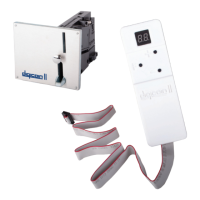

 To Next Page