
 Need help?
Do you have a question about the Griots Garage Battery Manager V and is the answer not in the manual?
Lists key features like reverse polarity protection, input/output specs, reconditioning, and connectivity options.
Explains the indicators for selecting battery voltage (6V/12V).
Explains the indicators for selecting battery type (FLD, AGM, LiFe).
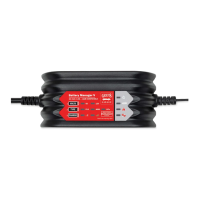
Details the function of selector buttons and status indicators on the device.
Warns about explosive gases, static electricity, and handling.
Advises on wearing eye protection and immediate actions for acid contact.
Covers safe storage of clamps and caution when working in engine compartments.
Notes the product contains chemicals known to cause reproductive harm.
Instructions on removing battery terminals and ensuring ventilation.
Steps for cleaning battery terminals and checking acid levels.
Emphasizes following manufacturer advice and checking battery voltage.
Provides rules for charger placement away from battery, ventilation, and moisture.
Specific caution for marine batteries regarding onboard charging.
Advice on positioning cords and staying clear of moving parts to prevent sparks.
Explains how to identify positive/negative posts and vehicle grounding.
Step-by-step guide for connecting clips to a negative grounded vehicle.
Step-by-step guide for connecting clips to a positive grounded vehicle.
Instructions for connecting the second clip to the chassis or engine block.
Steps for safely disconnecting the charger after use.
Checks polarity and attaches battery cables for external charging.
Safely connects the negative charger clip to the free end of the battery cable.
Sequence for turning off charging and disconnecting leads safely.
Guidance on selecting the correct battery type (FLD, AGM, LiFe).
Clarifies that the LiFe setting is only for Lithium Iron Phosphate batteries.
Describes plugging in the unit and indicators in Standby Mode.
Explains what the POLARITY and ERROR LEDs indicate.
Guides users through selecting voltage, type, and initiating charge.
Details the indicators for full charge and when the battery can be used.
Procedure for disconnecting the AC power and DC leads.
Explains the unit's ability to resume charging after a power interruption.
Describes the proprietary process designed to optimally charge and maintain batteries.
The initial mode where the charger determines the best charging path.
Protects deeply discharged batteries during the initial charge period.
Activates if battery sulfation is detected, extending charge time.
Manages battery health during long-term storage and non-use.
Charger is compatible with various battery types including Lithium.
Sends power only when a proper battery connection is made.
Guards against reverse connections, indicated by a POLARITY LED.
Details the seven phases of the charging process: Energizing to Restoring.
Technology that alters charging based on ambient temperature for battery health.
Guards against charging compromised batteries, indicated by flashing LEDs.
Prevents power delivery if a shorted connection is detected.
Protects against charging errors, indicated by the ERROR light.
Explains how to switch Recovery Mode ON/OFF and its function.
Provides contact information for customer service and product inquiries.
 General
| Brand | Griots Garage |
|---|---|
| Model | Battery Manager V |
| Category | Battery Charger |
| Language | English |

 To Next Page