EasyManua.ls Logo

Grizzly G9849 - User Manual

Grizzly G9849
4 pages
Print Icon
To Next Page IconTo Next Page
Loading...
Listed below are the dial indicator components.
Match the description with the corresponding part
number in the illustration above.
1. The adjustable markers can be moved along
the circumference of the dial.
2. The dial lock secures the dial face after being
rotated around the indicator body.
3. On the scale, the distance between the lines
equals 0.001" (one thousandths of an inch).
4. These numbers represent 0.010" (ten thou-
sandths of an inch).
5. The contact point touches the surface to be
measured.
6. Each number on the decade counter repre-
sents one full rotation of the needle and is
equal to 0.100" (one hundred thousandths of
an inch).
© 2002 Grizzly Industrial, Inc.
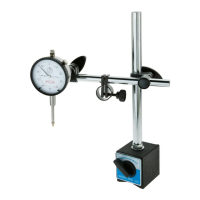
The Model G9849 Magnetic Base/Dial Indicator Combo features a 0.001" resolution, 1" range, and a 2"
easy-to-read dial. The indicator is supplied with a decade counter, adjustable markers and a dial face lock.
The magnetic base features an ON/OFF switch, a magnetic base for both tubular and flat mounting, a stout
column, fine-tune adjustment knob and 2 positioning joints. This tool will allow you to accurately and quickly
measure runout, lead, and motion. Please familiarize yourself with the terminology of the components to
maximize the effective use of this tool.
G9849
Magnetic Base/Dial
Indicator Combo
10
20
30
40
50
60
70
80
90
0
0
.5
.4
.9
.3
.8
.2
.7
.1
.6
.001'' 0—1''
20
10
90
80
70
60
50
40
30
0
Below is a list of the magnetic base compo-
nents.
1. The column supports the mounting assem-
bly.
2. The lock knobs secure the mounting assem-
bly after adjustments are made.
3. The indicator mounting stud fastens indicator
to the boom.
4. The ON/OFF switch for the magnet.
5. The magnetic base. One mounting surface
on the back and one on the bottom.
6. The fine-tune adjustment knob allows the
indicator to be adjusted in small increments.
7. One of 2 pivot joints that allows articulation of
the mounting assembly.
8. The boom supports the mounting assembly.
Figure 1. Indicator components.
ON
OFF
Figure 2. Magnetic base components.
3
4
5
6
1
2
1
2
3
4
5
6
7
8
-1-
Question and Answer IconNeed help?

Do you have a question about the Grizzly G9849 and is the answer not in the manual?

Summary

Grizzly Magnetic Base;Dial Indicator Combo

Indicator Components

Explanation of the dial indicator's numbered parts, including adjustable markers and contact point.

Magnetic Base Components

Explanation of the magnetic base's numbered parts, including column, lock knobs, and ON/OFF switch.

Magnetic Base Assembly

Dial Indicator Assembly

Basic Operations

Adjusting the Assembly

Setting the Contact Point

Reading the Dial

Dial Lock Function

Adjustable Markers Usage

Overview

This document describes the Grizzly G9849 Magnetic Base/Dial Indicator Combo, a precision measuring tool designed for various industrial applications.

Function Description

The G9849 combo consists of a magnetic base and a dial indicator. The magnetic base provides a stable platform for the dial indicator, allowing it to be positioned on flat or round ferrous surfaces. The dial indicator is used for precise measurement of small linear distances, typically for checking runout, flatness, and motion. It is calibrated to read 0.001" and has a range of 1". The device is designed to help ensure proper setup and accurate measurements in various industrial settings.

Important Technical Specifications

  • Dial Indicator Calibration: 0.001"
  • Dial Indicator Range: 1"
  • Dial Indicator Face: 1.75" diameter, easy-to-read dial.
  • Magnetic Base: Features an ON/OFF switch for easy attachment and release from ferrous surfaces. It has a ground, flat surface and a notched bottom for mounting to curved surfaces.
  • Mounting Stud: Threaded end inserts into the flange on the back of the dial indicator.
  • Pivot Joint: Has two holes, with only one correctly sized for the stud. The sleeve on the pivot joint can be rotated for alignment.
  • Adjustable Markers: Two markers on the dial face for setting a measurement range.
  • Fine-Tune Adjustment Knob: Allows for precise zeroing or setting of reference points.
  • Lock Knobs: Used to adjust the height and angle of the support boom and to secure the pivot joint.
  • Dial Lock: Allows the dial face to be rotated for setting absolute measurements.

Usage Features

Magnetic Base Operation

  1. Securing the Base: Use the ON/OFF switch on the magnetic base to engage or disengage the magnet. Always turn the switch OFF when moving the unit to avoid marring surfaces and prevent sudden jarring that could damage the indicator.
  2. Surface Compatibility: The magnetic base can be positioned on flat or round steel or iron surfaces. The bottom is notched for curved surfaces and has a ground, flat surface for flat surfaces. The back of the base is also ground flat for mounting.
  3. Stability Check: After turning the switch to the ON position, gently rock the base to ensure it is securely attached to the surface.
  4. Adjustments: Make adjustments to the support assembly only when the base is magnetically secured to a steel or iron object to prevent damage to the indicator if the base falls.

Column and Mounting Assembly

  1. Assembly:
    • Locate the flat washer and attach it to the threaded end of the column.
    • Thread the column into the threaded hole on top of the magnetic base until it stops turning.
    • Tighten the column by turning the jam nut with an 11/16" wrench.
  2. Adjusting the Support Boom: Loosen the lock knobs to adjust the height and angle of the support boom. Avoid forcing the indicator to move without loosening the locks, as this can cause premature wear.
  3. Positioning: The support assembly can be positioned in various configurations by loosening the two pivot joints.

Dial Indicator Operation

  1. Mounting the Indicator:
    • Loosen the lock knob that secures the mounting stud to the boom and remove the stud.
    • Unscrew and remove the knurled nut and flat washer from the mounting stud.
    • Insert the threaded end of the stud into the flange on the back of the dial indicator (from either the left or right side, depending on mounting needs).
    • Attach the washer and thread the knurled nut back onto the stud.
    • Insert the plain end of the stud into the pivot joint. Note that only one of the two holes in the pivot joint is correctly sized for the stud. Rotate the sleeve on the pivot joint to align parts if necessary.
    • Tighten the lock knob for the pivot joint.
    • Tighten the knurled nut with a flat blade screwdriver to lock the dial into place.
  2. Setting the Contact Point:
    • Ensure the contact point is perpendicular to the expected motion of the object being tested to avoid measurement errors.
    • The contact point must be resting against the part before any change can be indicated. Adjust the unit so the needle has moved to ensure proper measurement.
  3. Fine-Tune Adjustment: Use the fine-tune adjustment knob to precisely set the dial to zero or any other reference point.
  4. Reading the Dial:
    • The dial indicator reads 0.001" per increment.
    • The pointers rotate in opposite directions when the contact point is depressed: the large dial pointer rotates clockwise, and the smaller dial pointer rotates counterclockwise.
    • Keep track of the number of revolutions for the smaller dial. The first revolution is indicated by the numbers on the outer ring, and the second revolution by the innermost numbers.
    • When the contact point is not touching anything, the pointers will read "under" the zero inch mark.
  5. Dial Lock: Loosening the dial lock allows the dial face to be rotated. This is useful for absolute measurements or when adjusting the column, boom, and fine adjustment knob is difficult.
  6. Adjustable Markers: Two adjustable markers on the dial face can be positioned to set a measurement range, allowing the device to be used as a range tester.

Maintenance Features

  • Preventing Damage: Avoid dropping the dial indicator, as this can reduce its accuracy and make it unusable.
  • Secure Mounting: Always ensure the magnetic base is securely attached to a suitable ferrous surface. Sheet metal may not have sufficient mass to support the unit, and hanging the base upside-down or from the side of a machine can cause it to fall.
  • Proper Adjustment: Always loosen lock knobs before making adjustments to prevent premature wear on the system.

Grizzly G9849 Specifications

General IconGeneral
BrandGrizzly
ModelG9849
CategoryMeasuring Instruments
LanguageEnglish