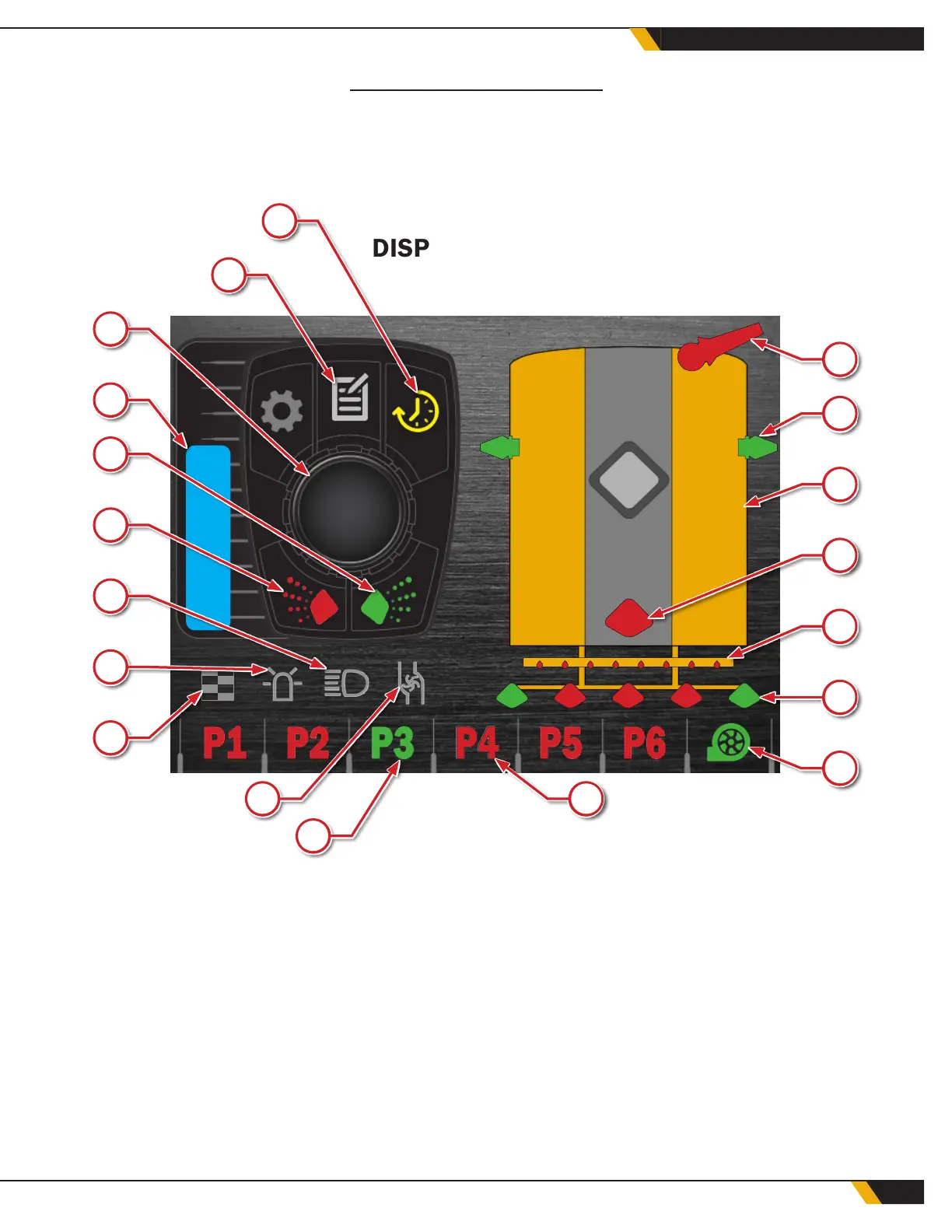
* Not all devices are present on all trucks. Display will indicate each water truck as it is equipped.
** When selecting a program, the active program will display green, and the selected program will be indicated by a white highlight.
*** Low level warning will appear over the water tank when there is 10 seconds of water remaining. The timer will count down until
the low-level shut-off point, when the water pump will automatically shut off to prevent component damage.
WWW.GFWORLDWIDE.COM | +1 (208) 664-9291
WATER CONTROL SYSTEM
The Ground Force Water Control System (WCS) display/control module, encoder and keypad allow the opera-
tor to continually adjust the water delivery based on the current conditions without having to stop the truck
or return to the shop to change operating parameters. All of the functions and adjustments described are
available to the operator when the ignition key is on.
DISPLAY SCREEN
2
13
3
14
4
15
5
16
6
17
7
18
8
19
12
9
10
11
1
1. Timer control
2. Settings menu
3. System options
4. Water level bar graph*
5. Curb side spray on/off
6. Driver side spray on/off
7. Work lights*
8. Safety beacon*
9. Timer/staggered mode indicator
10. Onload pump*
11. Active program**
12. Highlighted program**
13. Water cannon*
14. Side spray*
15. Water tank***
16. Gravity drain valve*
17. Drip bar*
18. Rear spray bar spray head*
19. Water pump indicator
29
WATER CONTROL SYSTEM



 To Next Page