EasyManua.ls Logo

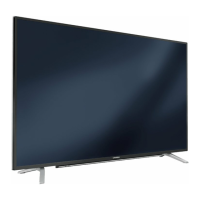
Grundig 65 GHU 7970 B - User Manual

Grundig 65 GHU 7970 B
123 pages
Print Icon
To Next Page IconTo Next Page
Loading...
Television
User’s Manual
EN
65 GHU 7970 B

Table of Contents

Questions and Answers

  • M
    Michael CollinsAug 10, 2025
    Why Grundig 65 GHU 7970 B TV remote control does not work?
    • L
      Laura ReevesAug 10, 2025
      If the Grundig TV remote control isn't working, first, make sure you're pointing it directly at the TV. Then, check the batteries and replace them if needed. If it still fails, try turning off the TV completely by using the main power key or unplugging it for about 2 minutes before turning it back on.
  • K
    kenneth04Aug 21, 2025
    What to do if my Grundig TV screen is on (black screen), but there is no channel?
    • A
      April CookAug 21, 2025
      If your Grundig TV screen is black but on and there's no channel, check if the antenna cable is properly connected. If it is, try running a channel scan to program the TV stations. Also, adjust the brightness, contrast, or color settings. If the issue persists, test with a different TV station to rule out problems at the broadcast source.
  • P
    penny05Aug 30, 2025
    How to fix ghosting, reflection, no color picture but no sound on Grundig TV?
    • R
      Roger NelsonAug 30, 2025
      If your Grundig TV shows ghosting, reflection, no color picture, and no sound, try performing an automatic or manual channel setting. Have the antenna cable or system checked. Also, ensure the color intensity isn't at minimum; turn up the color. Select the correct color standard, and test with another channel to exclude station issues. Finally, check that the volume isn't set to minimum and turn it up.

Grundig 65 GHU 7970 B Specifications

General IconGeneral
Screen Size65 inches
Smart TVYes
HDRYes
Display TechnologyLED
Operating SystemAndroid TV
Refresh Rate60 Hz
HDMI Ports4
USB Ports2
Wi-FiYes
BluetoothYes
Sound Output20W
Resolution3840 x 2160

Related product manuals