9 / ENHot Air Fryer / User Manual
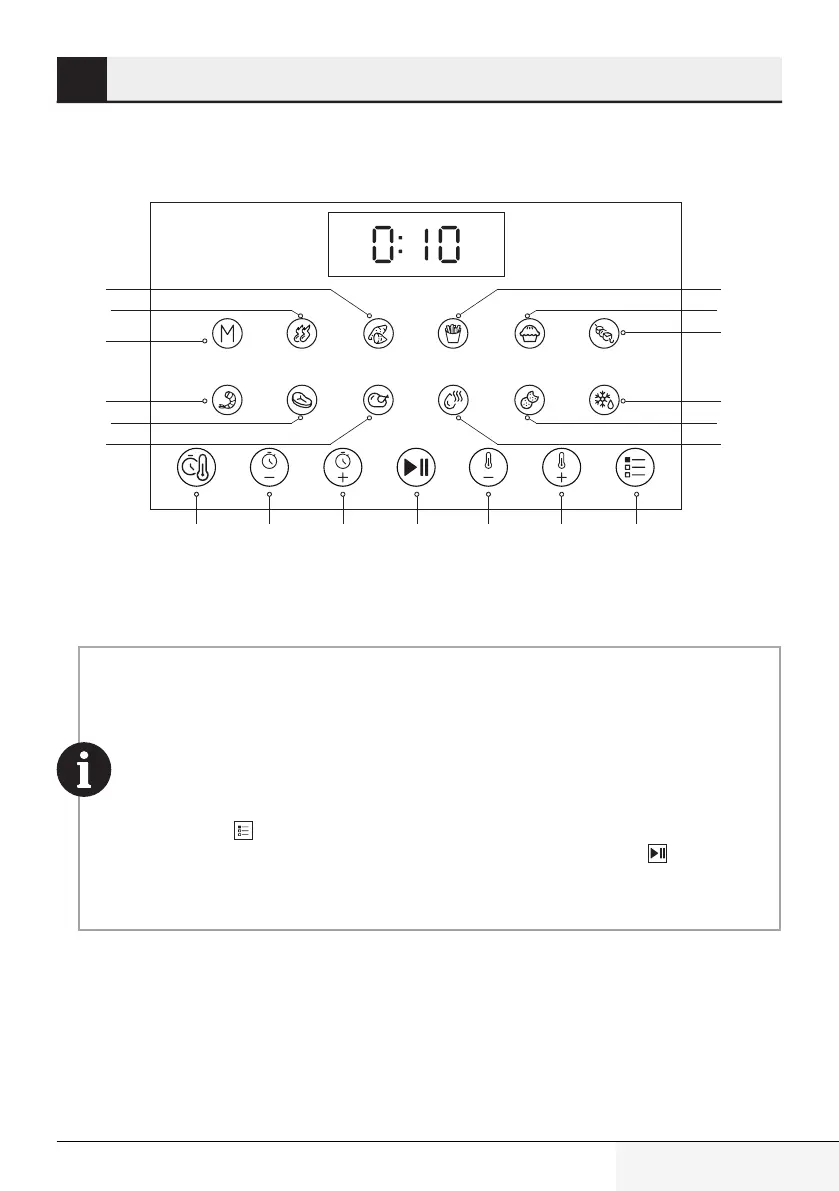
3.2 Control panel and led display:
Chicken
Meat
Pre-set
Function
Time
Increase
Temper
ature
Decrease
Temperature
Increase
Time
Decrease
MenuStart / Stop
Shrimp
Manual
Fries
Cake
Defrost
Dehydrate
Skewers
Cookie
Sweet
Potato
Chicken
Wings
• When “--” is shown on the display, it means that the appliance is in standby mode.
• When “b” is shown on the display, it means that the cooking process is completed. You
can remove the cooking basket out of the appliance.
• Display shuts down, when the cooking basket is taken out of the appliance. Appliance
resumes,
when the cooking basket is put back.
• Press “Menu ” symbol until finding the desired program to select a program. When the
desired program is found, the light of the program will blink, press “Start ” symbol to
start the program.
3 Operation



 To Next Page