4
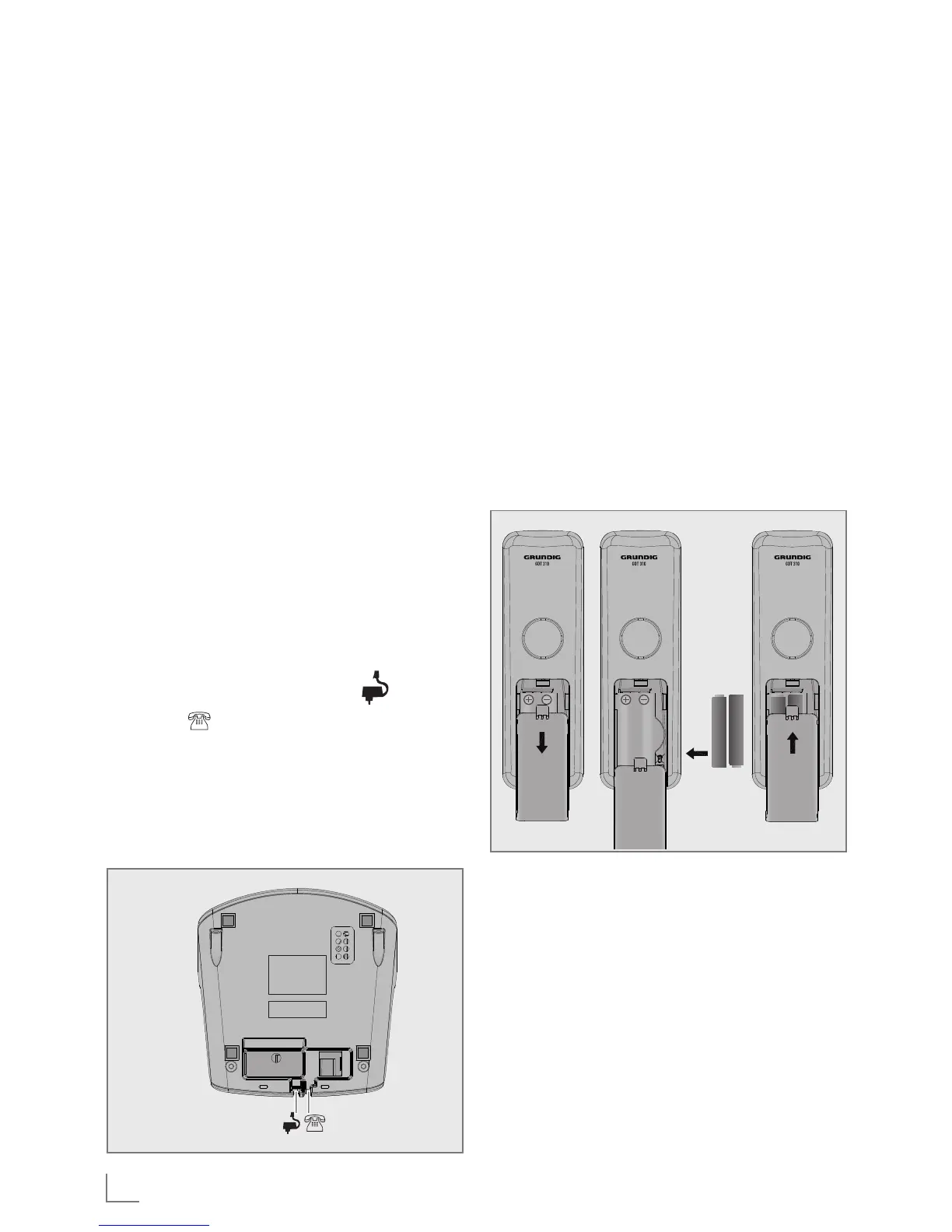
Installing and charging the
batteries
1 Slide open the battery compartment
cover.
2 Place the 2 batteries as indicated.
Respect polarity.
3 Slide the battery compartment cover
back.
4 Put the handset on the base and
charge for 14 hours first time. A beep
indicates that the handset is properly
placed on the base or charger.
Note:
█
Use only the power pack pro-
vided for the base station.
█
Use only NiMH rechargeable
batteries.
INSTALLING YOUR PHONE
_________________________
Package contents
The package contains the following
items:
█
1 Handset
█
1 Base station
█
1 AC power adapter
█
1 Telephone line cord
█
2 rechargeable batteries
█
1 User manual
The maximum range between the base
station and the handset is approxi-
mately 300 meters. Depending on the
surrounding conditions as well as spa-
tial and structural factors, the range
may be reduced. The range indoors is
normally less than outdoors.
Connecting the base station
1 Plug the power supply » « & line
cord » « into the base station.
2 Plug the power supply & line cord
into the wall socket.
3 Always use the cables provided in
the box.



 To Next Page