EasyManua.ls Logo

Grundig STR 310 - Page 35

Grundig STR 310
39 pages
Print Icon
To Next Page IconTo Next Page
To Previous Page IconTo Previous Page
Loading...
Remote
Control
of
GRUNDIG
TV
Sets
Calling
Up
the
Menu
Press
the
@
key.
Use
the
A\
and
&
keys
to
select
functions
and
confirm
with
x.
Activating
Teletext
Press
the
€>
()
TIMER
key.
TOP-Text
functions
can
be
selected
with
the
O
keys
(blue,
yellow,
red,
green).
Switching
Off
Press
the
©
key.
Universal
Remote
Control
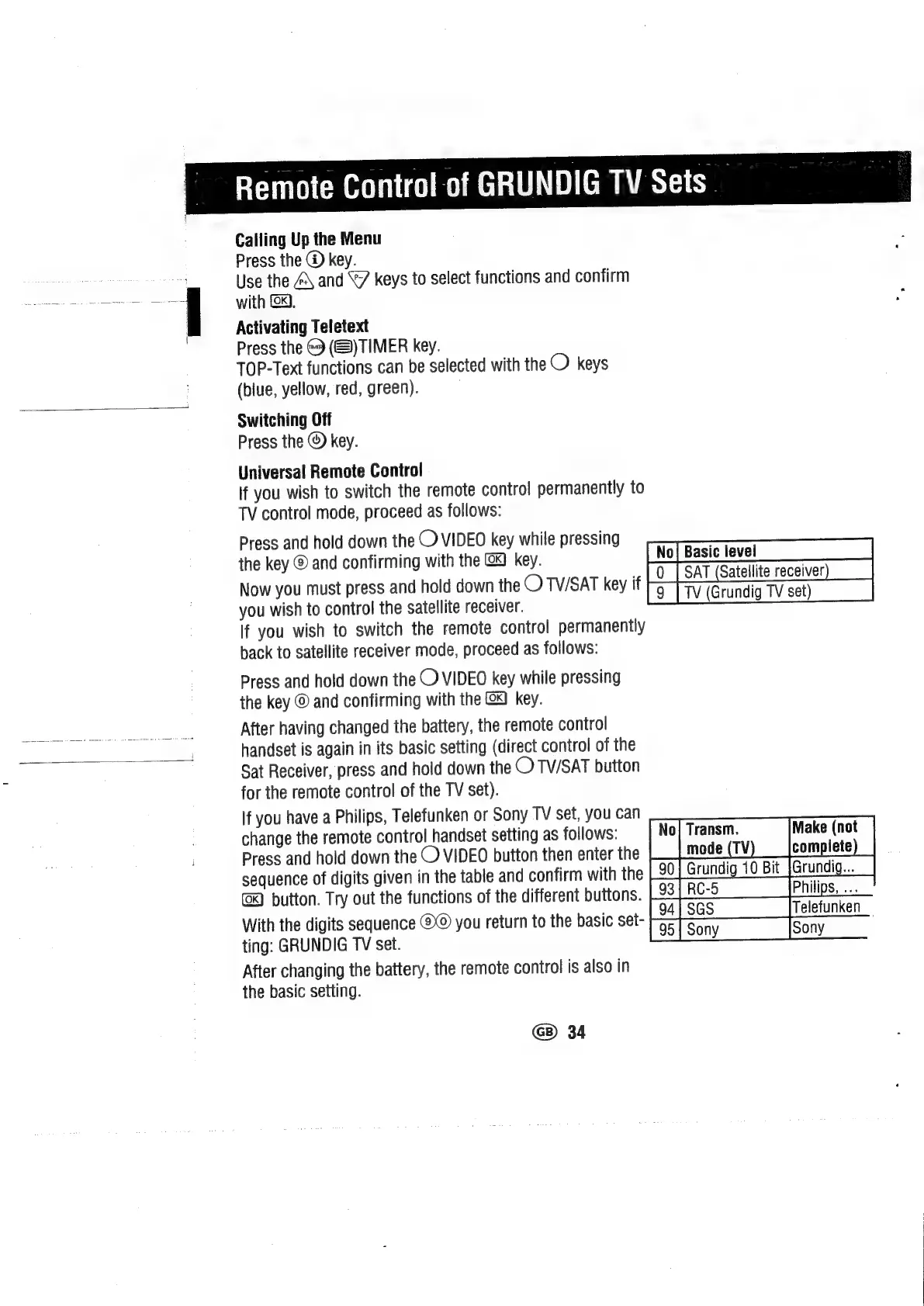
If
you
wish
to
switch
the
remote
control
permanently
to
TV
control
mode,
proceed
as
follows:
Press
and
hold
down
the
©
VIDEO
key
while
pressing
:
the
key
©
and
confirming
with
the
(x)
key.
[No[Basiclevel
,
LO_|
SAT
(Satellite
receiver)
_|
Now
you
must
press
and
hold
down
the
OTVI/SAT
key
if
rg
PTV
(Grundig
TV
set)
you
wish
to
control
the
satellite
receiver.
g
lf
you
wish
to
switch
the
remote
control
permanently
back
to
satellite
receiver
mode,
proceed
as
follows:
Press
and
hold
down
the
O
VIDEO
key
while
pressing
the
key
©
and
confirming
with
the
@&)
key.
After
having
changed
the
battery,
the
remote
control
handset
is
again
in
its
basic
setting
(direct
control
of
the
Sat
Receiver,
press
and
hold
down
the
O/TV/SAT
button
for
the
remote
control
of
the
TV
set).
If
you
have
a
Philips,
Telefunken
or
Sony
TV
set,
you
can
change
the
remote
control
handset
setting
as
follows:
Press
and
hold
down
the
©
VIDEO
button
then
enter
the
sequence
of
digits
given
in
the
table
and
confirm
with
the
button.
Try
out
the
functions
of
the
different
buttons.
With
the
digits
sequence
you
return
to
the
basic
set-
ting:
GRUNDIG
TV
set.
After
changing
the
battery,
the
remote
control
is
also
in
the
basic
setting.
eaten
mode
(TV
complete
90]
Grundig
10
Bit
[Grundig..._|
RC-5
ili
foa{sas
GB)
34

Related product manuals