EasyManua.ls Logo

Grundig STR 310 - Page 8

Grundig STR 310
39 pages
Print Icon
To Next Page IconTo Next Page
To Previous Page IconTo Previous Page
Loading...
|
Connection
This
diagram
illustrates
4“)
the
STR
310
model
Satellite
aerial
Terrestrial
aerial
If
you
do
not
have
a
video
recorder
connect
the
cable
directly
to
the
aerial
input
of
the
TV.
Before
connecting
your
receiver,
please
consult
the
important
safety
notice
on
page
1.
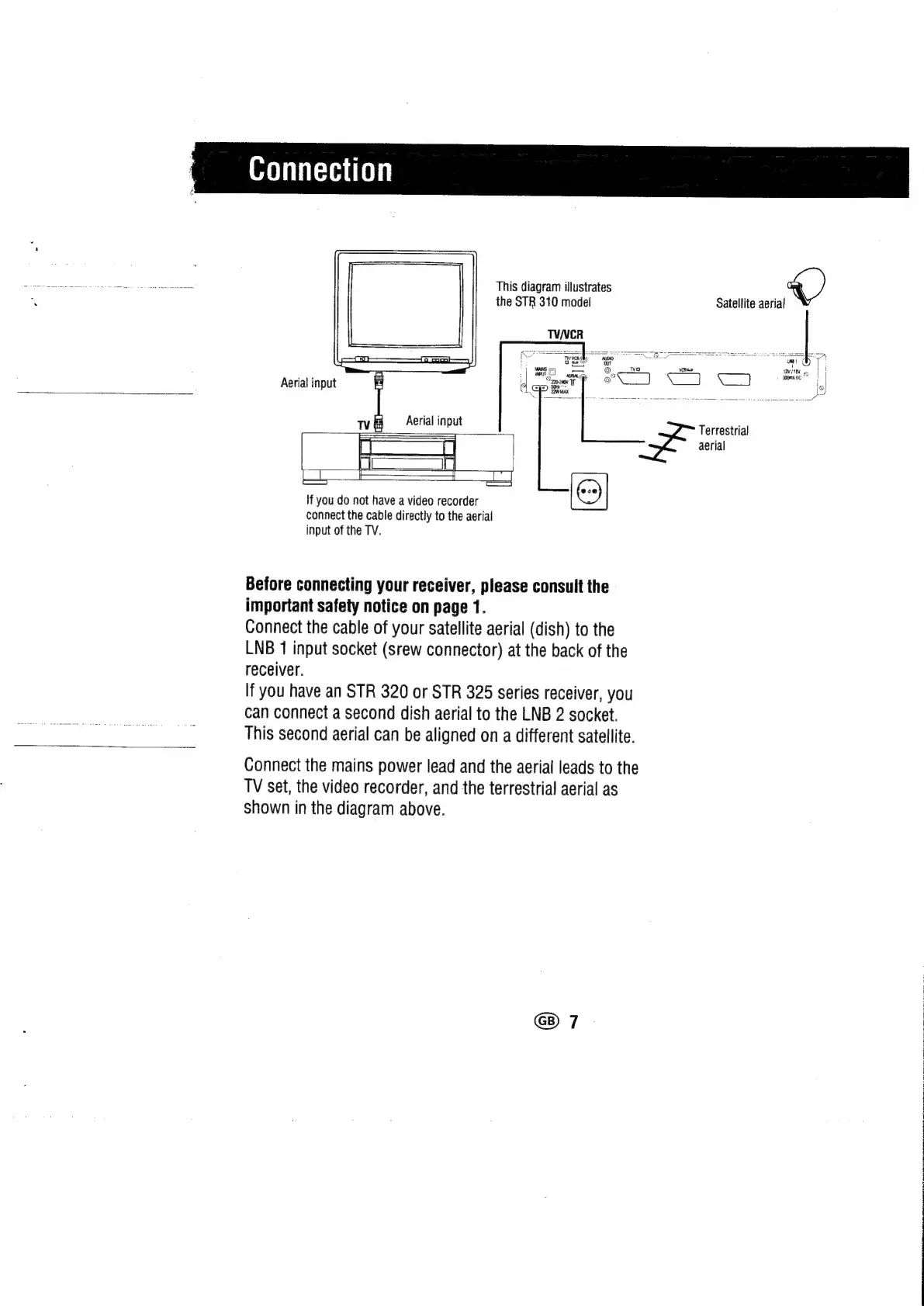
Connect
the
cable
of
your
satellite
aerial
(dish)
to
the
LNB
1
input
socket
(srew
connector)
at
the
back
of
the
receiver.
If
you
have
an
STR
320
or
STR
325
series
receiver,
you
can
connect
a
second
dish
aerial
to
the
LNB
2
socket.
This
second
aerial
can
be
aligned
on
a
different
satellite.
Connect
the
mains
power
lead
and
the
aerial
leads
to
the
TV
set,
the
video
recorder,
and
the
terrestrial
aerial
as
shown
in
the
diagram
above.
!
tI
6
|
sooma
oe
|
io

Related product manuals