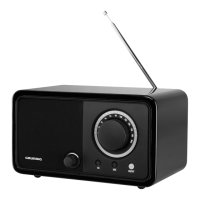
The Grundig TR 1200 is a table radio designed for the playback of audio signals. Any other use is expressly prohibited.
To ensure safe operation, several precautions must be observed:
- Water Protection: The device must be protected from dripping or splashing water. Do not place any vessels, such as vases, on the device, as they may be knocked over and spill fluid onto electrical components, posing a safety risk.
- Fire Safety: Do not place any naked flames, such as candles, on the device.
- Climate: Use the device only in a moderate climate.
- Ventilation: Ensure the device is adequately ventilated by placing it at least 10 cm from any other object. Do not cover the device with newspapers, tablecloths, curtains, etc.
- Static Electricity: If malfunctions occur due to static electricity charges or fast transient (burst), reset the device by pulling out the power plug and reconnecting it after a few seconds.
- Placement: When deciding where to place the device, be aware that furniture surfaces are often covered by varnishes and plastics containing chemical additives. These additives can corrode the device supports, leaving residues that may be difficult or impossible to remove.
- Cleaning: Do not use any cleaning agent, as this may damage the casing. Clean the device with a clean, dry cloth.
- Servicing: Never open the device casing. The manufacturer will not accept any liability for damage resulting from improper handling.
- Power Plug Accessibility: Make sure the power plug is freely accessible.
- Hearing Protection: Prolonged listening at loud volumes with earphones can damage your hearing.
Technical Specifications
The Grundig TR 1200 is noise-suppressed according to applicable EU directives and fulfills European directives 2004/108/EC, 2006/95/EC, and 2009/125/EC. The type plate is located on the bottom of the device.
- Power Supply: 230V~, 50/60 Hz
- Max. Power Consumption:
- Operating: < 13 W
- Stand-by: < 0.5 W
- Output: DIN 45324, 10% THD 5 W
- Frequency Band: FM 87.5 ... 108.0 MHz
- Dimensions (B x H x T): 243 x 135 x 160 mm
- Weight: Approximately 1.8 kg
Technical and design modifications are reserved.
Environmental Note
This product is manufactured with high-quality parts and materials that can be reused and are suitable for recycling. Do not dispose of the product with normal domestic waste at the end of its service life. Take it to a collection point for the recycling of electrical and electronic equipment. This is indicated by the symbol on the product, in the operating manual, and on the packaging. Consult local authorities for the nearest collection point. Help protect the environment by recycling used products.
Power Supply
Mains Operation:
- Check that the mains voltage on the type plate (on the bottom of the device) corresponds to your local mains supply. If not, contact your specialist dealer.
- Plug the supplied mains cable into the "AC: 230V ~" socket on the device.
- Plug the mains cable into the socket (230V~, 50/60 Hz).
Caution:
- The device is connected to the mains via the power cable. To completely disconnect the device from the mains, pull out the power cable.
- Unplug the mains plug to disconnect the device from the mains. Ensure the power plug is easily accessible during operation and not hindered by other objects.
Overview of Controls and Connections
Controls on the Front:
- Volume Knob: Adjusts the volume.
- FM Button: Selects the FM (UKW) waveband.
- AUX Button: Selects the input source for an external device.
- ON/OFF Button: Switches the device on and off.
- FM Tuning Knob: Used for tuning to a radio station, with a station and waveband scale.
- Tuning Indication Light: Lights up at the best possible station setting.
Controls on the Back:
- Telescopic Antenna: For FM reception.
- PHONES Socket: Earphone socket (3.5 mm stereo plug). Provides mono playback via earphones.
- AUX IN Socket: Audio signal input (stereo/mono) for connecting to an external device.
- AC: 230V ~ 50/60 Hz Socket: Connection socket for the supplied power cable.
Operating Instructions
Radio Mode:
- Press "ON/OFF" to switch on the device.
- Select the FM waveband with "FM".
- Note: For the best FM reception, extend the telescopic antenna and direct it accordingly.
- Find and tune the station using the "FM" tuning knob. The "tuning indication" light will illuminate at the best possible station setting.
- Adjust the volume using the volume knob.
- Press "ON/OFF" to switch off the device.
Listening to an External Source:
- Use a standard audio cable to connect the "AUX IN" socket on the back of the device to an AUDIO OUT socket on your external equipment.
- Press "ON/OFF" to switch on the device.
- Select the input source for the external device with "AUX".
- Adjust the volume using the volume knob.
- Start playback on the external device.
- Press "ON/OFF" to switch off the device.
Automatic Shutdown:
If no audio signal is available on the "AUX IN" socket, the device will automatically switch to Stand-by mode after 15 minutes. To use it again, switch the device on.

 Need help?











 To Next Page


 General