30
Choice 7:
<STX><Unsigned DATA><sp><CR>
Choice 8:
<STX><Signed DATA><sp><lb/kg><sp><Gross/Net/Qty><STAT><SPS><CR>
Choice 9:
<STX><Signed DATA><sp><lb/kg><STAT><SPS><CR>
Choice 10:
<STX><Signed Displayed Weight><sp><lb/kg><SPS><CR>
Choice 11:
<STX><Unsigned Displayed Weight><SPS><CR>
Choice 12:
<STX><Unsigned DATA><sp><lb/kg><sp><Gross/Net/Qty><STAT><CR>
Use choice 12 to send to a 450/455/550 remote display that is set to text mode and a <CR>
terminator.
Choice 13:
<STX><Unsigned DATA><sp><lb/kg><sp><Gross/Net/Qty><STAT> <CR><LF>
Choice 14 (Simulates NCI 3835):
<LF>Signed DATA<CR><LF><STAT><CR><ETX>
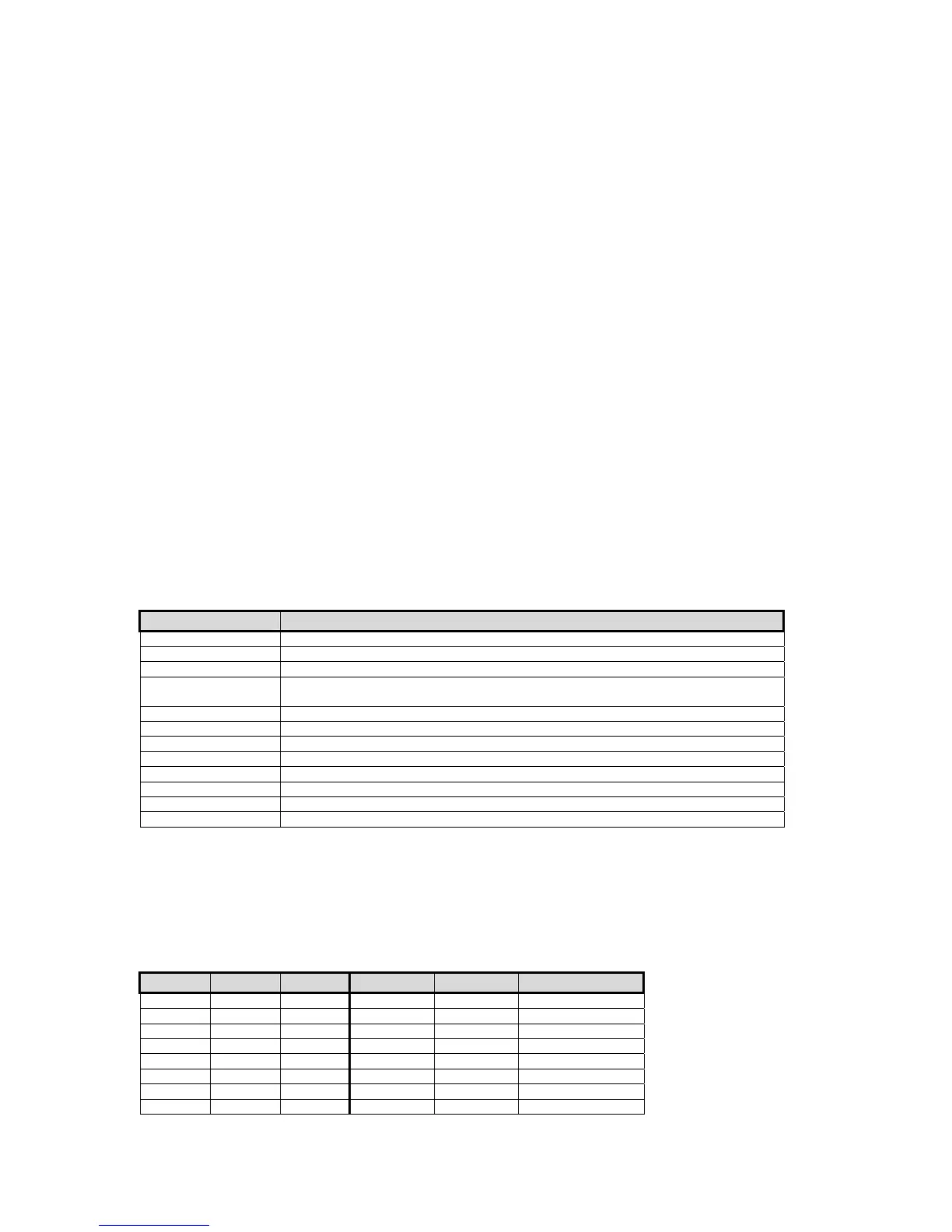
Data Block Name Description
<STX> A single control code, decimal value of 2.
<ETX> A single control code, decimal value of 3.
<POL> A <space> for positive data or a - for negative data.
<Signed DATA> 8 characters right justified, space padded, including a decimal point and polarity sign.
Polarity is a ‘+’ or ‘–‘ to the immediate left of the most significant digit.
<Unsigned DATA> 8 characters right justified, space padded, including a decimal point.
<lb/kg> Two characters indicating pounds or kilograms.
<Gross/Net/QTY> Single word for gross weight, net weight or quantity.
<STAT> An 'O' (overload/underload), 'M' (motion), or <space> otherwise
<SPS> See <SPS> Setpoint Status below.
<CR> A single control code, decimal value of 13.
<LF> A single control code, decimal value of 10.
<sp> ASCII Space, decimal value of 32.
<SPS> Setpoint Status
Transmitting the setpoint status will reflect the current state of all the setpoints, regardless of
which setpoint operation is configured. The status can be read as a single ASCII numeric
character (0-7), a Hex value (30h-37h) or a binary bit comparison. Status is preceded by a
<space> and an "S". The preceding data stream format is for fixed transmissions of <SPS> as
specified above. This is not associated with the custom transmission of parameter P96.
SP 1 SP 2 SP3 ASCII Hex Bit Comparison
Off Off Off 0 30h 0011 0000
On Off Off 1 31h 0011 0001
Off On Off 2 32h 0011 0010
On On Off 3 33h 0011 0011
Off Off On 4 34h 0011 0100
On Off On 5 35h 0011 0101
Off On On 6 36h 0011 0110
On On On 7 37h 0011 0111



 To Next Page