EN
25
3. Optical attenuation
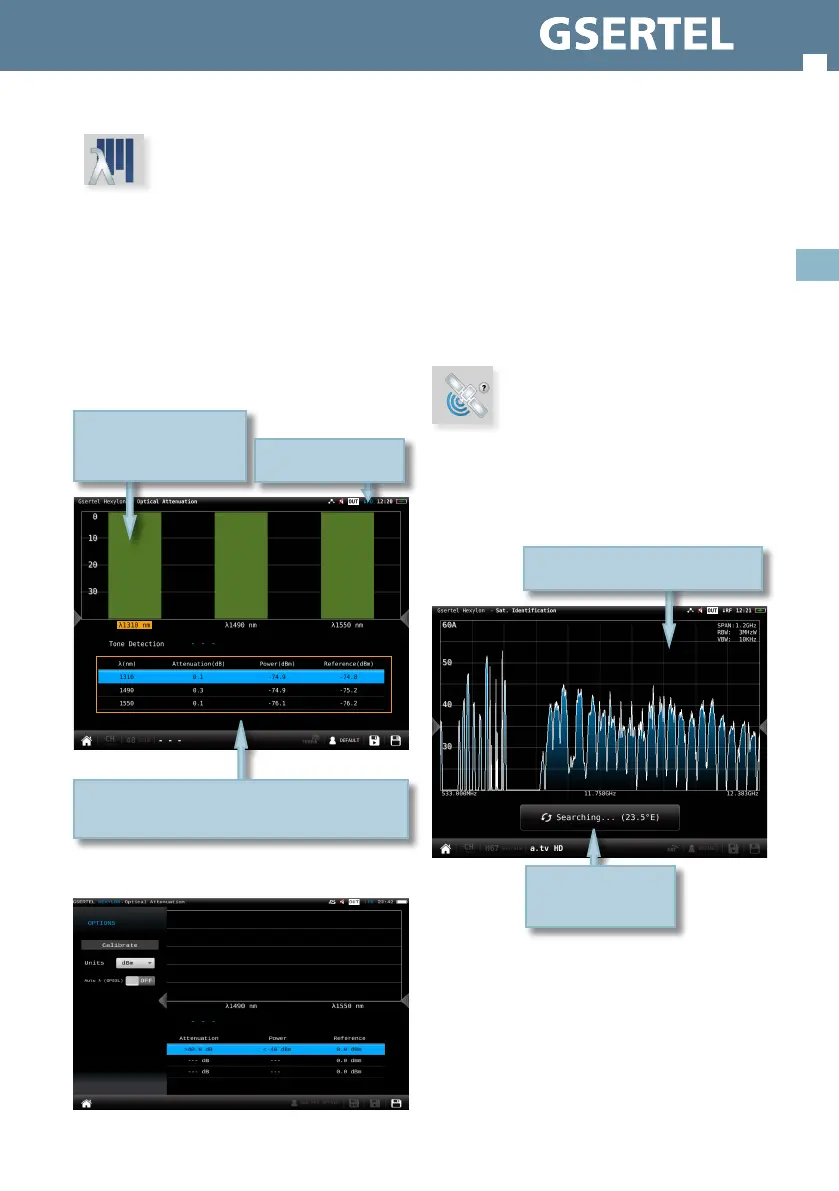
This feature allows measure the optical attenuation
in the ber network in three wavelengths: 1310nm,
1490nm and 1550nm.
When the user selects this features, the optical
ber input is automatically enabled.
Please, see section Top Menu->Inputs/Outputs to
learn how to enable the optical input.
3.1.- Main window:
3.2.- Options context menu:
List with the measurements in each wavelength:
attenuation, power and reference
Tap to select
Bar graph that represents
the attenuation of each
wavelength
Enabled O.F. input icon
• Calibrate: select the wavelength (tap on the
graphic or on the list) and tap on this button to
calibrate it.
• Units: mW/uW, dBm.
• Auto lambda (OPS3L): OFF/ON. If ON is selected,
the Hexylon synchronizes with the Televes OPS3L
light source, whenever it is in auto lambda mode
too, so the Hexylon gets the measurements over
the three lambdas simultaneously.
4. Satellite identification
This feature is able to detect automatically the
satellite the input signal belongs to.
4.1.- Main window
Once the satellite is
identied, the name is
shown in the display
The Hexylon adjusts automatically all
the paramenters of the spectrum


 To Next Page
 Loading...