EN
27
5.1.- Main window
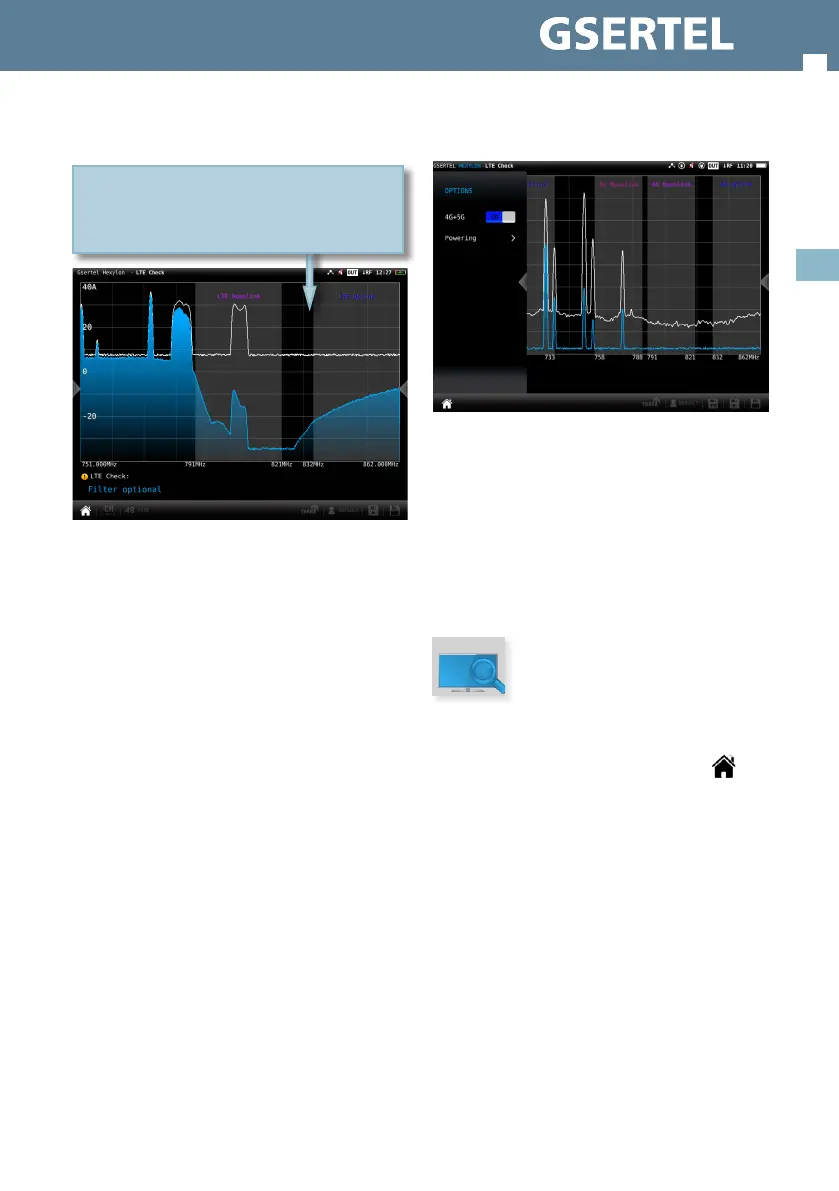
If it is necessary to insert a lter, is indicated on the
screen.
If it was not necessary to insert a lter, it will
be displayed the text “LTE Check OK” instead of
“Required LTE lter”.
On the screen are displayed simultaneously: 1-The
spectrum of the high “UHF” band (closest to the
LTE band); 2- The spectrum of the LTE down-link;
3- And the spectrum of the LTE up-link.
Simultaneous representation of the high UHF band
spectrum (closest to the LTE band), LTE down-link
spectrum, and LTE up-link spectrum
5.2.- Options context menu
• 4G+5G: ON/OFF. When ON is selected, the function
analyses the 4G up and down links, as well as the 5G
up and down links, detecting possible interfering
signals and, if it is necessary it recommends a lter.
• Powering:
- VDC: Selects the preamplier powering.
6. TV Analyser
This is the main function of the Hexylon. The user
can reach this funtion by tapping the icon
Thanks to this feature it is possible to have in one
screen all the information of the tuned signal.
The feature TV Analyser has 3 screens: Scan, Mosaic
3+1 and Mosaic 6. To switch between screens do
long swipe.
Below there is a detailed explanation of each of
these screens:
6.1.- Scan
This function scans the selected channel plan and
detects every existing analog and digital channel
in real time to determine the overall frequency
response of the system.
The scan measurement leverages the location
based thresholds to clearly show whether or


 To Next Page
 Loading...