Hexylon High-performance portable meter
28
not signal levels comply with the cable system
specications with their green, yellow and red bars.
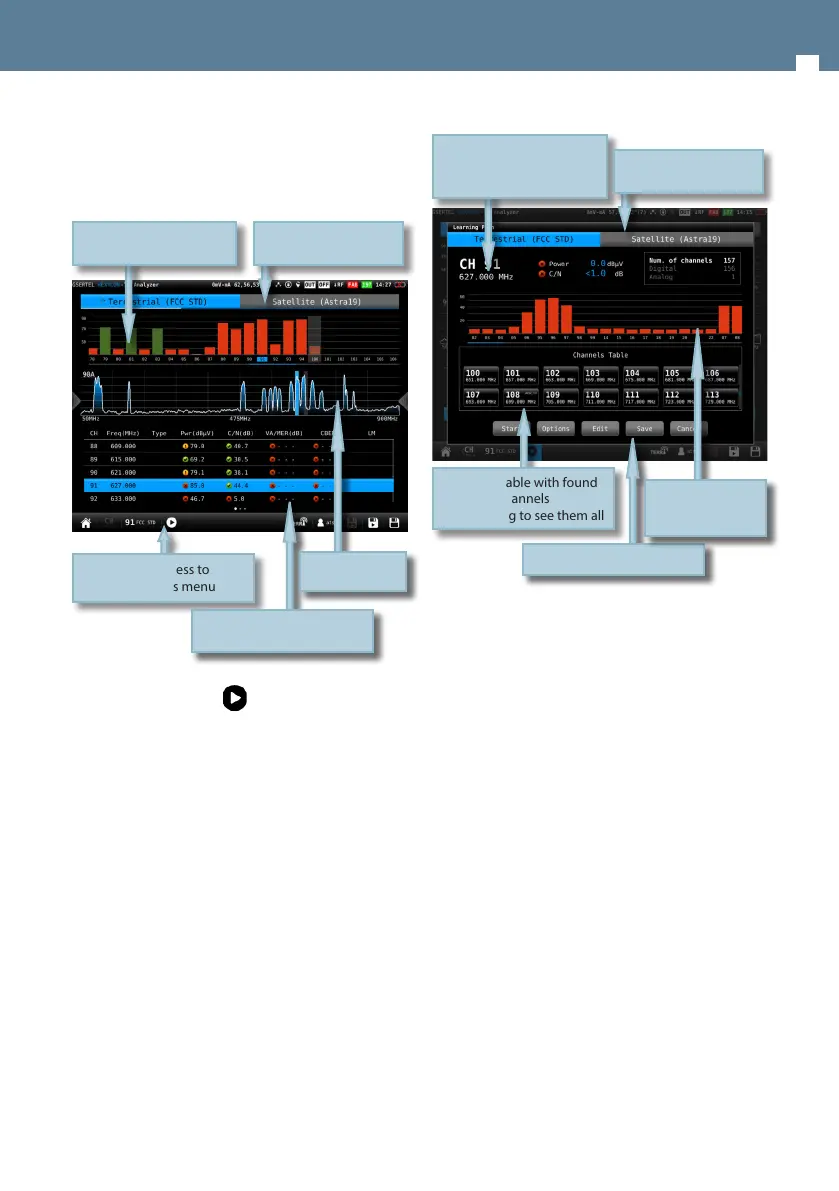
6.1.1.- Main window
Tapping on the icon a popup window will
appear showing the following functions:
Tap to access to
the options menu
Bar graph representing all
the found channels
Band
Tap to select
List with channels and
measurements
Signal spectrum
:
• Start: Starts a new system scan
• Options:
- Fast: ON/OFF. When the fast scan is
enabled (ON), the meter will not make
CBER and VBER measurements for digital
channels, neither V/A measurements for
analog channels. So, only power and level
measurements will be shown.
- Wide outlet: ON/OFF. Enable this option
when the outlet in your installation has
both terrestrial and satellite bands. So,
both bands will be scanned consecutively.
If this options is disabled, only the selected
band will be scanned.
Note: Note that if the selected user prole
does not allow to make measurements in
some bands, the scan will not be done in
that band.
• Edit: Allows to add/delete channels from the plan.
If the channel is selected (blue colored), when you
tap on it, it will be deselected. Otherwise, if the
channel is deselected (grey colored), when you tap
on it, it will be selected.
• Save: Saves a new plan with the found channels.
• Cancel: Closes the options window.
Channel table with found
channels
Vertical drag to see them all
Selected channel
Change tapping on the bar
graph or on the channel
table
Band
Tap to select
Options buttons (tap)
Bar graph with the
channels found in
the last scan


 To Next Page
 Loading...