Hexylon High-performance portable meter
50
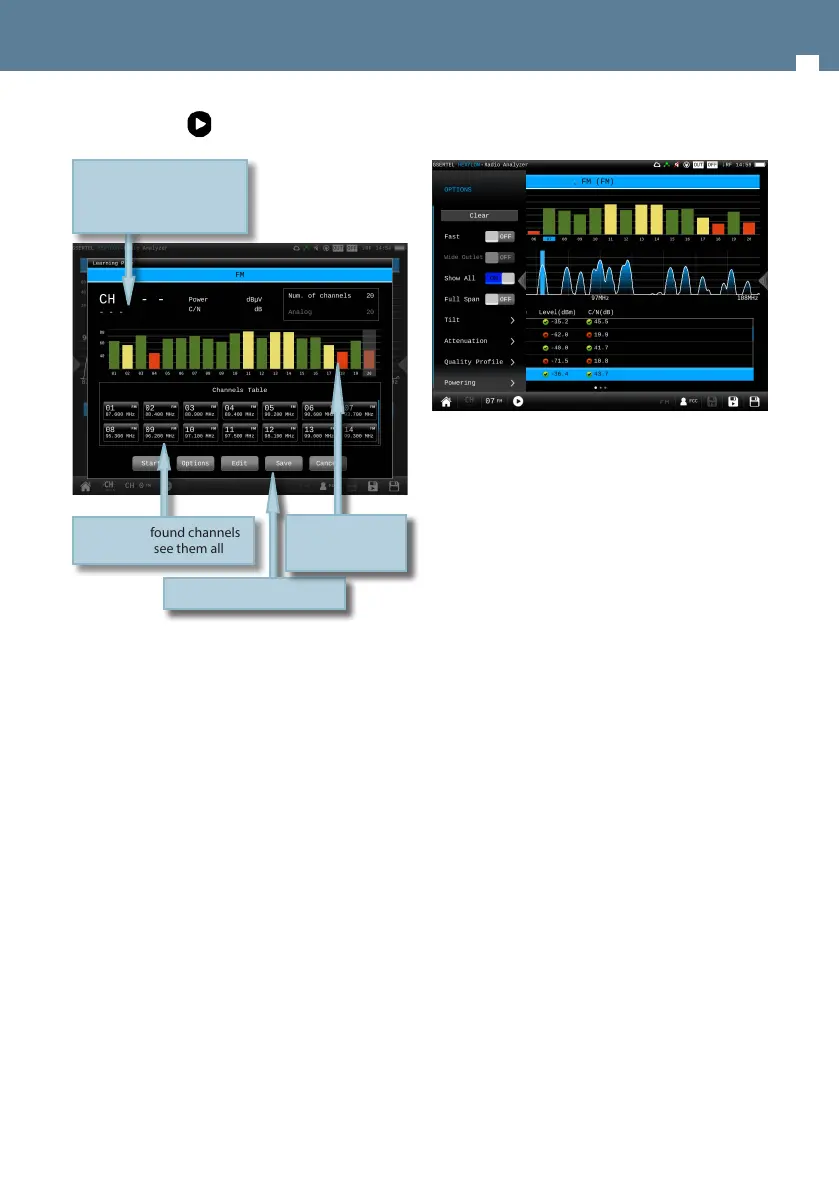
Tapping on icon a popup window will appear:
• Start: Starts a new system scan
• Options:
- Wide outlet: ON/OFF. Enable this option
when the outlet in your installation has
both terrestrial and satellite bands. So,
both bands will be scanned consecutively.
If this options is disabled, only the selected
band will be scanned.
Note: Note that if the selected user prole
does not allow to make measurements in
some bands, the scan will not be done in
that band.
• Edit: Allows to add/delete channels from the plan.
If the channel is selected (blue colored), when you
tap on it, it will be deselected. Otherwise, if the
channel is deselected (grey colored), when you tap
on it, it will be selected.
• Save: Saves a new plan with the found channels.
• Cancel: Closes the options window
Table with found channels
Scroll to see them all
Selected channel
Change tapping on the bar
graph or on the channel
table
Options buttons
Bar graph with the
channels found in
the last scan
8.3.2.- Options context menu
• Wide outlet: ON/OFF. Enable this option when
the outlet in your installation has both terrestrial
and satellite bands. So, both bands will be scanned
consecutively. If this options is disabled, only the
selected band will be scanned.
Note: Note that if the selected user prole does not
allow to make measurements in some bands, the
scan will not be done in that band.
• Show all: ON/OFF. When show all is ON, all the
measurements of all the channels are shown. When
it is OFF, you can only see the measurements of the
channel that is being measured in that moment.
• Span full: ON/OFF. When Span full is ON you can
see all the bars corresponding to all the found
channels. When this option is OFF, only 24 bars are
shown, so it is necessary to scroll to see them all.
• Tilt: ON/OFF. When the tilt option is ON, this
function measures the tilt between the channels
indicated in the labels CH A and CH B. Then you
can see a white line between these two channels
and the tilt measurement on it.
• Attenuation: ON/OFF. When the attenuation
option is ON, the Hexylon measures the attenuation
of the installation relative to a reference point,
usually the head-end ouput. So, the rst thing
you must do is connect the meter to the reference
point and tap on the Calibrate button. In this way,
the equipment will measure and save the level of
all the channels.
Then you must go to all the points of the installation
where we want to measure and connect the
meter, taking care to have this function ON. The
Hexylon will measure the levels of all the channels
comparing them with the reference ones.
When this option is ON, the bars of the graphic


 To Next Page
 Loading...