Hexylon High-performance portable meter
56
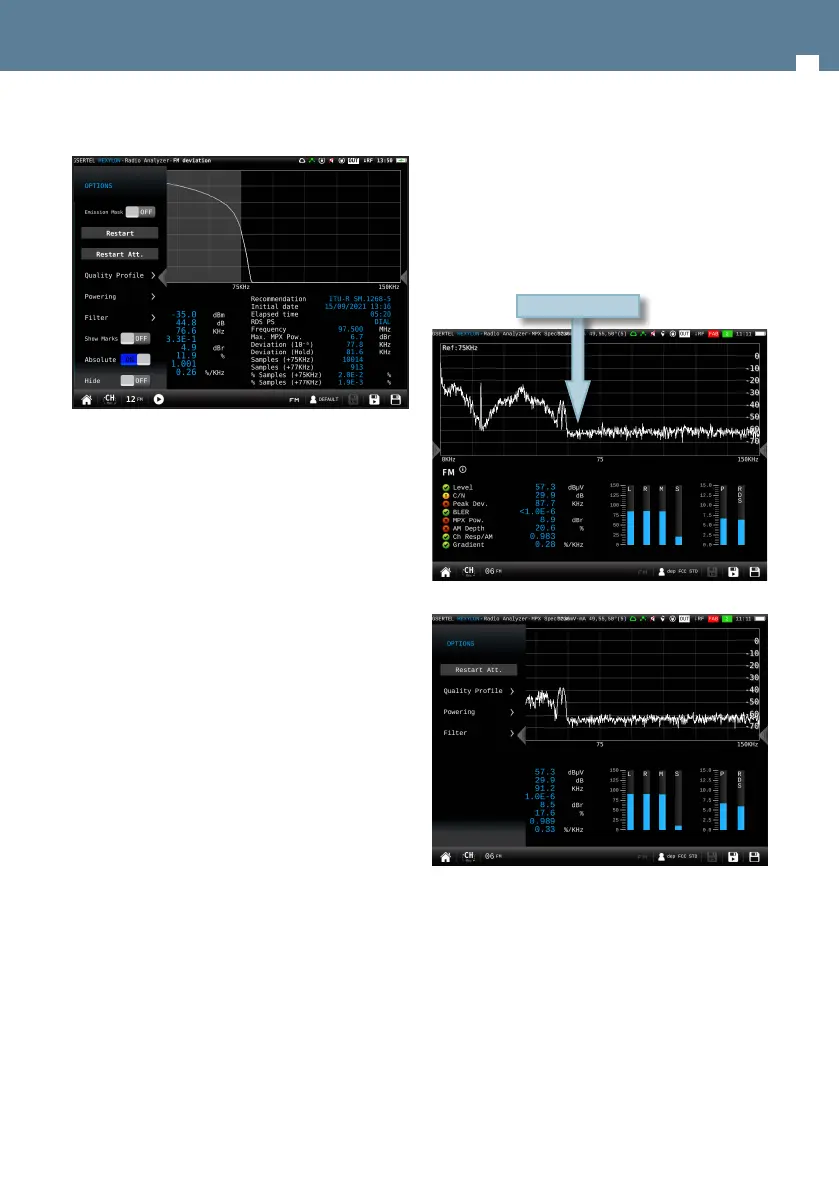
8.4.6.2.- Options context menu
• Emission mask ON/OFF: Shows the FM deviation
measure according to annex I/annex II of the
norm.
• Restart: Starts a new chart
• Restart Att: restarts the control attenuation.
• Quality prole: allows to select the quality prole .
• Powering:
- VDC: Selects the preamplier powering.
• Filter: allows to select the RF input channel lter.
• Show marks (only if Emission mask if OFF): shows/
hides the marks corresponding to values -15, -30
and -40
• Shows mask (only if Emission mask if ON): shows/
hides the trace corresponding to the limit of the
norm
• Shows trace (only if Emission mask is ON): shows/
hides the trace corresponding to the measure
• Absolute: shows deviation absolute values in the
graphic (0 -150 kHz)
• Hide: hides no relevant measurements to
deviation measurement.
8.4.13.- MPX Spectrum (Option 901633)
This feature shows the spectrum of the
demodulated FM signal, the FM channel
measurements, and several deviation
measurements:
• L Deviation: FM deviation produced by Left audio
• R Deviation: FM deviation produced by Right
audio
• M Deviation: FM deviation produced by mono
audio (20 Hz - 15 KHz)
• S Deviation: FM deviation produced by stereo
audio (23 - 53 KHz)
• Pilot Deviation: FM deviation produced by pilot
(18 - 20 KHz)
• RDS Deviation: FM deviation produced by RDS
signal (54 - 60 KHz)
8.4.13.1.- Main window
8.4.13.2.- Options context menu:
• Restart Att: restarts the control attenuation.
• Quality prole: allows to select the quality prole
• Powering:
- VDC: Selects the preamplier powering.
• Filter: Allows to select the lter to demodulate the
signal
MPX Spectrum


 To Next Page
 Loading...