EN
57
9. Wi-Fi Analyser
The HEXYLON is able to perform a full analysis
of the Wi-Fi band in both 2,4GHz, and 5GHz
bands. To change the band selection, tap on the
corresponding icon placed in the bottom bar.
When you access to this feature, the HEXYLON
activates the Wi-Fi automatically and, if it has been
connected to an available Wi-Fi network before,
the HEXYLON has saved the password, so it will
connect to the same network again automatically.
The default selected Wi-Fi network is the rst in the
Wi-Fi list, in addition, this Wi-Fi is highlighted in the
channel map of the widget at the bottom of the
screen. The selected Wi-Fi does not have to match
the Wi-Fi the HEXYLON is connected to.
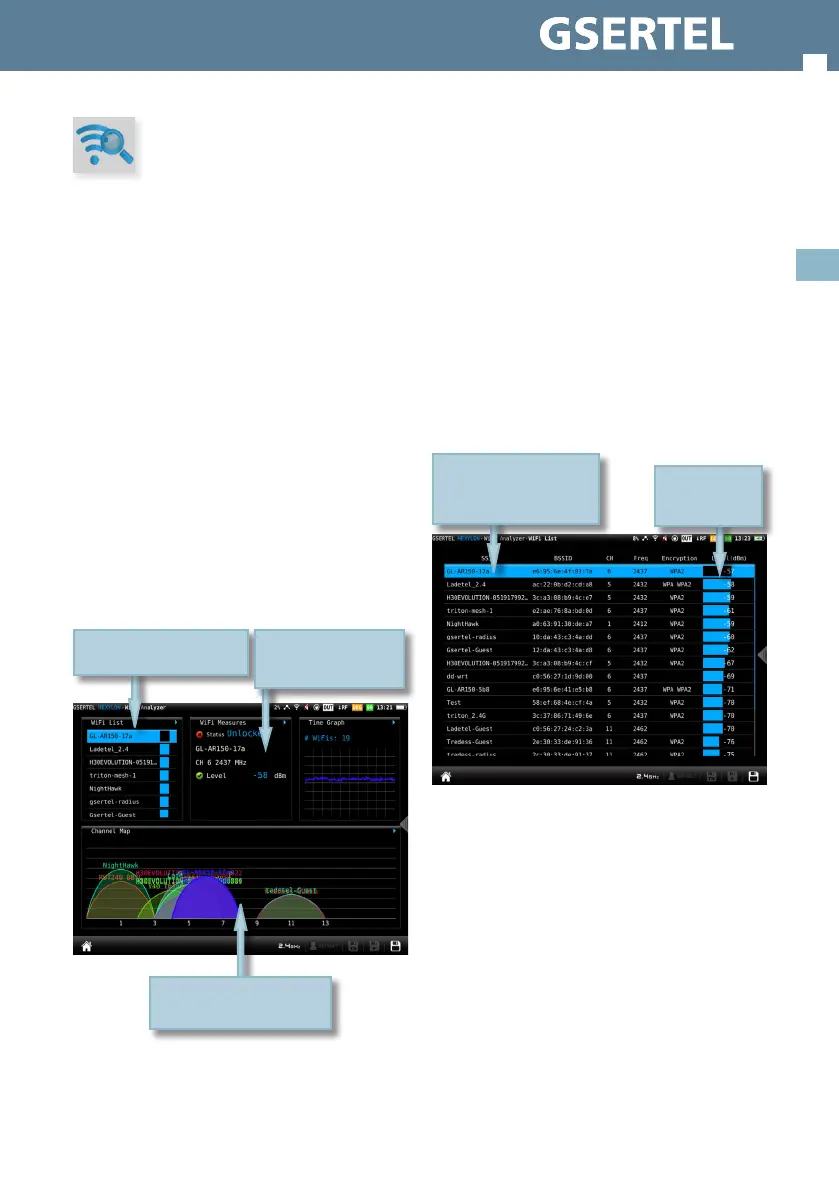
The screen corresponding to this feature is Mosaic
3+1 type. This conguration has 4 widgets, 3
square ones at the top and a rectangular in the
botton. The top widgets are user-congurable.
9.1.- Main window
9.2.- Features
This section explains all the features available to
The rectangular widget shows
the channel map feature
Tap on the top bar to select
the widget feature
Double-tap to see the
feature screen in full
screen
visualize in Wi-Fi analyser function.
9.2.1- Wi-Fi List
This feature shows a list with all the Wi-Fi networks
detected by the HEXYLON.
In this list, the user can select the Wi-Fi network
whose measurements he wants to view by tapping
on it.
Note: to minimize this widget, the user must tap
twice on the line corresponding to the selected Wi-
Fi, otherwise another Wi-Fi will be selected.
The list can be ordered by SSID, BSSID, channel
name, frequency, encryptation type or signal
level, the user just has to tap on the header of the
corresponding column.
10.2.2.1.- Main window
9.2.2- Wi-Fi measurements
This feature shows all the measurements of the
Wi-Fi network wich the HEXYLON in currently
connected to.
Tap on the column header
to order the list according
to that parameter
Tap on the Wi-Fi
to select it


 To Next Page
 Loading...