Hexylon High-performance portable meter
64
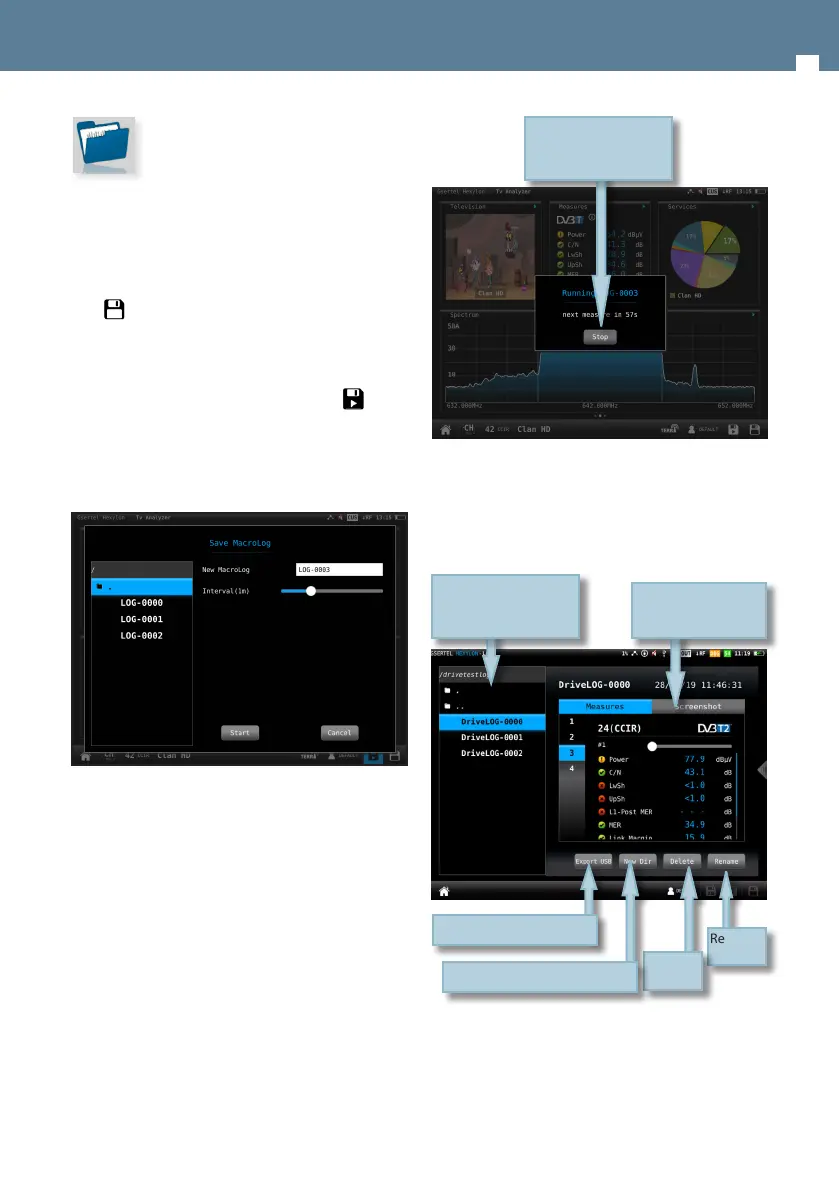
The LOGs feature allow us see all the LOGs and
MacroLOGs stored in the meter.
12.1.- Main window
For each LOG, there are two views:
• Measurement: shows a list with all the
measurements
Tap on Stop to stop the
MacroLOG
Stored LOGs
Tap to select
Renames
LOG
Two views:
Measurement and
screenshot
Deletes
LOG
Creates a new directory
Saves LOG in USB memory
12. LOGS
The Hexylon saves two types of measurements
les: LOGs and MacroLOGs.
A LOG saves all the measurements in the screen,
as well as a screenshot. To save a LOG, tap on the
icon in the bottom bar.
A MacroLOG is a scheduled measurement that
the meter repeats automatically in a time interval
selected by the user.
To schedule a MacroLOG tap on icon in the
bottom bar.
Then a popup window will be open, where you
can select the time interval. Then tap on the Start
button:
The meter makes and saves the measurements in
each specied time interval until the user taps on
Stop button.


 To Next Page
 Loading...