Chapter 6 - Remote Options
Data Flow Control Operation
Hardware Flow Control
When hardware control is selected, RTS/CTS handshaking is used. The remote device may
use the RTS signal to allow or inhibit data transmission for the GSI 61 to the remote device.
When the RTS signal is set true by the remote device, the GSI 61 is enabled to transmit data.
When the RTS signal is set false by the remote device, the GSI 61 is inhibited from transmitting
data. The remote device should insure that RTS is set true prior to requesting data from the GSI
61. If the RTS signal is false at the start of a transmission, or goes false during a transmission,
the GSI 61 will wait for 6 seconds for the signal to return true. If this does not occur, the
transmission is aborted and the error message “Not Available” will temporarily flash.
The GSI 61 uses the CTS signal to allow or inhibit data transmission from the remote
device to the GSI 61. When the CTS signal is set true by the GSI 61, the remote device
may transmit to the GSI 61. When the CTS signal is set false by the GSI 61, the remote
device must not transmit to the GSI 61. Failure to comply with this condition may result in
the loss of data transmitted to the GSI 61.
The GSI 61 will set the CTS line false to prevent data transmission by a remote computer.
This occurs while processing a completed input command, while printing, while the GSI 61
is transmitting a record and whenever the remote device is not enabled through the
Remote button.
Software Flow Control
When software flow control is selected, XON/XOFF handshaking is used. Software XON/
XOFF flow control is available to allow software commands from the external computer to
start and stop the flow of data from the GSI 61. The XOFF character used is the ASCII
control character [DC3]. The XON character used is the ASCII control character [DC1].
Sending XOFF to the GSI 61 pauses its transmission; sending XON to the GSI 61 resumes
the transmission. Once XOFF is received by the instrument, XON must be received within
6 seconds. If it is not received within this time constraint, the error message “Not
Available” is flashed on the front LCD panel.
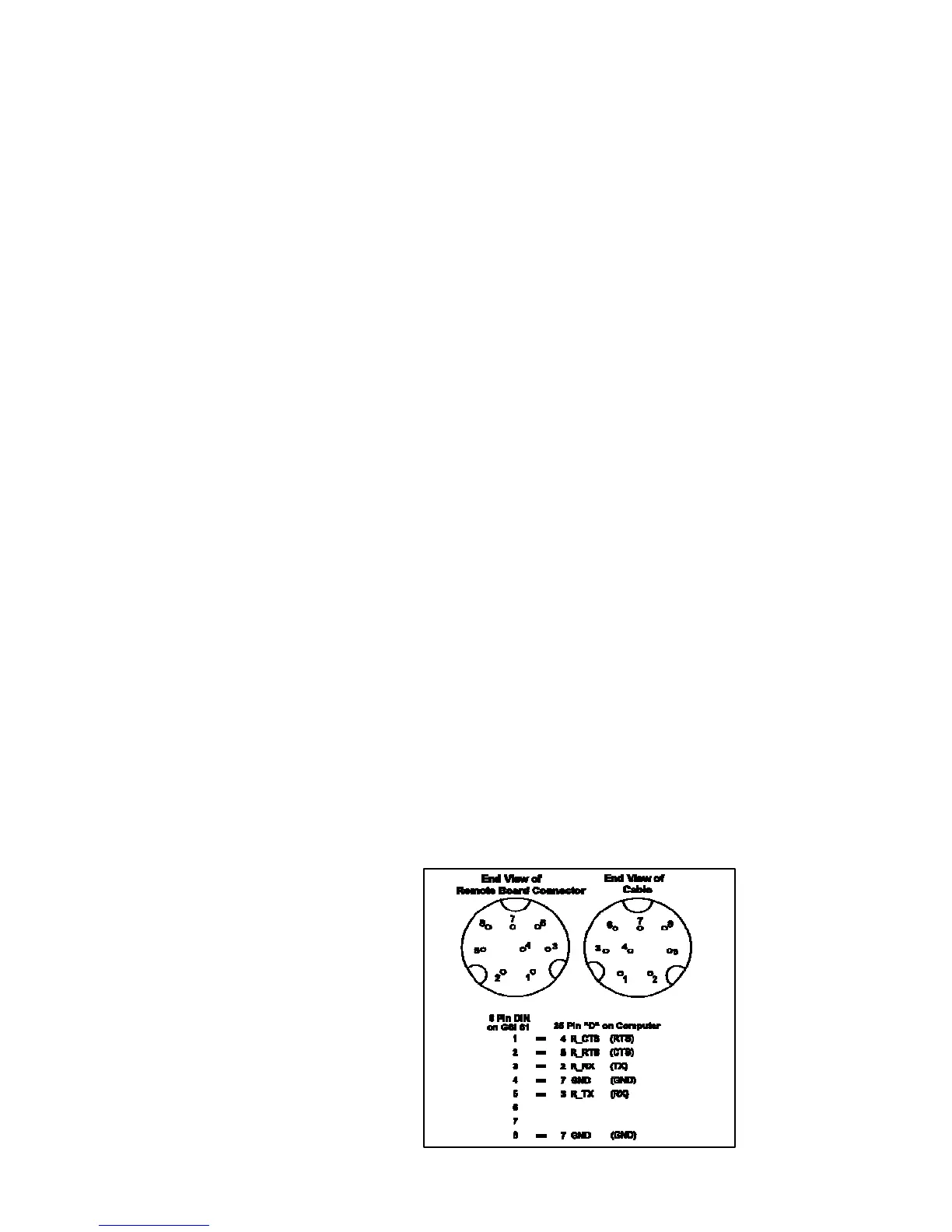
Cable Connections
The GSI 61 remote interface provides a serial interface consisting of RxD (Received Data),
TxD (Transmitted Data), RTS (Request to Send), CTS (Clear to Send) and ground signals
at the end of the supplied DB-25 male connector. This cable, which is supplied with the
Remote Option, can also be purchased as an Apple “Hayes Modem” cable, available from
Apple dealers.
IMPORTANT: Make sure this cable incorporates all the signals in the figure below!
6-5
1761-0100 Rev. B


 To Next Page
 Loading...



