EasyManua.ls Logo

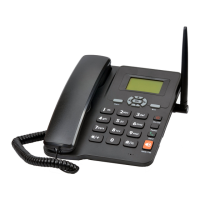
GSM ETS-6588 - User Manual

GSM ETS-6588
17 pages
Print Icon
To Next Page IconTo Next Page
Loading...
GSM FWP
ETS-6588
USERS
MANUAL

Questions and Answers

  • M
    Michelle GarciaAug 14, 2025
    How to unlock GSM ETS-6588 Telephone if it asks for a password?
    • T
      Thomas HernandezAug 14, 2025
      If your GSM Telephone prompts you to enter a password when you switch it on, enter the lock code that you previously set to unlock the phone.
  • J
    Jessica GarciaAug 17, 2025
    How to enter PIN code on GSM ETS-6588 Telephone?
    • R
      Robert CarrAug 17, 2025
      If your GSM Telephone prompts you to enter a PIN when you switch it on, input the PIN code that came with your SIM card. If you've changed the PIN code, then enter the new PIN code.
  • A
    April KeyAug 20, 2025
    What to do if there is no ring tone on GSM ETS-6588?
    • M
      Marco AllisonAug 21, 2025
      If your GSM Telephone doesn't ring when you receive a call, check the volume setting for the ring tone. Also, check whether “mute” is enabled in the Profiles settings.
  • L
    lori31Aug 25, 2025
    Why does my GSM ETS-6588 say emergency?
    • W
      Whitney BuckleyAug 25, 2025
      If your GSM Telephone shows “Emergency” when you switch it on, check to make sure that a valid SIM card is properly inserted.
  • R
    Robert LutzAug 27, 2025
    Why CALL/REDIAL key does not work on GSM Telephone?
    • C
      Curtis WarrenAug 27, 2025
      If pressing the CALL/REDIAL key on your GSM Telephone does not send the number, check whether you have set call barring.
  • R
    Ronald AdamsAug 31, 2025
    What to do if GSM ETS-6588 screen is blank?
    • P
      Penny AndrewsAug 31, 2025
      If the screen of your GSM Telephone does not display anything when you disconnect the external power supply, check whether the battery has electricity or is damaged. You can also try powering the phone on again.
  • B
    Brent WallsSep 3, 2025
    How to fix GSM Telephone when it cannot send short messages?
    • J
      Jason NguyenSep 3, 2025
      If you cannot send short messages with your GSM Telephone, check the network condition or the message enter setting.
  • D
    David CooperSep 6, 2025
    Why certain calls cannot be received on GSM Telephone?
    • R
      Robert AtkinsSep 6, 2025
      If you cannot receive certain calls on your GSM Telephone, check whether the number is restricted.
  • B
    Brittney CarpenterSep 10, 2025
    What to do for other problems with GSM ETS-6588?
    • S
      Samuel OlsonSep 10, 2025
      If you encounter any other abnormal phenomenon with your GSM Telephone, first refer to the user manual. Then, check whether the power is connected correctly. If there's no problem, restart the phone.

Summary

Key Instructions

1,Menu Key

Enter main menu. Performs function indicated at the left bottom of the screen.

Installation

Powering the Phone On;Off

Making a Call

Phone Code and PIN;PUK Code

Menu Functions Overview

Advanced Call Settings

Call Divert and Waiting

Specify conditions for call diversion and manage call waiting.

Call Barring and Minute Beep

Restrict calls and set minute beep notifications.

Phone Settings and Features

Backlight and Security Codes

Set backlight time and manage PIN/phone lock codes.

Warning and Maintenance Precautions

Safety and Usage Guidelines

Troubleshooting Common Issues

GSM ETS-6588 Specifications

General IconGeneral
Network TechnologyGSM
Call recordsYes
LoudspeakerYes
GamesYes
ClockYes
AlarmYes
CalculatorYes
2G bandsGSM 900 / 1800
SIMMini-SIM
MessagingSMS
SIM CardMini-SIM