Parts
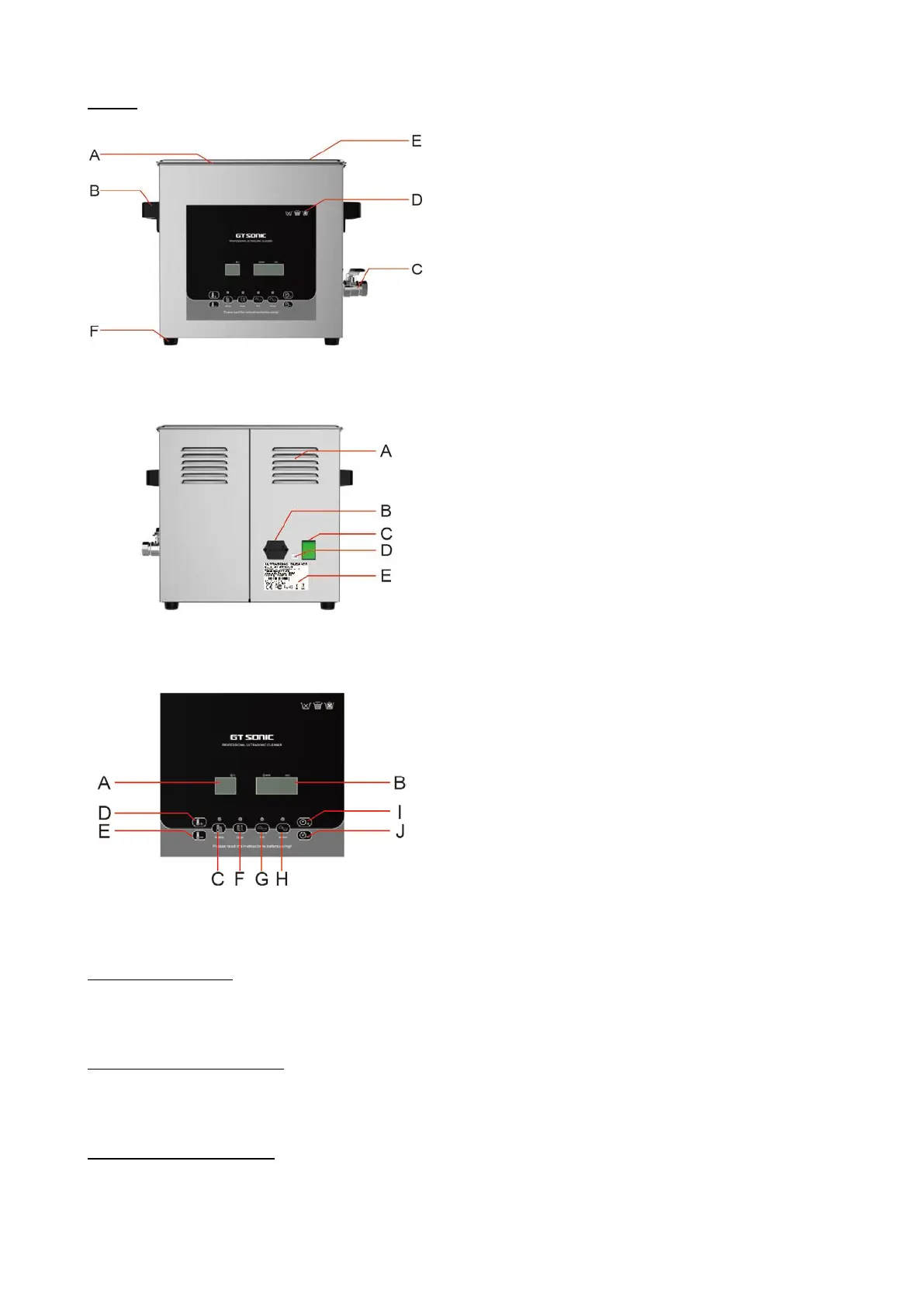
Front view/side view
A Tank
B Lifting handle
C Drain tap
D Warning marking
E Lid
F Anti-slide feet
Back view
A Louver
B Socket
C Power switch
D QC PASSED sticker
E Rating label
Front panel
A Temperature LED display
B Cleaning time LED display
C Heating button
D Increase temperature
E Reduce temperature
F Degas
G Soft cleaning
H Normal cleaning
I Increase time
J Reduce time
C Heating button
Press this button to start/stop heating.
Note: The new machine will display the ambient temperature when first time use.
D Increase temperature
Press this button to set the temperature: press one time to increase 1°C, hold the key to in-
crease by 10°C.
E Reduce temperature
Press this button to set the temperature: press one time to reduce 1°C, hold the key to re-
duce by 10°C.


 To Next Page