14
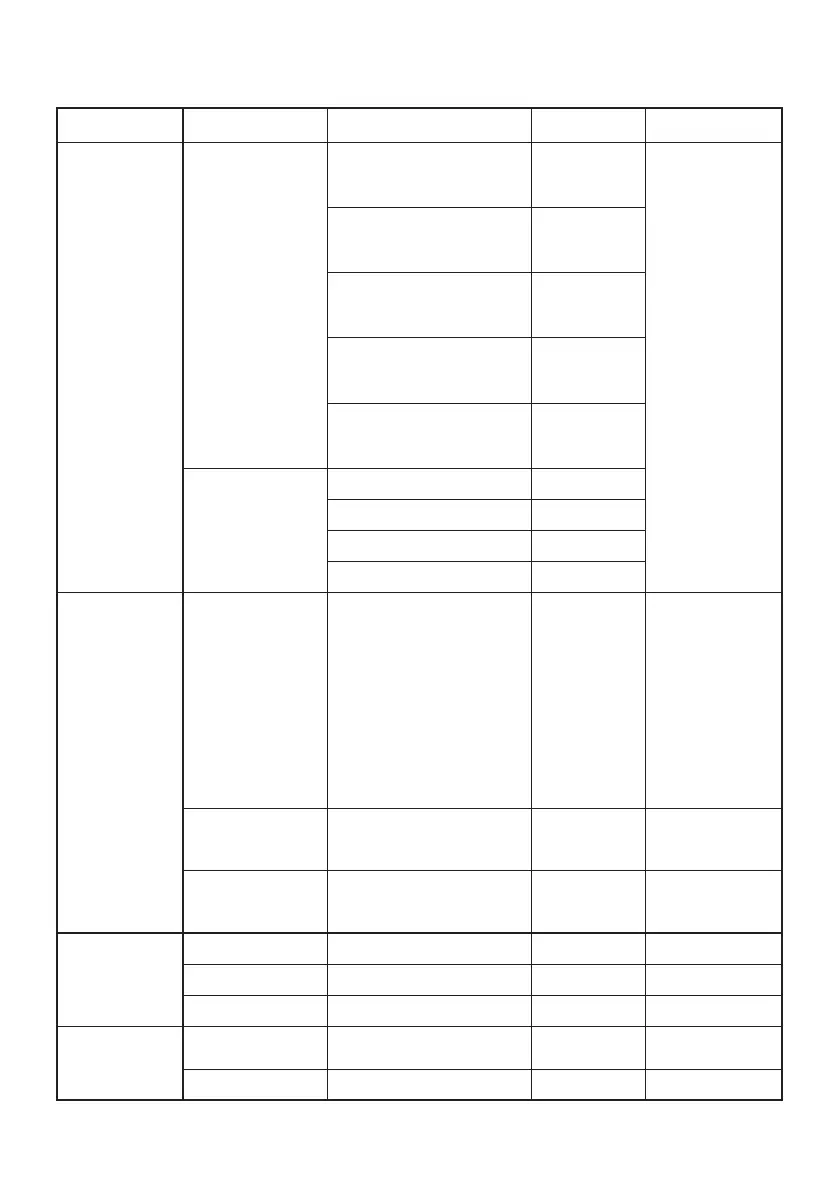
Sharpness 0-100 50Sharpness
DCR
100%
Off
90%
Weak
80%
Medium
70%
Strong
Input
VGA
HDMI
Note:
AUTO is opened
Select input source
Reset N/ASet Monitor to default status.
Auto Color
Auto Adjust
Color Temp
Color Temp.
Warm Recall Warm
Color
Temperature.
Standard Recall Normal
Color
Temperature.
Cool Recall Cool
Color
Temperature.
SRGB Recall sRGB
Color
Temperature.
User Recall User
Color
Temperature.
The Color
Temperature will
be set to Warm.
R/G/B value will be
modified by color
temp.
The User R/G/B
value (default is
50) will not be
Modified by Reset
function in user
mode.
Main Menu Item 1st Sub Menu Item Description Adjust Range Reset Value
Reset
OSD Setup
Extra
Language
English
Deutsch
Francaise
French
Espanol
Italian
Nederlands
Chinese
Japanese
Korean
Dansk
Portuguese
Turkish (*2)
Language won’t
reset while reset
all setting.
Set OSD display language to
English
Transparency
0-100 0
Adjust the OSD transparence.
each step will
increase/decrease value by 25
Timeout
5-120 10Adjust the OSD timeout.
each step will
increase/decrease value by 5


 To Next Page