

EasyManua.ls Logo

GTO FM143 - User Manual

GTO FM143
12 pages
Print Icon
To Next Page IconTo Next Page
Loading...
Copyright © 2021 Nortek Security & Control LLC
PRINTER’S INSTRUCTIONS:
INSTR, INSTL, FM143 - P/N: 10024428 Rev-B - INK: BLACK - MATERIAL: 20 LB. MEAD BOND - SIZE: 8.500” X 11.000” - PRINT FRONT AND BACK - SCALE: 1-1
IMPORTANT: Before you install the automatic gate lock be sure your gate is level, moves freely
on its hinges, and does not bind or drag against the ground.
Installation Manual
AUTOMATIC
GATE LOCK
®
PLEASE NOTE: Because of the various mounting applications, no mounting hardware is provided with the
Automatic Gate Lock. All necessary mounting hardware can be obtained from your local hardware store; all
other hardware is provided.
This manual shows two examples of the most common installations, and should provide insight into most other
applications. If you have any questions during installation, please call (800) 543-1236 for technical support.
FM143/FM144 Installation Manual Printed in China
Question and Answer IconNeed help?

Do you have a question about the GTO FM143 and is the answer not in the manual?

Summary

Before You Begin

Parts Included

Lists all components provided with the Automatic Gate Lock for installation.

What else do you need?

Details the mounting hardware required for various gate types and installation scenarios.

Installing The Gate Lock

Single Gate Installation

Step-by-step guide for installing the automatic gate lock on a single gate system.

Dual Gate Installation

Instructions for installing the automatic gate lock on dual gate systems, including sequencing.

Manual Lock Release

Wiring the Automatic Gate Lock

Wiring to MM371, MM372, MM571, MM572, TS571 Operators

Connects the gate lock to specific MM and TS operator models, detailing required jumpers.

Wiring to MM560, MM562, Linear Pro 3000 XLS;4000 XLS

Details wiring the gate lock for MM560, MM562, and Linear Pro 3000/4000XLS operator series.

Wiring to MM272, HD272, MM262, MM362, MM462, Linear Pro 2000 XLS

Provides wiring instructions for MM272, HD272, MM262, MM362, MM462, and Linear Pro 2000XLS series.

Wiring to MM271 and MM260 Operators

Connects the gate lock to MM271 and MM260 operator models, including dip switch settings.

Wiring to MM360 Operators

Details wiring the gate lock for MM360 operator models, noting dip switch setting for LOCK (OFF).

Wiring the Lock to Gate Opener Control Boards

Troubleshooting

Limited Warranty

Summary

Before You Begin

Parts Included

Lists all components provided with the Automatic Gate Lock for installation.

What else do you need?

Details the mounting hardware required for various gate types and installation scenarios.

Installing The Gate Lock

Single Gate Installation

Step-by-step guide for installing the automatic gate lock on a single gate system.

Dual Gate Installation

Instructions for installing the automatic gate lock on dual gate systems, including sequencing.

Manual Lock Release

Wiring the Automatic Gate Lock

Wiring to MM371, MM372, MM571, MM572, TS571 Operators

Connects the gate lock to specific MM and TS operator models, detailing required jumpers.

Wiring to MM560, MM562, Linear Pro 3000 XLS;4000 XLS

Details wiring the gate lock for MM560, MM562, and Linear Pro 3000/4000XLS operator series.

Wiring to MM272, HD272, MM262, MM362, MM462, Linear Pro 2000 XLS

Provides wiring instructions for MM272, HD272, MM262, MM362, MM462, and Linear Pro 2000XLS series.

Wiring to MM271 and MM260 Operators

Connects the gate lock to MM271 and MM260 operator models, including dip switch settings.

Wiring to MM360 Operators

Details wiring the gate lock for MM360 operator models, noting dip switch setting for LOCK (OFF).

Wiring the Lock to Gate Opener Control Boards

Troubleshooting

Limited Warranty

Overview

The GTO Automatic Gate Lock is a security device designed to enhance the safety and security of automatic gate systems. It works in conjunction with gate openers to provide a firm and secure closure, preventing the gate from being forced open. The lock is suitable for both single and dual gate installations, offering flexibility for various gate configurations.

Function Description:

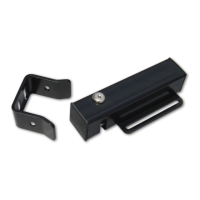
The Automatic Gate Lock operates by engaging a lock catch against a lock receiver when the gate is in the closed position. This mechanical engagement ensures that the gate remains securely shut, even against external forces. The lock is designed to work with automatic gate openers, and its proper function relies on the gate closing firmly against a positive stop. The system includes a lock control board (Lock PCB) that manages the electronic release mechanism. In the event of an electronic malfunction or power outage, the lock is equipped with a manual release feature, allowing users to open the lock using a key. This ensures access even when the electronic system is disabled.
Important Technical Specifications:

  • Mounting Hardware: Not included. Users are advised to obtain appropriate mounting hardware (up to 5/16" in diameter) from a local hardware store. Lock washers and lock nuts are recommended for a more secure installation.
  • Wire Length: The lock comes with 20 feet of low voltage wire.
  • Power Requirements: The lock control board (Lock PCB) typically connects to the gate opener's power supply. Specific wiring diagrams are provided for various gate opener models, including MM371, MM372, MM571, MM572, TS571, MM560, MM562, Linear Pro 3000XLS, 4000XLS, MM272, HD272, MM262, MM362, MM462, Linear Pro 2000XLS, MM271, MM260, and MM360.
  • Dimensions: The lock unit measures approximately 8.5 inches in length, 2 inches in width, and 3.5 inches in height. The lock receiver measures approximately 5.5 inches in length, 2 inches in width, and 2.75 inches in height.
  • Manual Release: Keyed for manual release. Keys are unique and cannot be replaced by Nortek Security & Control. A locksmith is required if all keys are lost.

Usage Features:

  • Single Gate Installation:
    • Preparation: Ensure the gate is level, moves freely on its hinges, and does not bind or drag. Turn off power to the control box and disconnect the gate opener arm from the gate bracket to allow free gate movement.
    • Placement: Determine the best location for the lock and receiver, ensuring they are level and aligned with the opener. The lock should have a solid surface or cross member for stability.
    • Mounting Receiver: Clamp the receiver and lock together, aligning the receiver pin hole and lock slot. Mark positions for drilling holes. Mount the receiver to the gate post using carriage bolts (not U-bolts) to ensure proper seating.
    • Mounting Lock: Hold the latch open with a key, operate the gate to check closed limit and lock alignment. Drop the pin into the receiver (without the cap) to recheck alignment. Mark the lock's position for drilling holes through the slots in the lock bracket. Secure the lock to the gate using U-bolts and saddles (for chain link gates) or carriage bolts (for iron/aluminum tube gates).
    • Final Assembly: Install the clevis pin through the slots in the lock receiver and hammer it into the locking cap. Secure the lock bracket and recheck alignment.
  • Dual Gate Installation:
    • Preparation: Similar to single gate installation, turn off power and disconnect gate openers.
    • Gate Sequencing: Crucially, the gate sequencing must be set so the PRIMARY GATE opens first and closes last. The lock must be mounted on the PRIMARY GATE, and the lock receiver on the SECONDARY GATE. Refer to the gate opener manual for programming dual gate sequencing.
    • Placement: Determine the best location for the lock and receiver, ensuring they are level and aligned with the opener. The lock should have a solid surface or cross member for stability.
    • Mounting Receiver: Clamp the receiver and lock together, aligning the receiver pin hole and lock slot. Mark positions for drilling holes. Mount the receiver to the SECONDARY GATE using carriage bolts (not U-bolts).
    • Mounting Lock: Hold the latch open with a key, operate the gate to check closed limit and lock alignment. Drop the pin into the receiver (without the cap) to recheck alignment. Mark the lock's position for drilling holes through the slots in the lock bracket. Secure the lock to the PRIMARY GATE using U-bolts and saddles (for chain link gates) or carriage bolts (for iron/aluminum tube gates).
    • Final Assembly: Install the clevis pin through the slots in the lock receiver and hammer it into the locking cap. Secure the lock bracket and recheck alignment.
  • Wiring: Detailed wiring diagrams are provided for various gate opener control boards.
    • General Steps: Turn off power, disconnect battery leads. Connect the WHITE wire (included) to Terminal #1 on the lock board and the RED battery lead wire (included) to Terminal #5. Attach control board battery lead wires to double spade tongue connectors. Pull RED and BLACK wires from the gate lock through the strain relief and connect BLACK to Terminal #3 and RED to Terminal #4 on the lock board. Attach lock board battery lead wires to the double spade tongue terminals with the control board lead wires. Connect the WHITE wire from the lock board to the PRIMARY OPERATOR terminal block (along with the opener arm power cable wire), connecting to RED for Pull-to-Open or BLACK for Push-to-Open. Reconnect the BLACK Battery lead wire (included) to Terminal #2 on the lock board. Connect RED wires (with double spade tongue terminal) to POSITIVE (+) battery terminal and BLACK wires (with double spade tongue terminal) to NEGATIVE (-) battery terminal. Plug in the transformer or rewire solar and turn on power. Test the opener and lock.
    • Specific Operator Wiring: Instructions include diagrams for MM371/372/571/572/TS571 (requiring a jumper between 'LOCK V-' and 'LOCK Relay Common'), MM560/562/Linear Pro 3000XLS/4000XLS, MM272/HD272/MM262/MM362/MM462/Linear Pro 2000XLS, MM271/MM260, and MM360 (requiring Dip switch 4 to be set to LOCK (OFF)).
  • Time Adjustment: It is recommended that the time adjustment knob on the lock board is turned all the way to the right.

Maintenance Features:

  • Troubleshooting:
    • Lock hangs up or does not latch properly:
      • Reset closed position limit so the gate is snug against the stop plate.
      • Lubricate the latch with silicone spray to help it operate freely.
      • Check the alignment of the lock by using the key to hold the latch open while operating the gate opener.
    • General Operation: Ensure the gate moves freely on its hinges without binding or dragging.
    • Stall Force Setting: For optimal service and safety, find the ideal stall force sensing setting for the gate opener. This setting should be just enough to move the gate without self-obstruction (stopping or reversing due to its own weight), yet sensitive enough to reverse and stop when it meets an obstruction. Refer to the gate opener installation manual for obstruction settings.
  • Corrosion Prevention: Place a dab of petroleum jelly on the terminal contacts of the lock board to prevent corrosion.
  • Technical Support: For any installation questions or issues, contact Nortek Control Technical Service Department at (800) 543-1236.
  • Warranty: The product comes with a 12-month limited warranty against defects in material and workmanship, provided it was purchased directly from Nortek Control or an authorized sales partner. The warranty covers repair or replacement of defective products. Users are responsible for labor and shipping costs for returns. The warranty does not cover damage from negligence, abuse, improper installation, or normal wear and tear. Proof of purchase is required for warranty service.

GTO FM143 Specifications

General IconGeneral
BrandGTO
ModelFM143
CategoryLocks
LanguageEnglish

Related product manuals