EasyManua.ls Logo

Guardian AC4900CA - User Manual

Guardian AC4900CA
9 pages
Print Icon
To Next Page IconTo Next Page
Loading...
E-1
©2016 Guardian Technologies LLC
LIMITED WARRANTY
To the consumer, Guardian Technologies LLC warrants this product to be free of defects in materials or
workmanship commencing upon the date of the original purchase. In order to be eligible for this Limited Warranty,
an original sales receipt or comparable substitute proof of purchase bearing the date of original purchase is
required. Refer to the original product carton or specific product/model page on the Guardian Technologies
website for warranty length for your particular model. This warranty applies only to the original purchaser of this
product from the original date of purchase. This warranty covers product purchased from authorized distributors only.
This warranty applies to repair or replacement of product found to be defective in materials or workmanship. This
warranty does not apply to damage resulting from unusual wear, commercial, abusive, unreasonable use or
supplemental damage. This warranty does not cover damage from unauthorized repairs or from any use not in
accordance with the instruction manual. Defects that are the result of normal wear and tear will not be considered
manufacturing defects under this warranty.
If this product should become defective within the warranty period, we will repair or replace any defective parts
free of charge. All warranty repairs must be completed by Guardian Technologies LLC. This warranty gives you
specific legal rights and you may also have other rights (other rights may vary from state to state in the U.S.A.)
To submit product under warranty the complete machine must be delivered pre-paid to GuardianTechnologies LLC.
Please include complete information including: the problem, the model number of the product, the day of purchase,
and a copy of the original sales receipt along with your name, address, and telephone (email optional). Address
returns to the attention of: Customer Service, at the address below. Additional questions or comments can be made
toll free to the number listed below.
Additional copies of the instruction manual can be obtained by accessing and
printing directly from our website or calling customer service.
USA and Canada
Guardian Technologies LLC
26251 Bluestone Blvd.
Euclid, Ohio 44132
1.866.603.5900
www.guardiantechnologies.com
Please go to www.guardiantechnologies.com to register your product. We consider the registration process important
to ensuring superior service to our customers, however submitting the warranty registration is optional and does not
affect your rights to utilize this warranty according to the conditions stated above.
E-1
Air Cleaning System
USE & CARE INSTRUCTIONS
Model No. AC4900
3-Year Limited Warranty
Date Purchased month ________ year _________
Customer Service
1.866.603.5900
www.guardiantechnologies.com
English E - 1 French F - 1 Spanish S - 1
Use GENUINE Guardian Technolo
gies replacement parts only.
REV0318

Question and Answer IconNeed help?

Do you have a question about the Guardian AC4900CA and is the answer not in the manual?

Overview

This document provides the use and care instructions for the Guardian Technologies Air Cleaning System, Model No. AC4900. It outlines the product's function, technical specifications, usage, and maintenance procedures, emphasizing the importance of using genuine Guardian Technologies replacement parts to maintain performance and warranty.

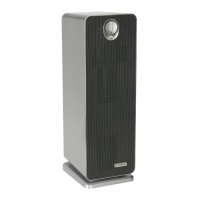
The Guardian Technologies Air Cleaning System is designed to improve indoor air quality through a multi-level cleaning process. It combines a pre-filter/charcoal layer, an activated carbon filter, and UV-C light technology with Titanium Dioxide (TiO2) to capture allergens, kill germs, and remove odors.

Function Description:

The air cleaning system utilizes a 3-in-1 approach to air purification:

  • Prefilter/Charcoal Layer: This initial layer acts as a pre-filter, capturing large dust particles, lint, and pet hair. This action helps extend the lifespan of the main filter. The activated carbon component in this layer is responsible for absorbing household and pet odors.
  • Activated Carbon Filter: This filter further contributes to odor control and the prevention of bacteria, germs, and mold growth.
  • UV-C Light with Titanium Dioxide (TiO2): The UV-C light technology, when activated, works in conjunction with TiO2 to enhance the elimination of airborne germs. TiO2 is activated by the UV-C light to decompose remaining odor molecules that result from activities such as smoking, cooking, and pets.

Important Technical Specifications:

  • Model No.: AC4900
  • Warranty: 3-Year Limited Warranty
  • Power Source: 120V AC electrical outlet
  • Ozone Emission: The 8-hour TWA Ozone for this product is 0.001 ppmv when tested in a 30 m³ chamber. It complies with the maximum allowable concentration of ozone of 0.050 parts per million by volume (ppmv) in a 24-hour period. The Health Canada Guideline 2010 recommends a maximum exposure limit of 0.020 ppmv or less when tested in a sealed, controlled room of approximately 30 m³.
  • UV-C Bulb: 5W, Model No. LB4000. Contains mercury.
  • Combination Filter: Filter B, Model No. FLT4825. Includes pre-filter, charcoal, and HEPA filters.
  • Replacement Carbon Filter (4-Pack): Model No. FLT22CB4.
  • Energy Efficiency: This product is ENERGY STAR qualified, meaning it meets strict energy efficiency guidelines set by the US EPA. Its energy efficiency is measured based on the ratio between its CADR for Dust and the electrical energy it consumes (CADR/Watt).

Usage Features:

  • Controls: The unit features a Power & Variable Speed Control for adjusting fan speed (I = lowest, III = highest) and a UV-C Control button to turn the UV-C mode ON or OFF.
  • Placement: For optimal air flow, the unit should be placed on a firm, level, and flat surface, at least 1 foot away from any wall or furniture. Ensure that none of the air inlet or outlet grills are blocked.
  • Portability: The air purifier has a carrying handle located on the back for easy movement. Always lift the unit by this handle when moving it.
  • Safety Features: The appliance has a polarized plug (one blade wider than the other) to reduce the risk of electric shock. It is designed to fit into a polarized outlet only one way. Users are warned not to defeat this safety feature.
  • Filter and Bulb Replacement Indicators: The green power light on the air cleaner will turn red and flash continuously when it's time to replace the filter (approximately every 6 months, depending on usage). The UV-C light on the front will turn red when the UV-C bulb needs replacement.

Maintenance Features:

  • Filter Replacement:
    1. Turn off and unplug the unit.
    2. Press the lock and release button and remove the rear cover.
    3. Remove the used Combination Filter (Filter B) and dispose of it.
    4. Insert the new filter system into the unit, ensuring the arrow on the filter indicates the correct installation direction.
    5. Reattach the rear cover securely.
    6. Press and hold the UV/HEPA Reset Button for 5 seconds to restart the system; the light will turn back to green.
  • Filter Maintenance: The filter should be checked frequently. Depending on air quality conditions, it may need more frequent replacement. The carbon filter layer can be vacuumed as needed to remove loose debris and dust, which helps prolong the filter's life. To check the filter's status, peel back the carbon layer to expose the pleated filter; if it is no longer white and is covered in grey dust/dirt, it should be replaced.
  • Important Filter Note: Do NOT wash and re-use the Combination Filter. Only use GENUINE Guardian Technologies replacement parts.
  • UV-C Bulb Replacement:
    1. Turn off and unplug the unit.
    2. Press the lock and release button and remove the rear cover.
    3. Remove the combination filter.
    4. Use a Philips head screwdriver to remove 2 screws and detach the UV-C Metal Shield.
    5. Carefully grasp the bulb with a clean cloth or tissue and pull it straight out of the unit.
    6. Reinstall the new UV-C Bulb by sliding it horizontally back into the slots at the top of the unit.
    7. Push and hold the UV/HEPA Reset Button for 5 seconds to reset the UV Bulb Change Indicator; the light should remain a constant blue.
  • Cleaning: Do NOT use gasoline, benzene, thinner, harsh cleaners, alcohol, or other solvents on or in the unit, as they can damage the product.
  • Troubleshooting: A troubleshooting guide is provided for common issues such as the unit not operating, unexpected shutdowns, lack of air circulation, increased noise, and flashing indicator lights for filter or bulb replacement.

Warranty and Customer Service:

Guardian Technologies LLC warrants the product to be free of defects in materials or workmanship from the date of original purchase. An original sales receipt is required for warranty claims. The warranty covers repair or replacement of defective parts and does not cover damage from unusual wear, commercial use, abuse, or unauthorized repairs. Customer service can be reached at 1.866.603.5900 or via their website at www.guardiantechnologies.com. Product registration is encouraged but optional and does not affect warranty rights.

Guardian AC4900CA Specifications

General IconGeneral
BrandGuardian
ModelAC4900CA
CategoryAir Cleaner
LanguageEnglish

Related product manuals