OPERATIN G
INSTRUC TI ONS
TO FIND THE INSTRUCTIONS
THAT APPLY, SIMPLY MATCH YOUR WATCH
TO THE DIAGRAMS ON THE FOLLOWING PAGES.
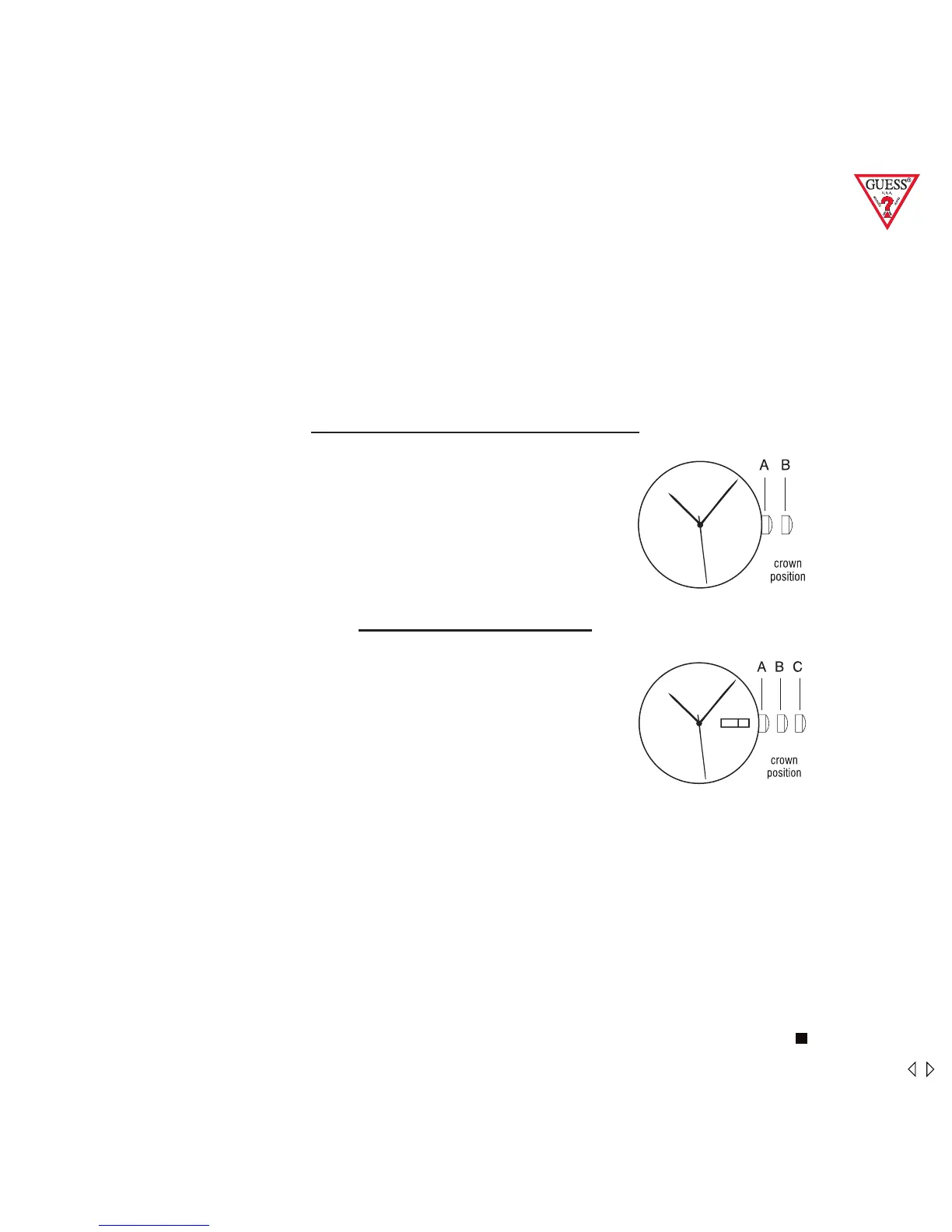
SIMPLE TIME / MINI SWEEP
To set the time:
1. PULL out crown to B position.
2. TURN crown either way to correct time.
3. Push in crown to A position.
Note: Mini sweep subdial measures seconds.
DATE / DAY & DATE
To set the time:
1. PULL out Crown to C position.
2. TURN Crown either way to correct time.
3. PUSH in Crown to A position.
To set the calendar / date:
1. PULL out Crown to B position.
2. TURN Crown away from you to correct date.
3. TURN Crown towards you to correct the day.
4. PUSH in crown to A position.
NOTE: The date changes automatically every 24 hours.
On “Day & Date” watches, the days of the week are in English +
French. Once set in English, the consecutive days will continue to
be in English.
6 Womens



 To Next Page