KNX/EIB Air1 Server V2
Chapter 4 Connect the Air1 Server to the AirHome Management Software
When connecting Air1 Server for the first time, connect the LAN network router to the device then
connect the power supply 9~36V DC. The server will then boot all the firmware and user data. The
Server will now get an IP address automatically from the router (DHCP server).
Note: It is important that your server is connected to the same network as your computer, so you
can use the Server Connection command on AirHome Manager Software.
4.1 Router connection
Please follow the steps below:
Step 1: Open AirHome Manager Software
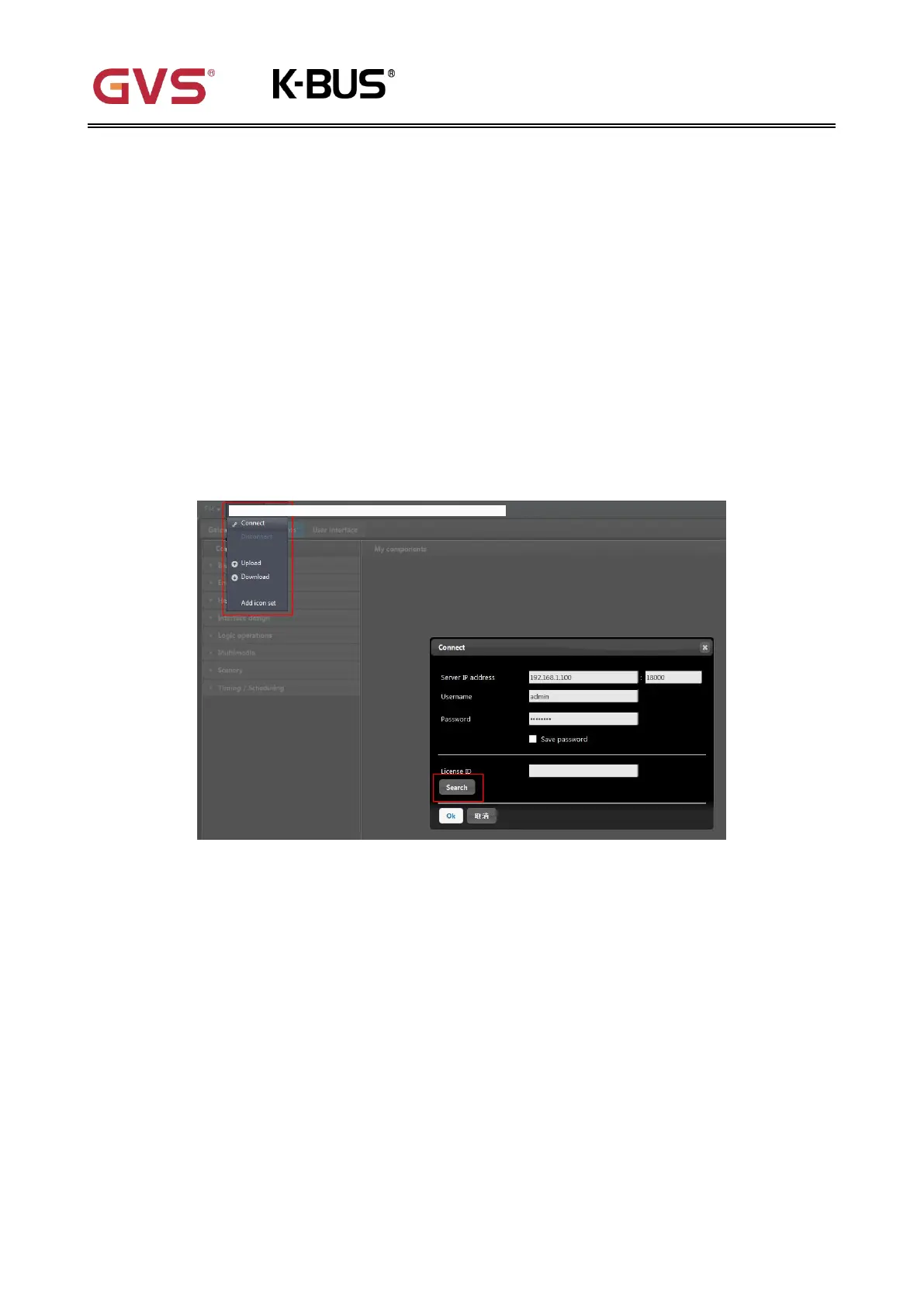
Step 2: Select [Project] from top menu, then click [Connect command] to popup the Connect dialog
box.
Step 3: Click [Search] button find Air1 Server on the whole network.
The details of the sever will be display in the Connect dialog box, including IP address, License ID
(the unique ID of the Air1 Server) and Username.
Step 4: Select the required Air1 Server from the search results, enter the correct username and
password, then click [OK] to confirm the connection.
Note: The default username is “admin” and the default password is “password”, which can be
changed in the AirHome Management Software.
Complete the above steps to connect to the Air1 Server and you can start configuring the project.


 To Next Page