This document describes the Habitus Smart Jump Rope, a fitness device designed for tracking jump rope workouts. It includes specifications, usage instructions, and maintenance guidelines in both English and Dutch.
Function Description
The Habitus Smart Jump Rope is a fitness device that allows users to track their jump rope workouts. It features an LCD display for real-time feedback and can connect to the "Skipjoy" app for more advanced tracking, mode selection, and data synchronization. The jump rope supports various jumping modes, including free jumping, time countdown jumping, and numbers countdown jumping. It also has an offline storage function, allowing it to record workout data even when not connected to the app, and then synchronize the data upon re-connection.
Important Technical Specifications
- Product Size: Ø 26x164mm (handle), Rope size 3000mm
- Product Weight: 0.245 kg
- LCD Display: 19.6 x 8.1 mm
- Power: 3.7 V Rechargeable Lithium Cell Battery 60 mAh
- USB Cable: 50CM meter Type-C USB
- Max. Jumps: 9999 times
- Max. Time: 99 Mins 59 Seconds
- Min. Jump: 1 time
- Min. Time: 1 second
- Auto off Time: 60 seconds
- Battery Life: Approximately 25 days of normal use (based on 15 minutes daily use), 33 days standby time.
- Connectivity: Bluetooth (BT icon on LCD indicates connection)
- App Compatibility: Skipjoy App (available on App Store and Google Play), requires Bluetooth, GPS & Location permissions on Android 6.0+ devices.
Usage Features
The jump rope offers several features to enhance the user experience:
Installation:
The jump handle and rope are packed separately. Users need to install the rope into the handle and adjust its length. An important note advises ensuring the longer rope is installed in the inside part of the handle to avoid inaccuracy.
Operation with Skipjoy App:
- App Download: Users must download the "Skipjoy" app from the App Store or Google Play. A QR code is provided for easy download.
- Permissions: When installing the app, users must accept Bluetooth, GPS, and Location permissions, especially for Android devices (version 6.0 and above) due to Google's requirements for BLE device scanning. The manual clarifies that no private information is collected by the app.
- Personal Info & Start: Open the Skipjoy App, fill in personal information, and start the app.
- Automatic Pairing: The app automatically pairs with the jump rope. The connection status ("Connected" or "Disconnected") can be checked on the app's main interface. If disconnected, users can manually add the device via "Mine" → "Device" → "+".
- Mode Selection: Users can select their desired jumping mode from the main interface of the app to begin their workout.
Jumping Modes:
The jump rope supports three main modes, which can be shifted by pressing the button on the device for about 3 seconds or selected directly from the app:
- Free Jumping Mode: Allows jumping without any time or repetition limits. The LCD displays the number of jumps and jumping time.
- Time Countdown Mode: Users set a time limit for their workout. Options include 30 seconds, 1 minute, 5 minutes, 10 minutes, and customized times via the Skipjoy App. Without the app, the device uses the last selected time period. The LCD displays the countdown time and the number of jumps.
- Jump Countdown Mode: Users set a target number of jumps. Options include 50, 100, 500, 1000, and customized numbers via the Skipjoy App. Without the app, the rope records the last completed set of reps. The LCD displays the remaining jumps and the jumping time.
Offline Storage Function:
Workout data is temporarily recorded by the rope even when the app is not running and is synchronized with the app upon re-connection.
Reset Function:
The rope can be reset by pressing the button on the back of the LCD display for 8 seconds. The LCD will show all signals for 2 seconds and then shut down, after which pressing the button again enters normal use.
Maintenance Features
- Environmental Care: Do not place the rope in very wet or hot environments.
- Physical Handling: Avoid violently hitting or dropping the rope to prevent damage. Treat it with care as it is an electronic instrument.
- Water Exposure: Do not immerse the handle in water or use it in the rain, as it is not waterproof and can damage the built-in electronic device.
- Intended Use: The rope is solely for physical exercise; do not use it for other purposes.
- Safety: Exercise caution to avoid injuries. Children under 10 should use the rope under parental supervision.
- Battery Maintenance:
- To prolong battery life, avoid leaving the rope with a completely drained battery for extended periods. Charge it when the battery is low.
- If not used for a long time, charge the rope once a month.
- Do not open the handle to prevent damage.
- Do not burn the handle with batteries to avoid an explosion.
- Dispose of the rope and its battery responsibly, checking with local authorities for recycling advice.
- Charging: Recharge the rope when the battery indicator flashes on the screen. Use a standard mobile phone charger with a Type-C USB plug. The battery signal on the LCD will flash during charging until full.
Regulatory Compliance
- FCC Statement: The device complies with Part 15 of the FCC Rules, meaning it will not cause harmful interference and must accept any received interference.
- CE Mark: Indicates compliance with European health, safety, and environmental protection standards.
- RoHS Compliant: Indicates compliance with the Restriction of Hazardous Substances Directive.
- Disposal: Dispose of the device and its packaging in an environmentally friendly manner at a recycling center for electrical and electronic devices.

 Need help?
 General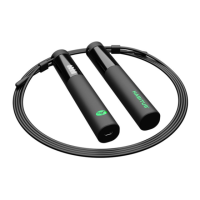

 To Next Page