EasyManua.ls Logo

Hable One User Manual

Hable One
3 pages
To Next Page IconTo Next Page
Page #1 background imageLoading...
Page #1 background image
Hable One Starting Guide for Android
Welcome to the Hable One starting guide! The Hable One is a controller that allows you to
navigate and type on your mobile phone. Through TalkBack you get feedback while using the
Hable One. With the help of this guide, you will be able to use the controller quickly. The
starting guide explains how to hold, set up and use the Hable One.
Preparation:
Inside the box you will find the Hable One controller and USB C charging cable. The Hable
One controller is around the same size as the iPhone 6, but a little thicker in size for better
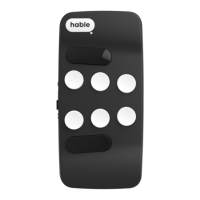
grip. The controller has 2 sides, the button side and the flat side. The Hable One has a matt
black finishing, the middle 6 buttons have a white finishing. Together, this gives the
controller a futuristic and modern look.
Figure 1: The Hable One viewed, from the top and side
Question and Answer IconNeed help?

Do you have a question about the Hable One and is the answer not in the manual?

Hable One Specifications

General IconGeneral
BrandHable
ModelOne
CategoryController
LanguageEnglish

Summary

Preparation

Holding the Hable One Controller

Secure Controller Grip

Hold the controller securely with both hands, ensuring the flat back faces you and buttons are pressed towards yourself.

Button Identification and Placement

Learn the numbering of the six small braille buttons (1-6) and the two function keys (7-8) for operation.

First Time Setup

Enable TalkBack and Bluetooth

Ensure TalkBack is enabled and activate Bluetooth on your smartphone for pairing.

Power On and Pair Hable One

Switch on the Hable One controller and pair it with your smartphone via Bluetooth.

TalkBack Gestures

Basic Navigation Gestures

Perform actions like going home, moving between items, and activating items using specific button combinations.

App Interaction Gestures

Learn gestures to open apps, navigate within them, and return to previous states.

Typing with Hable One

Typing Basic Characters

Master typing space, backspace, and enter using designated buttons.

Typing Numbers and Capitals

Learn the specific button presses for typing numbers and capital letters.