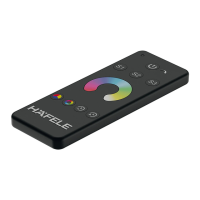
The Häfele Connect Mesh Eco is a lighting control system designed for both multiwhite and RGB LED applications, offering a comprehensive solution for managing various lighting setups. The system primarily consists of a Connect Mesh Box (available in Multiwhite or RGB versions for 12V or 24V systems) and a Connect Mesh Remote Eco. These components are pre-paired in sets, allowing for immediate use upon installation.
Function Description
The core function of the Häfele Connect Mesh Eco is to provide intuitive control over LED lighting. The Connect Mesh Box acts as a central hub, receiving power from a Häfele Loox LED Driver and distributing it to up to four lighting channels. The Remote Control allows users to adjust various lighting parameters, including brightness, color temperature (for multiwhite lights), and hue (for RGB lights). The system supports both individual channel control and group control, enabling flexible management of multiple light sources.
Important Technical Specifications
Connect Mesh Box (Example: 4-way distributor MW 850.00.957/958)
- Input: 12V max 5A (for 12V version) or 24V max 5A (for 24V version)
- Output Total: 12V max 60W (for 12V version) or 24V max 120W (for 24V version)
- Operating Temperature (ta): -25°C to 45°C
- Case Temperature (tc): 65°C
- Usage: Dry locations only
- Connectivity: Bluetooth® Mesh
- Certifications: CE, FCC ID: 2AAQS-ISP1507, IC: 11306A-ISP1507
- Channels: 4-way distributor
Connect Mesh Remote Eco
- Power Source: Coin cell battery (CR2032)
- Channels: 5 channels (channel 0 for all, channels 1-4 for individual control)
- Battery Saving Mode: Device falls asleep after 5 seconds of no button press.
- Connectivity: Bluetooth® Mesh
Usage Features
The Connect Mesh Eco system is designed for ease of use, with several features enhancing the user experience:
- Pre-paired Sets: All Connect Mesh Sets are pre-paired, eliminating the need for initial pairing setup. Users can simply install the components and begin controlling their lights.
- Installation:
- Connect Mesh Box: Plugs into a Häfele Loox LED Driver. It's crucial to ensure the power supply unit and the box operate on the same voltage system (e.g., 12V driver with 12V box).
- Connect Mesh Remote Eco: Requires a CR2032 coin cell battery to be inserted into its battery compartment.
- General Functions:
- Power On/Off: A central power button on the remote controls all connected ports simultaneously.
- Channel Selection: Buttons 1-4 on the remote allow users to select and turn on individual Connect Mesh Box channels. Pressing and holding the same button turns the selected channel off.
- Individual Channel Control: Once a channel is selected, pressing the click wheel within 5 seconds allows for individual control of that channel.
- Lighting Adjustments:
- Brightness: Controlled by pressing "up" or "down" on the click wheel. A single click jumps to maximum or minimum brightness.
- Color Temperature (for Multiwhite): Adjusted by pressing "left" (warmer) or "right" (colder) on the click wheel. A single click jumps to maximum or minimum temperature.
- Hue (Color for RGB): Controlled by double-pressing and holding "right" (increase hue) or "left" (reduce hue) on the click wheel. A double click jumps to maximum or minimum hue values (0 and 360 both represent red).
- Colour Run (for RGB): Initiated by pressing and holding "left" or "right" to start a smooth, continuous hue change. The change can be locked by pressing the middle "on/off" button once while holding. To quit, press and hold "left" or "right" briefly.
- Provisioning (Adding Devices):
- Adding Connect Mesh Boxes: To add new boxes, simultaneously press channel buttons 3 and 4 on the Remote Eco for 4 seconds. The remote's status LED will blink slowly, indicating a scan for addable devices. The Connect Mesh Box to be added must be in provisioning mode (status LED blinking). Once found, the remote's status LED flashes faster, and the box double-blinks. The user then assigns the box to a desired channel. After successful addition, the remote restarts scanning. Pressing any button on the control wheel finishes the process.
- Creating a New Network: The process for creating a new network after a complete reset of all devices is the same as adding Connect Mesh Boxes.
Maintenance Features
- Resetting Devices:
- Connect Mesh Box Eco: Press and hold the reset button for at least 8 seconds. The status LED will start blinking, indicating a reset.
- Connect Mesh Remote Eco: Press and hold the reset button for at least 8 seconds. The status LED will start blinking, indicating a reset.
- Battery Replacement (Remote Control): The Remote Eco uses a CR2032 coin cell battery. The battery compartment is located on the back of the device for easy access. The status LED will blink if the battery is low, prompting replacement.
- Status LED Indicators: Both the Connect Mesh Box Eco and the Connect Mesh Remote Eco feature status LEDs that provide visual feedback on the device's operational state, aiding in troubleshooting and monitoring.
- Connect Mesh Box Eco Status LED:
- Off: No power.
- Repeated blinking with one-second pause: In provisioning mode, ready to be provisioned.
- Solid Red: Turned on and connected to the BLE Mesh Network.
- Blinking rapidly: In OTA update mode, ready to be updated (remains for 60 seconds or until power is interrupted).
- Connect Mesh Remote Eco Status LED:
- Off: Normal operation or empty battery.
- Blinking: Low battery (change soon).
- Repeated blinking with one-second pause: In provisioning mode.
- Solid Red: One of the channel/group buttons was pressed; the selected channel can be controlled until the remote falls asleep.
- Blinking rapidly: In OTA update mode, ready to be updated (remains for 60 seconds or until power is interrupted).

 Need help?
 General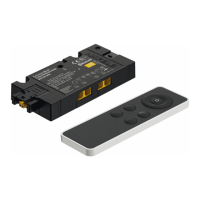

 To Next Page