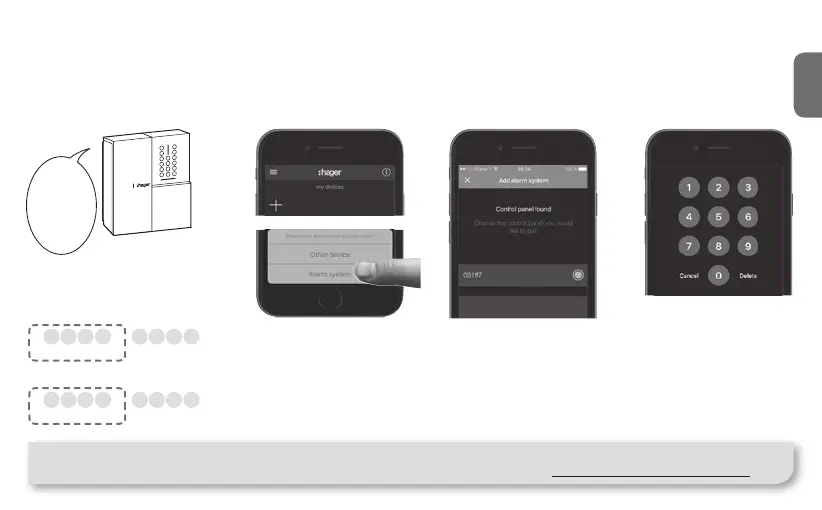
Installation Step 2.B : Associating an Alarm System
You can easily associate a sepio Hager Alarm System to the TKP100
as follows :
"beep"
instal-
lation
mode
The control panel must
be in installation mode.
If it is not, enter :
#
2
#
#
master code
(factory: 0000)
Then
#
3
#
#
installer code (factory: 1111)
Press the blue "+"
Button in the coviva
App main page to add a
new Device, and select
"Alarm System".
After a few seconds, your
Alarm Control Panel serial
number (last 6 digits) shall
appear in the list. Con rm
the right Control Panel
serial by clicking "OK".
Note : Only one control panel can be paired to the TKP100.
You will nd more detailled information on alarm installation and settings on : www.hager.com/coviva/alarm
17
z
1 2
Your Alarm System is
now paired and ready for
use with coviva !
You will always be asked
to type the Alarm installer
code to access the Alarm
System visualisation
and
functions from the App.
3 4



 To Next Page