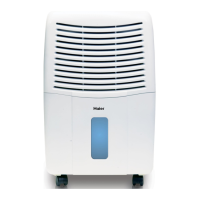
This document is a user manual for the Haier HEH50ET Dehumidifier, providing instructions for its safe operation, maintenance, and troubleshooting. The manual is presented in English, French, and Spanish.
Function Description
The Haier HEH50ET is a dehumidifier designed to remove excess moisture from the air, thereby reducing the relative humidity of the surrounding environment. It operates by drawing in humid air, cooling it to condense moisture, and then expelling drier air. The unit is equipped with an auto-defrost sensor that stops the compressor when temperatures drop to 60°F or lower to prevent ice formation on the evaporator coils, allowing the fan to continue running until the ice melts. Once the ice is gone, the compressor restarts.
The dehumidifier features a control panel with several functions:
- Power: Turns the unit ON or OFF. Holding the power button for 5 seconds before turning the unit on allows switching the temperature display between Fahrenheit (°F) and Celsius (°C).
- Auto Restart: In the event of a power outage, the unit will automatically restart after 3 minutes, resuming its previous operation settings based on humidity conditions.
- Humidistat: Allows users to set the desired humidity level in the air, with a setting range of 40%RH to 70%RH. The display shows the current humidity level, ranging from 30%RH (LO) to 90%RH (HI).
- Timer: Enables programming the dehumidifier to turn ON or OFF automatically at pre-determined times, up to 24 hours in advance.
- Two Fan Speeds: Offers two fan speed levels: LOW and HIGH.
- Smart Dry: Automatically adjusts the fan speed by comparing the set humidity level with the actual humidity level.
- Signal: Controls an audible alert for when the bucket is full. The default setting is ON. When the bucket is full, the red "BUCKET FULL" indicator light blinks, and an alarm sounds 5 times every 15 minutes. The audible signal can be turned OFF, in which case the light will still blink, but no sound will be made.
- Bucket Full Indicator: An indicator light that illuminates when the water bucket is full, automatically stopping the unit.
- Current Temp/Timer Set Display: Displays the current ambient temperature when the unit is running. When the timer is set, it shows the programmed ON/OFF time.
- Current Humidity/Setting Humidity Display: Shows the current humidity level and the user-selected desired humidity level.
- Check Filter Indicator: Flashes when the air filter needs cleaning. After cleaning and re-installing the filter, pressing "Filter Reset" turns off the indicator.
Important Technical Specifications
- Model: HEH50ET
- Refrigerant: R410A
- Voltage/Frequency: 115V/60Hz
- Capacity: 50 pints (per 24 hours)
- Net Dimension (WxHxD): 13 3/8 x 19 1/2 x 10 3/8 inches
- Packed Dimension (WxHxD): 14 3/8 x 22 1/2 x 12 inches
- Power Supply Cord Wiring Requirements: 115 Volt (103.5 min. – 126.5 max), 15 Amp time-delay fuse or circuit breaker.
Usage Features
The dehumidifier offers two primary methods for water removal:
- Emptying the bucket manually: When the "BUCKET FULL" indicator light comes on, the unit must be turned OFF. After a few minutes to allow dripping to stop, the bucket can be lifted by its handles, emptied into a sink or tub, and then reinstalled. It is crucial to ensure the drain cap is tightened before operating the unit.
- Attaching a standard garden hose for continuous drainage: This feature allows for continuous water removal without needing to empty the bucket. To set this up, remove the bucket and the plastic cover at the bottom, then remove the rubber insert from the cover (to be kept for later use). A purchased garden hose is then firmly screwed into the direct drain opening. The dehumidifier should be positioned as close as possible to a floor drain, with the hose opening directly over it. When not using the direct drain function, the hose should be removed, and the rubber cap provided should be used to plug the direct drain opening.
For optimal performance, the dehumidifier should be placed in an enclosed area without restricting airflow to the front coil or top grille. All doors, windows, and other outside openings in the room should be closed. Operating the unit in a basement will have minimal effect on adjacent enclosed storage areas unless there is adequate air circulation. After the unit stops, a 3-minute wait is recommended before restarting.
Maintenance Features
Regular maintenance is essential for the dehumidifier's efficiency and longevity:
- Cleaning: Before cleaning, the unit must be turned OFF and unplugged. Inlet and outlet grilles can be cleaned with water and a mild detergent; bleach or abrasives should not be used.
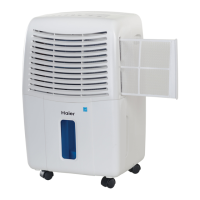
- Air Filter Removal and Cleaning: The air filter is located on the front of the dehumidifier and should be checked every 2 to 3 weeks for cleaning. To remove, grasp the filter handle and pull it out. The filter can be cleaned thoroughly using a vacuum cleaner or by washing it with lukewarm water and mild detergent. It must be dried thoroughly before re-installation. To reinstall, slide the filter back into its tracks and push inward.
- Condenser Coils: After prolonged use, the condenser coils behind the filter may accumulate residue. Regular cleaning with a soft brush is recommended to prevent hardening, which might otherwise require professional cleaning methods.
- The dehumidifier must be properly installed and grounded with a 3-prong plug into a properly installed and grounded outlet.
- The third (ground) prong should never be cut or removed from the power cord.
- Extension cords or adapters should not be used.
- Do not cover the air vents.
- Children should not be allowed to climb on or play with the unit.
- Always disconnect the power supply before servicing or moving the unit.
- In case of standing water, disconnect power before touching the water or unit.
- Damaged power cords must be immediately repaired or replaced.
- For service and repair, always contact a professional.
Storage
When the dehumidifier is not in use for extended periods:
- Disconnect the power cord.
- Empty and thoroughly clean the water tank.
- Thoroughly clean the air filter.
- Repackage the unit in its original carton.
- Store the unit upright in a dry location.

 Need help?
 General


 To Next Page