16 | English
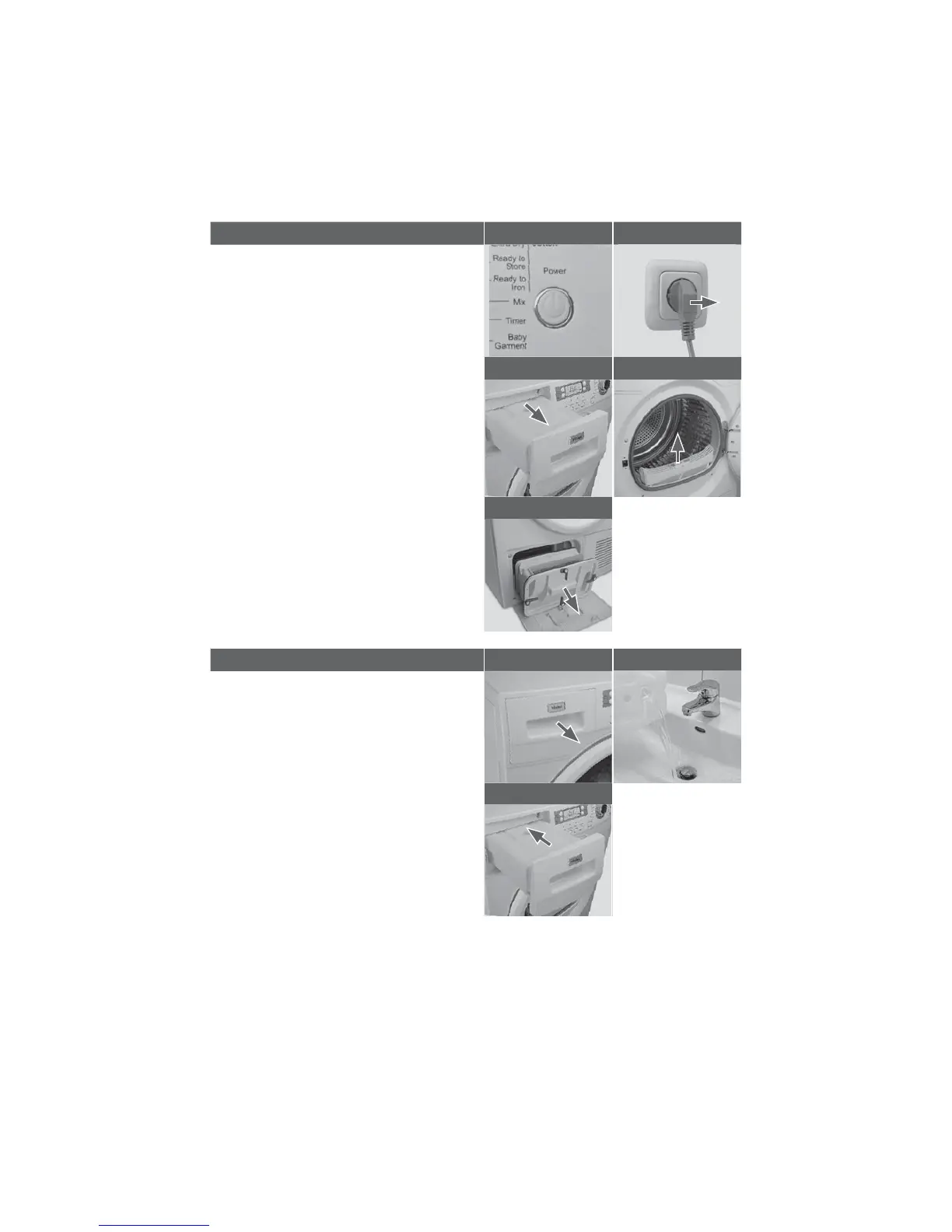
END OF DRY CYCLE 1 2
The tumble dryer stops operation
automatically when a dry cycle is
complete. The display shows END. Open
the tumble dryer door and remove the
laundry. If the laundry is not removed the
anti-crease program starts automatically.
1 Switch off the tumble dryer by pressing
the Power button.
2 Unplug the tumble dryer from the
power socket.
3 Empty the water tank after each dry
cycle.
4 Clean the lint filter after each dry
cycle.
5 Clean the condenser filter approx.
every 20 dry cycles.
34
5
EMPTY THE WATER TANK 1 2
During operation, steam condenses to
water which is collected in the water
tank. Empty the water tank after each
drying cycle.
1 Pull out the water tank from its
housing.
2 Empty the water tank.
3 Reinstall the water tank to the tumble
dryer.
Note: Do not use the water for any
kind of drinking or food processing.
3


 To Next Page