EasyManua.ls Logo

Haier IPDS-1 - Clock Function Settings; Weather Function Settings

Haier IPDS-1
14 pages
Print Icon
To Next Page IconTo Next Page
To Previous Page IconTo Previous Page
Loading...
English
Haier
Rise
App
SETTINGS
CLOCK
FUNCTION:
Setting
the
alarms
via
the
application:
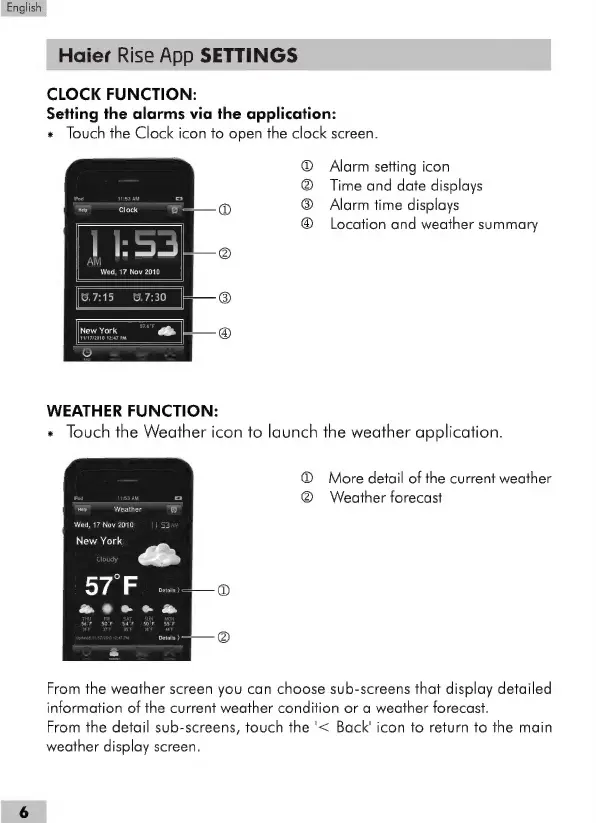
*
Touch
the
Clock
icon
to
open
the
clock
screen.
Alarm
setting
icon
Time
and
date
displays
Alarm
time
displays
Location
and
weather
summary
60600
WEATHER
FUNCTION:
x
Touch
the
Weather
icon
to
launch
the
weather
application.
O
More
detail
of
the
current
weather
fee
O
Weather
forecast
Weather
Wed,
17
Nov2010
||
53
New
York
2
SP
e
atc
:
From
the
weather
screen
you
can
choose
sub-screens
that
display
detailed
information
of
the
current
weather
condition
or
a
weather
forecast.
From
the
detail
sub-screens,
touch
the
'<
Back'
icon
to
return
to
the
main
weather
display
screen.