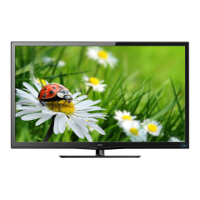
This document is the owner's manual for a Haier TFT-LED LCD TV, providing comprehensive instructions for its setup, operation, and maintenance. It begins with crucial safety information and warnings, emphasizing the importance of reading and following all instructions to prevent fire, electric shock, and damage to the unit or personal injury. Users are advised against exposing the TV to rain or moisture, placing heavy objects on the panel, or blocking ventilation openings. The manual also highlights the need for qualified service personnel for repairs and responsible recycling of the product.
The manual then delves into the TV's main features, which include an integrated ATSC TV tuner for HDTV broadcast reception, high brightness and dynamic contrast for a vivid picture, a wide 16:9 aspect ratio for a home theater experience, HDMI inputs for digital connections, a VGA port for PC connectivity, an integrated stereo speaker system, and a full-function remote control. It also lists the accessories included with the TV, such as a power adapter, infrared remote control, user's manual, and AAA batteries.
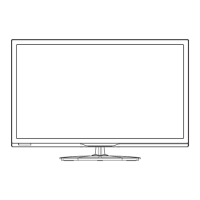
A significant portion of the manual is dedicated to the physical installation of the TV, starting with base stand assembly instructions. Users are guided to place the TV face down on a soft surface, position the base stand onto the neck, and firmly tighten the supplied screw. Detailed diagrams illustrate this process. The manual then describes the front and side panels of the TV, identifying the remote control sensor, indicator LED (blue for power on, red for standby), and side panel keys (SOURCE, MENU, CH+/-, VOL+/-, STANDBY). It explains the function of each button for navigating menus, changing channels, adjusting volume, and switching input sources.
Rear and side connection terminals are clearly labeled and explained. The rear connections include the power socket, composite video input, audio input, and YPbPr (component) input, noting that AV and YPbPr share the same audio input. The side connections feature HDMI1, HDMI2, USB, VGA, headphone output, PC audio input, coaxial output, and RF input. Specific notes are provided for HDMI connections, clarifying audio input requirements when connecting from a DVI source.
The manual provides step-by-step instructions for connecting the TV to a PC, recommending that both devices be off before making connections. It details connecting VGA and audio cables, powering on the TV, switching to PC mode, and then powering on the PC. A table of preset modes for various resolutions and frequencies is included for PC connectivity. Instructions for applying power to the TV via the included AC adapter are also given, emphasizing proper plug insertion.
For AV equipment, the manual illustrates how to connect various devices like VCRs, DVD players, camcorders, and video game systems to the TV's input terminals. It specifies that YPbPr supports video formats such as 480i, 576i, 480p, 576p, 720p, and 1080i.
The remote control section provides an exhaustive description of each button's function, from power and number keys to menu navigation, volume, channel control, input source selection, mute, recall, display, sound mode, aspect ratio, channel list, EPG, favorite channels, and direct access to HDMI, AV, DTV strength, TV, YPbPr, CC, VGA, MTS, and color keys.
The operation section details the TV's on-screen menus, starting with the PICTURE MENU. Here, users can adjust settings like picture mode (Standard, Sports, Movie, Custom, Vivid), brightness, contrast, color, tint, and sharpness. It also covers advanced video settings such as color temperature (Cool, Normal, Warm), aspect ratio (Wide, Zoom, Cinema, Normal), and noise reduction (Strong, Auto, Off, Weak, Middle).
Next is the AUDIO MENU, where sound options can be configured. This includes sound mode (Standard, News, Music, Theater, Sports, Custom), bass, treble, balance, surround sound (on/off), AVL (Auto Volume Level), digital output (PCM), and audio language (English, French, Spanish). A note clarifies that audio language is only available for ATSC (DTV) programs.
The SETUP MENU allows for system settings adjustments. This includes parental controls, timer settings, closed caption options, menu settings, and VGA settings. The parental controls section is particularly detailed, explaining how to set and change passwords, and manage TV and MPAA movie ratings (G, PG, PG-13, R, NC-17, X) for both US and Canadian (English and French) content. It also covers RRT (Rating Region Table) settings for ATSC digital TV mode.
The timer settings allow users to adjust the sleep timer, time zone, DST, and clock. Closed caption settings enable users to switch modes and customize options like font style, size, edge style, colors, and opacity. Menu settings cover language selection and auto scan for channels. VGA settings, available only in PC input mode, allow for adjustments to horizontal and vertical position, clock, phase, and auto-adjustment to fit the screen.
The CHANNEL MENU provides options for managing TV channels, including selecting Air or Cable TV signals, performing an auto scan to capture and store available channels, adding/deleting favorite channels, showing/hiding channels, changing channel numbers, editing channel labels, and displaying DTV signal strength.
Finally, the Multimedia MENU explains how to display JPEG pictures and play MP3 music from an external USB storage device. It specifies that the USB device must be FAT32 formatted and a high-speed USB 2.0 device with a maximum capacity of 50GB. The manual provides instructions for navigating folders and files, playing media, and using playback controls such as play, pause, stop, fast backward/forward, previous/next track, repeat all, and random play.
The troubleshooting section offers a table of common symptoms and their corresponding inspection checks, such as snow or ghosting in the picture, noise in the audio, interference, no picture, no color, and picture breaking up. It provides guidance on checking antenna connections, volume, power, and channel tuning. A note at the end clarifies that a few non-active pixels on the LCD panel are normal and do not affect product performance.
The manual concludes with warranty information, outlining Haier's commitment to repair or replace defective products for a specified period. It details what the warranty covers and excludes, the commencement date, the need for an original purchase receipt, and limitations on implied warranties. It also provides contact information for obtaining service or customer assistance.



 To Next Page
 General