-8-
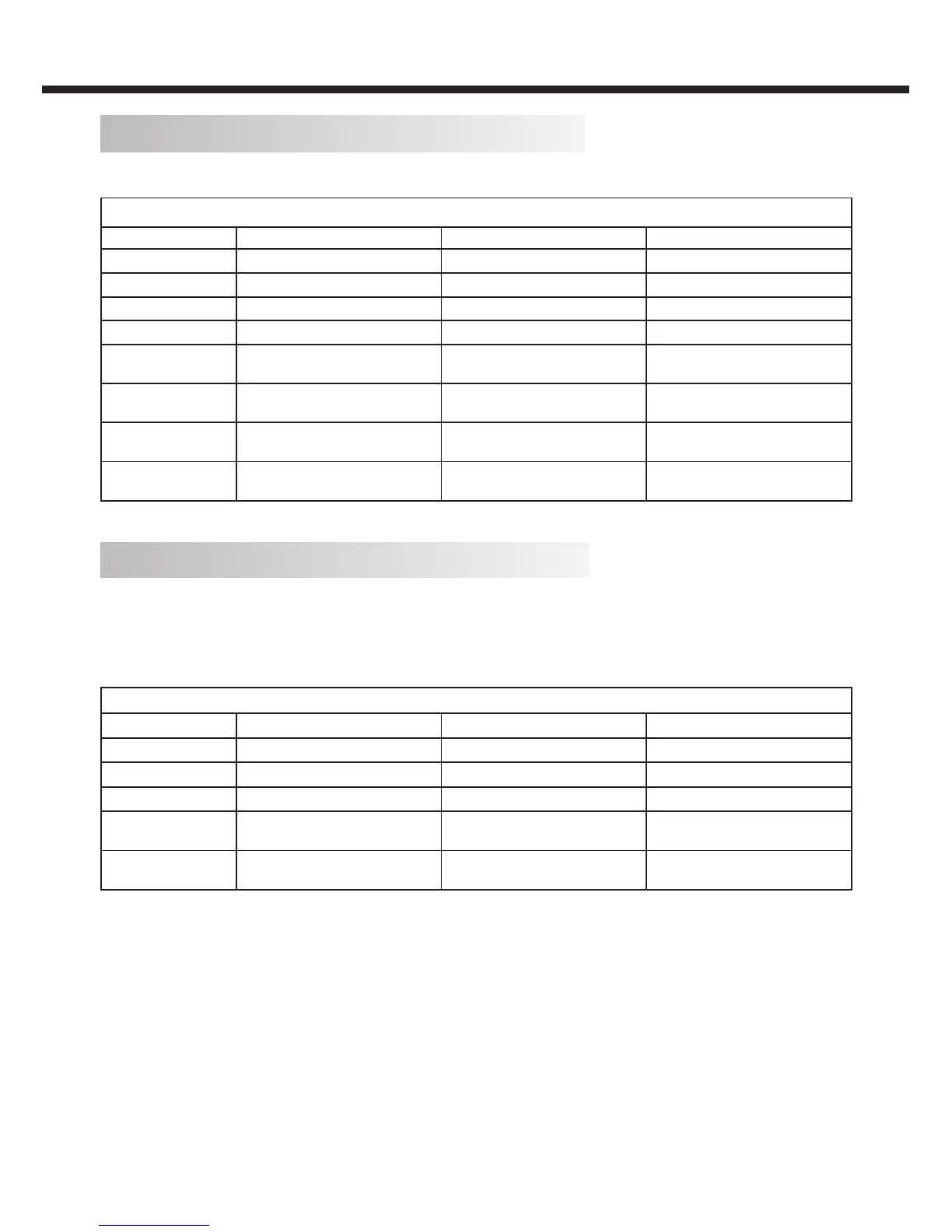
PC Input Signal Reference Table
Connect a computer to your TV set and set up the computer output signal in accordance with table below.
Default computer mode
Item Resolution Horizontal Frequency (kHz) Vertical Frequency(Hz)
1 640 × 480 31.469 59.94
2 720 × 400 31.469 70.087
3 800 × 600 37.879 60.317
4 1024 × 768 48.363 60.004
5
1360 × 768
(*LE32V600)
47.72 59.799
6
1440 × 900
(only for LE46V600/LE50V600)
55.469 59.901
7
1680 × 1050
(only for LE46V600/LE50V600)
65.29 59.954
8
1920 × 1080*
(only for LE46V600/LE50V600)
66.587 59.934
*Recommended resolution
DVI/ PC HDMI Input Signal Reference Table
When DVI port is being used: connect the DVI port of video device to your TV set with a DVI-to-HDMI line and set up the
output signal of the video device in accordance with table below.
When HDMI port is being used: connect the HDMI ports of your computer and TV set with one HDMI wire and set up the
output signal of the video device in accordance with table below.
Default HDMI Mode
Standard Resolution Horizontal Frequency (kHz) Vertical Frequency(Hz)
1 640 × 480 31.469 59.94
2 800 × 600 37.879 60.317
3 1024 × 768 48.363 60.004
4
1360 × 768
(*LE32V600)
47.72 59.799
5
1920 × 1080*
(only for LE46V600/LE50V600)
66.587 59.934
*Recommended resolution
INSTALLATION


 To Next Page