EasyManua.ls Logo

HAISEN HD05R - User Manual

HAISEN HD05R
2 pages
Print Icon
To Next Page IconTo Next Page
Loading...
The button “Test (2s)” is for testing purpose after commissioning.Pressing this
button,the sensor goes to test mode (hold time is only 2s).
HD05R
Screen Display, Memory
& Apply Function, Optional Scenes
Detection Range
Daylight Threshold
Stand-by dimming level
Denition of the ambient brightness; only when the ambient brightness is lower
than the preset specic lux am ount , the sensor will work; w hen it's preset as
"d is able", the sens or w or ks e ve ry ti me i t d ete c ts m ot i o n r ega r dle s s o f t h e
ambient lux level.
Increase or decrease the parameters.
Test (2s)
Scene
WM/PIR
Hold time
Stand-by period
Press the button to change from the different scene options.daylight threshold
disabled.
The period of light keeping low output before it gets completely off. When it's preset
as --, the light always keep at low output even no movement in the detection area.
Turn on or turn off the remote control.
ON/OFF
Start
Memory
Apply
Press the button before choosing the parameters; or press it for 10S, it will be
RESET function.
Press the button after choosing all the parameters to save them.
Press the button to deliver the saved settings to the other sensors directly.
Press the button to change the output power from 0% to 100%, it changes 5%
every press.
Power %
Change from the microwave sensor function to PIR sensor function, and the
other around.
The area in which movement will trigger the sensor, 100% detection area also
means strong sensitivity.
The period of light keeping 100% brightness after moving objects leave the
detection area.
The denition of low output during the standby period.
Question and Answer IconNeed help?

Do you have a question about the HAISEN HD05R and is the answer not in the manual?

Summary

HD05 R Remote Control Functions

ON;OFF Button

Turns the remote control on or off.

WM;PIR Button

Switches between microwave and PIR sensor functions.

Scene Button

Changes scene options; daylight threshold is disabled.

Start Button

Initiates parameter selection or performs a reset.

Memory Button

Saves chosen parameters after selection.

Apply Button

Applies saved settings to other sensors.

Test (2 s) Button

Enters test mode with a 2-second hold time.

Power % Button

Adjusts output power in 5% increments from 0% to 100%.

HD05 R Sensor Settings

Hold Time Setting

Duration light stays at 100% brightness after motion ceases.

Stand-by Period Setting

Time light remains at low output before turning off.

Daylight Threshold Setting

Ambient brightness level that triggers sensor operation.

Detection Range Setting

Area where movement triggers the sensor.

Stand-by Dimming Level Setting

Defines the low output level during the standby period.

Function Setting Guide

Entering Setting Mode

Procedure to enter the setting mode using Start and Scene buttons.

Adjusting Parameters

Guide on adjusting parameters using specific buttons and +/- controls.

Completing Settings

Process to save and complete settings using Memory and Apply buttons.

Overview

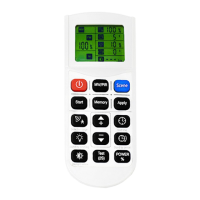
This document describes the HD05R, a device featuring screen display, memory, and apply functions, with optional scenes, controlled by a remote.

Function Description

The HD05R is a sensor-based control system, likely for lighting, that allows users to customize various parameters through a remote control. It integrates both microwave (MW) and passive infrared (PIR) sensing capabilities, enabling flexible detection methods for motion. The device supports multiple "Scene" options, allowing for quick changes between predefined settings, although the daylight threshold is disabled in scene mode.

A core feature is its "Start" function, which initiates parameter selection. Pressing "Start" for 10 seconds also serves as a "RESET" function, restoring default settings. Once parameters are chosen, the "Memory" button saves them. The "Apply" button then delivers these saved settings to other sensors directly, indicating a multi-sensor system capability.

The device offers granular control over several key operational aspects:

  • Hold time: This defines the duration the light remains at 100% brightness after moving objects leave the detection area. The adjustable range is 5 seconds to 30 minutes.
  • Stand-by period: This specifies the duration the light maintains a low output before turning off completely. If set to "--", the light will continuously stay at low output when no movement is detected. The adjustable range is 0 seconds to 30 minutes.
  • Power %: Users can adjust the output power from 0% to 100%, with each press of the button changing the power by 5%.
  • Daylight Threshold: This feature defines the ambient brightness level below which the sensor will activate. If the ambient brightness is lower than the preset lux amount, the sensor will operate. If set to "disable," the sensor will activate whenever it detects motion, regardless of the ambient light level. The adjustable range is 0 to 120 lux.
  • Detection Range: This determines the area within which movement will trigger the sensor. A 100% detection area signifies strong sensitivity. The adjustable range is 25% to 100%.
  • Stand-by dimming level: This defines the low output level during the standby period. The adjustable range is 10% to 50%.

The remote control includes dedicated buttons for increasing or decreasing parameters, providing intuitive adjustment.

Usage Features

The HD05R is designed for user-friendly setup and operation. The remote control features an "ON/OFF" button for basic power control. The "MW/PIR" button allows users to switch between microwave and PIR sensor functions, adapting to different environmental needs.

A "Test (2s)" button is included for commissioning purposes. When pressed, the sensor enters a test mode where the hold time is fixed at 2 seconds, allowing for quick verification of detection and response.

The setting process is guided and time-sensitive:

  1. Entering Setting Mode: Pressing the "Start" button, followed by a sequence of actions (indicated as steps ①②③ on the remote), causes an "S" icon to flash on the screen, confirming entry into the setting mode. All subsequent operations must be completed within 30 seconds to prevent the setting from failing.
  2. Adjusting Parameters: Once in setting mode, the screen displays icons corresponding to the parameters that can be adjusted. Users press the same button as the displayed icon. When an icon flashes, the "▲" (increase) and "▼" (decrease) buttons are used to adjust the parameter values. This process applies to all five adjustable functions: Detection Range, Hold Time, Stand-by Dimming, Stand-by Period, and Daylight Sensor.
  3. Saving Settings: After all desired function settings are complete, the "Memory" button is pressed. An "M" icon will appear on the screen, indicating that the settings are saved.
  4. Applying Settings: Finally, the "Apply" button is pressed to deliver the saved settings to other sensors, completing the configuration process for the system.

The screen display on the remote provides real-time feedback, showing current settings like "100% S" (likely indicating 100% sensitivity in scene mode) and other numerical values for parameters.

Important Technical Specifications (Derived from adjustable ranges):

  • Detection Range: 25% - 100%
  • Hold Time: 5 seconds - 30 minutes
  • Stand-by Dimming Level: 10% - 50%
  • Stand-by Period: 0 seconds - 30 minutes
  • Daylight Sensor Threshold: 0 - 120 lux

Maintenance Features

The "RESET" function (pressing "Start" for 10 seconds) is a key maintenance feature, allowing users to revert to factory default settings if configurations become problematic or if a fresh start is desired. The "Test (2s)" mode also aids in troubleshooting and verifying sensor functionality after installation or adjustments. The ability to save and apply settings across multiple sensors simplifies system-wide updates and reduces individual sensor configuration time, which can be considered a maintenance efficiency feature.

HAISEN HD05R Specifications

General IconGeneral
BrandHAISEN
ModelHD05R
CategoryRemote Control
LanguageEnglish