EasyManua.ls Logo

Halex ORB - Page 5

Halex ORB
12 pages
Print Icon
To Next Page IconTo Next Page
To Previous Page IconTo Previous Page
Loading...
Halex.
Electronic
Dartboard
8
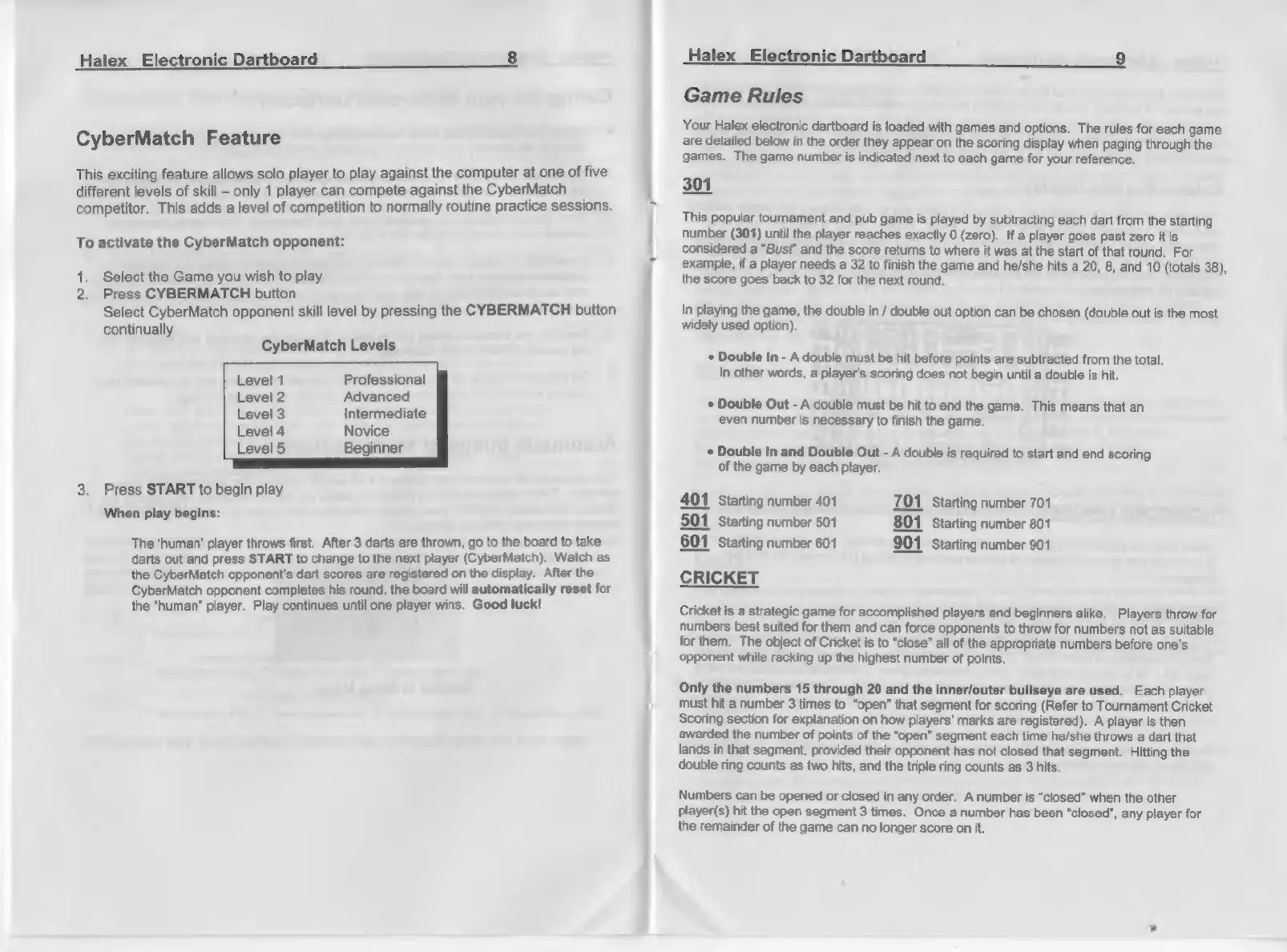
CyberMatch
Feature
This
exciting
feature
allows
solo
player
to
play
against
the
computer
at
one
of
five
different
levels
of
skill
only
1
player
can
compete
against
the
CyberMatch
A
competitor.
This
adds
a
level
of
competition
to
normally
routine
practice
sessions.
To
activate
the
CyberMatch
opponent:
1.
Select
the
Game
you
wish
to
play
2,
Press
CYBERMATCH
button
Select
CyberMatch
opponent
skill
level
by
pressing
the
CYBERMATCH
button
continually
CyberMatch
Levels
Level
1
Professional
Level
2
Advanced
Level
3
Intermediate
Level
4
Novice
Level
5
Beginner
3.
Press
START
to
begin
play
When
play
begins:
The
‘human’
player
throws
first.
After
3
darts
are
thrown,
go
to
the
board
to
take
darts
out
and
press
START
to
change
to
the
next
player
(CyberMatch).
Watch
as
the
CyberMatch
opponent's
dart
scores
are
registered
on
the
display.
After
the
CyberMatch
opponent
completes
his
round,
the
board
will
automatically
reset
for
the
“human”
player.
Play
continues
until
one
player
wins.
Good
luck!
Halex
Electro:
Dartboard
9
Game
Rules
Your
Halex
electronic
dartboard
is
loaded
with
games
and
options.
The
rules
for
each
game
are
detailed
below
in
the
order
they
appear
on
the
scoring
display
when
paging
through
the
games.
The
game
number
is
indicated
next
to
each
game
for
your
reference.
301
This
popular
tournament
and
pub
game
is
played
by
subtracting
each
dart
from
the
starting
number
(301)
until
the
player
reaches
exactly
0
(zero).
If
a
player
goes
past
zero
it
is
considered
a
“Bust”
and
the
score
returns
to
where
it
was
at
the
start
of
that
round.
For
example,
if
a
player
needs
a
32
to
finish
the
game
and
he/she
hits
a
20,
8,
and
10
(totals
38),
the
score
goes
back
to
32
for
the
next
round.
In
playing
the
game,
the
double
in
/
double
out
option
can
be
chosen
(double
out
is
the
most
widely
used
option).
*
Double
In
-
A
double
must
be
hit
before
points
are
subtracted
from
the
total.
In
other
words,
a
player's
scoring
does
not
begin
until
a
double
is
hit.
+
Double
Out
-
A
double
must
be
hit
to
end
the
game.
This
means
that
an
even
number
is
necessary
to
finish
the
game.
*
Double
In
and
Double
Out
-
A
double
is
required
to
start
and end
scoring
of
the
game
by
each
player.
401
Starting
number
401
701
Starting
number
701
501
Starting
number
501
801
Starting
number
801
601
Starting
number
601
901
Starting
number
901
CRICKET
Cricket
is
a
strategic
game
for
accomplished
players
and
beginners
alike.
Players
throw
for
numbers
best
suited
for
them
and
can
force
opponents
to
throw
for
numbers
not
as
suitable
for
them.
The
object
of
Cricket
is
to
“close”
all
of
the
appropriate
numbers
before
one's
‘opponent
while
racking
up
the
highest
number
of
points.
Only
the
numbers
15
through
20
and
the
inner/outer
bullseye
are
used.
Each
player
must
hit
a
number
3
times
to
“open”
that
segment
for
scoring
(Refer
to
Tournament
Cricket
Scoring
section
for
explanation
on
how
players’
marks
are
registered).
A
player
is
then
awarded
the
number
of
points
of
the
“open”
segment
each
time
he/she throws
a
dart that
lands
in
that
segment,
provided
their
opponent
has
not
closed
that
segment.
Hitting
the
double
ring
counts
as
two
hits,
and
the
triple
ring
counts
as
3
hits.
Numbers
can
be
opened
or
closed
in
any
order.
A
number
is
“closed”
when
the
other
Player(s)
hit
the
open
segment
3
times.
Once
a
number
has
been
“closed”,
any
player
for
the
remainder
of
the
game
can
no
longer
score
on
it.