EasyManua.ls Logo

Halfords HDC200 - Dash Cam Settings Configuration; Video, Photo, and Loop Settings; Audio Recording and G-Sensor Settings

Halfords HDC200
28 pages
Print Icon
To Next Page IconTo Next Page
To Previous Page IconTo Previous Page
Loading...
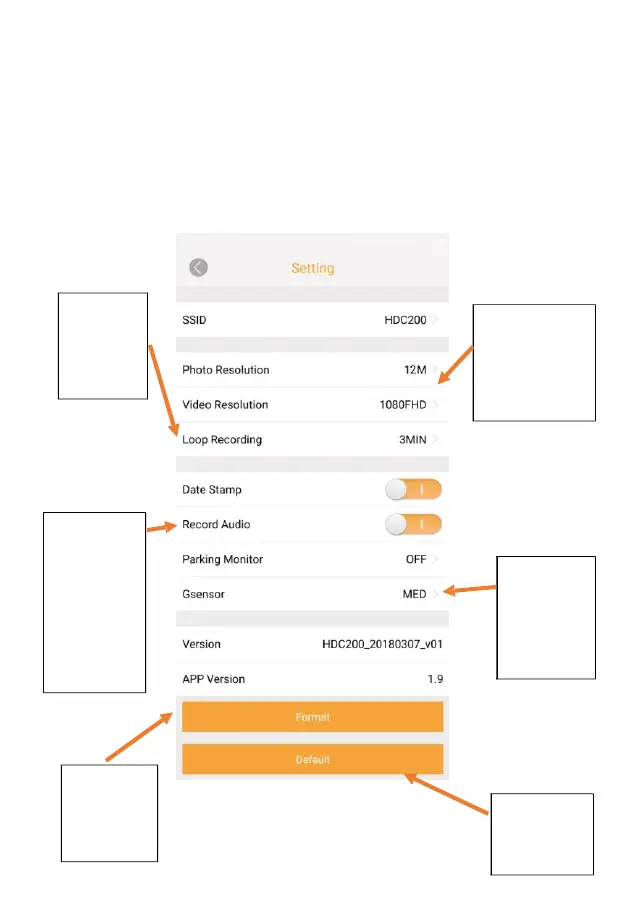
4. SETTINGS
The settings menu allows you to fully setup your dash cam from the MyHDC APP
Change the
length or
recording
time. Default
is 3min
Adjust Video and
image quality to
achieve longer
recording time but
at a reduced quality
image
Add date stamp
to your
recording, have
audio recording
enabled or
disabled and
have your
screen avoid
distraction
when driving
Adjust Gsensor
sensitivity to
control when
your camera
needs to lock a
file
Please see
formatting
instructions in
user manual
(Page 23)
Restore all
camera settings
to default
17

Related product manuals