C02 CYLINDER
STEP 2.
CAP
STEP 3.
HOUSING
STEP 6.
HOUSING
SHOULDER
STEP 7.
SERVICE
INDICATOR
STEP 10.
BOBBIN
STEP 4.
DISASSEMBLY
(see figure)
Step 1
: Unpack or open the life vest so that the manual/automatic inflator
is visible.
Step 2
: Remove gas CO2 cylinder by rotating cylinder couterclockwise then
pull out.
Discard cylinder.
Step 3
: Remove cap by turning counter-clockwise.
Step 4
: Remove bobbin from cap or housing unit.
Discard bobbin
(yellow). Check the housing to be sure it is clear and dry.
Note: The bobbin (yellow) body may remain in the housing or in the cap
assembly when you remove the cap. The bobbin body must be removed prior
to Rearming.
REARMING
Note: Rearming must follow the
sequence below
.
Step 5
: A new bobbin must be used. New bobbin must have been
purchased
within three ( 3 ) years. If bobbin purchase date is unknown, check date on
bobbin, replace if over three (3) years.
Step 6
:
IMPORTANT
!
Bobbin (yellow) must be installed into the
HOUSING
(**see figure), white
side up, aligning the slots on the bobbin with the ridges inside the threaded
housing. The bobbin will slide in easily if installed correctly.
Step 7
: Install cap by screwing clockwise until it meets the housing
shoulder.
Note: No gap between the cap and the housing shoulder.
Step 8
: Check the new cylinder to be sure it has not been punctured.
IMPORTANT
!
Install the bobbin and cap before installing a new cylinder.
Step 9
: Install new cylinder by engaging the cylinder threads with the
inflator threads. Turn cylinder clockwise till a firm seal is achieved.
WARNING: PFD WILL ONLY INFLATE IF
CYLINDER IS TURNED TO FULL STOP.
Step 10
: Check to be sure service indicator is
GREEN.
Halkey-Roberts Pro 1F® V95000
Service Instructions
SERVICE INDICATOR
If green, unit is
operable.
If red, stop and
service unit.

 Need help?
 General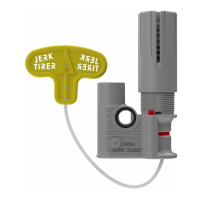

 To Next Page