Getting Started
Charge the HALO Magic Power Cube 3000 until the LED displays
solid green (no lights should be ashing). This will take up to six
hours and will vary depending on whether the unit is charged
from a wall outlet or car.
To Turn On/O the HALO Magic Power Cube 3000
The HALO charger will automatically turn on and begin charging
as soon as it is plugged into your personal electronic device. To
preserve the battery, the HALO charger will automatically turn o
after two minutes if your personal electronic device is fully
charged and no longer drawing power. The unit may also be
turned on/o by manually pressing and holding the power
button for three seconds.
Power Indicator/Battery Status
When charging/discharging, the LED will ash one of the follow-
ing colors indicating the amount of battery level remaining: red
(1%–33%), orange (34%–66%) or green (67%–99%). The power
status can also be checked by pressing and releasing the power
button when the unit is not in use. When the HALO charger is
100% charged, the green LED will stop blinking and turn solid
green.
Charging the HALO Magic Power Cube 3000
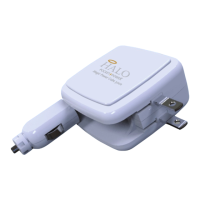
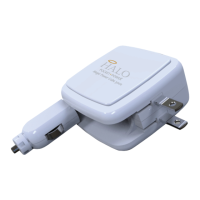
Charge your HALO charger using the built-in wall or car plug. If
charging indoors, plug the wall adapter into a wall outlet. If
charging on the go, plug the car adapter into the car lighter
outlet. Depending on how much charge your HALO charger
already has, the charging indicator light will ash green, orange,
or red, indicating your HALO charger is properly charging.
Charging Your Personal Electronic Device
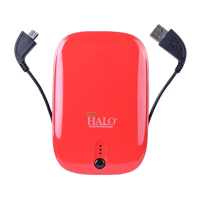
Charge your personal electronic device using the supplied
HALO Charge It Charge Me cable. Plug the USB connector into
your HALO charger. Insert the provided appropriate tip into
your personal electronic device and charging will begin
automatically. You may also use your own USB cable that was
supplied with your personal electronic device. While your
personal electronic device is charging, the LEDs will continue
to illuminate, indicating the HALO charger’s remaining capac-
ity. The red LED lights will begin to ash prior to the HALO
charger running out of power.
Note: To charge both the HALO charger and your personal
electronic device, rst plug the HALO charger into either a wall
outlet or car outlet. Using the supplied HALO Charge It Charge
Me cable, connect your personal electronic device to the HALO
charger and your personal electronic device will automatically
begin to charge. Once your personal electronic device is fully
charged, the HALO charger will then begin to charge itself.
Storing/Handling/Cleaning the
HALO Magic Power Cube 3000
- Do not get wet or store in extreme temperature conditions.
- Do not disassemble the HALO charger or attempt to repair it.
- Use a soft cloth with soap to clean the exterior of your HALO
charger. Do not use liquid detergent or chemicals of any
kind.


 To Next Page