3
• Do not attempt to service or repair the product
yourself. Leave any and all service work to
qualied experts.
• Do not modify the product in any way. Doing so
voids the warranty.
• Keep the packaging material out of the reach of
children due to the risk of suffocation.
• Dispose of packaging material immediately
according to locally applicable regulations.
Warning - Batteries
• Immediately remove and dispose of dead
batteries from the product.
• Only use batteries (or rechargeable batteries)
that match the specied type.
• When inserting batteries, note the correct
polarity (+ and - markings) and insert the
batteries accordingly. Failure to do so could
result in the batteries leaking or exploding.
• Do not overcharge batteries.
• Keep batteries out of the reach of children.
• Do not short circuit the batteries/
rechargeable batteries and keep them away
from uncoated metal objects.
4.
Getting Started
• Open the battery compartment (10), remove
the contact breaker and then close the battery
compartment (10).
5.
Operation
5.1. Setting date/time automatically using
the DCF signal
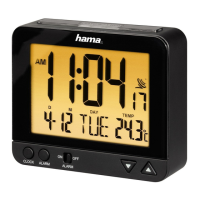
• Once you have removed the contact breaker,
an acoustic signal sounds and the alarm clock
automatically starts searching for a DCF signal.
At the beginning of the search, the radio symbol
ashes. Once the alarm clock has found
a radio signal,
appears and ashes. This
process can take 3 to 5 minutes.
• When the radio signal is received, the date and
time are set automatically and
is displayed
continuously.
Display DCF signal search
Flashing
display
Active –
no reception yet
Flashing display
Active – not completely
received yet
Display steady
(not ashing)
Successful – signal is
being received
No display
Error – signal search
ended


 To Next Page