5
5.2. Setting the time format / time / date
manually
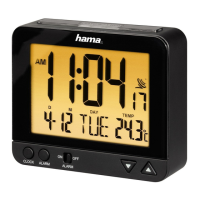
• If the clock is not receiving a radio signal, press
the MODE/SET button (2) for three seconds to
set the time manually.
• You can start by activating (ON) or deactivating
(OFF) the automatic DCF search function carried
out by the alarm clock every hour. Press the q
button (3) or the p button (4) to select and
conrm with the MODE/SET button (2).
• Afterwards, adjust the following information one
by one following the same procedure: Time zone,
hour, minute, year, month, day, temperature
display (°C/°F), language (day of the week),
button tone settings (ON/OFF).
• If the button tone is deactivated,
appears
in the display.
• If the time zone was changed manually,
F
appears in the display.
• The settings will automatically close if there is no
entry for 30 seconds.
• Instead of the year, the day or week can be
displayed, as well. When the display is normal,
press the q button (3) to alternate between the
three displays.
• Press the p button (4) to change the time format
(12/24 h). PM or AM will be displayed depending
on the selected display.
5.3. Setting the alarm time
• This alarm clock allows you to set two different
alarm times with different alarm signals.
• Press the corresponding alarm button
1
(5) or
2
(6) to set them.
• The hours display will ash. Press the q button
(3) or the p button (4) to select and conrm
with the alarm button
1
or
2
(6). Repeat this
step for the minutes display.
• Activate the alarm by pressing the corresponding
toggle switch
1
(7) or
2
(8) on the outside of
the alarm clock. If the alarm is activated and the
red side of the toggle switch is visible, there will
be a border around the alarm time and the alarm
symbol
1
or
2
will appear in the display.
• If the alarm is triggered, the alarm symbol will
begin to ash and an alarm will sound that gets
gradually louder.
• Press the corresponding toggle switch
1
(7) or
2
(8) to stop the alarm. Otherwise, it will stop
automatically after 2 minutes.
• If you press the SNOOZE-LIGHT button (1)
during the alarm, the alarm will be interrupted
for 4 minutes and then go off again. Z
z
will ash
in the display during this time.


 To Next Page