7
5. Charging
Fully charge the headphones once before using them for the rst time
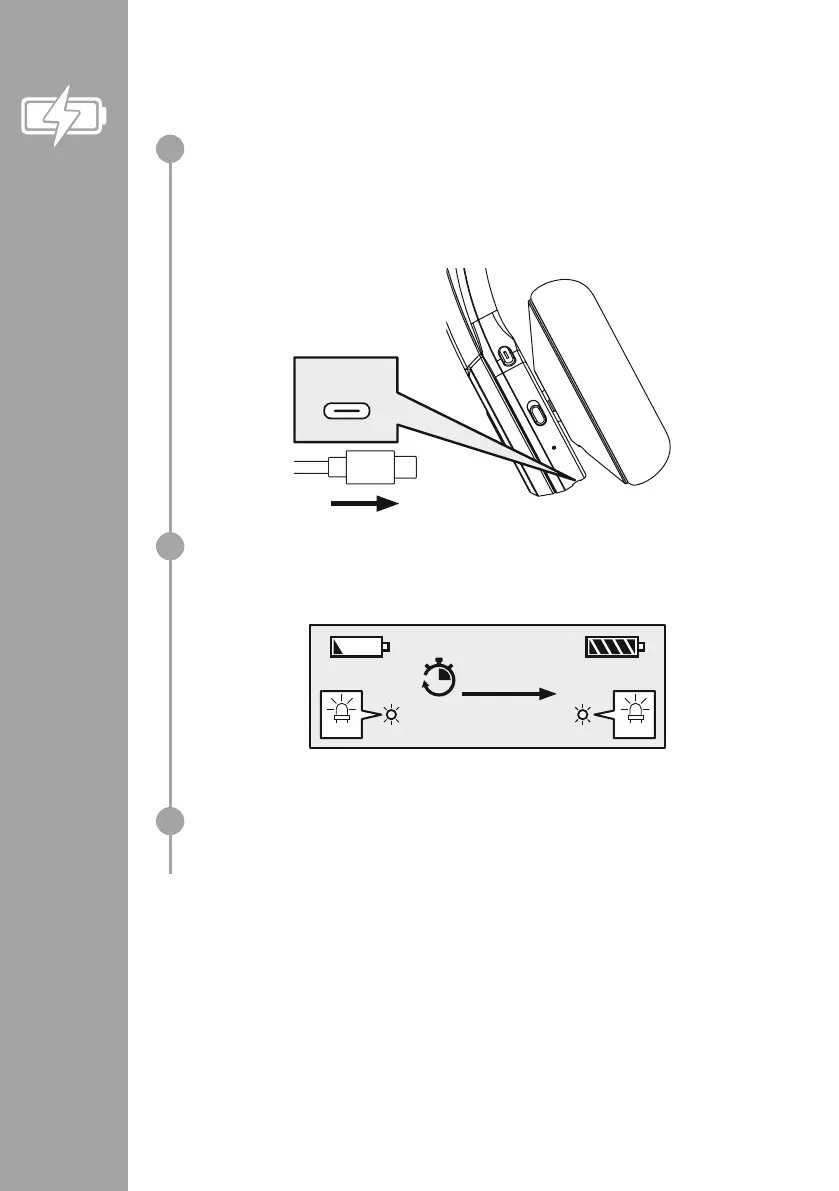
Switch off the headphones and connect them
Ensure that the headphones are switched off before charging them
Connect the USB charging cable included to the charging socket (6) Connect the free plug on the
micro-USB charging cable to a suitable USB charger
To do this, consult the operating instructions
for the USB charger you are using
USB-C
Charging process for the headphones
The LED (4) lights up solid red during the charging process
Once the charging process is complete, the LED (4) lights up blue
CHARGING CHARGED
red
blue
2h:00m
It can take up to 2 hours for the battery to be fully charged
Battery capacity
When the headphone battery capacity is low, the LED (4) ashes red and the announcement
"Battery Low" is heard
1
2
3


 To Next Page