4
Note
•Note that support of the Bluetooth
®
remote release depends on your terminal
device.
•Please refer to the operating instructions for the device you areusing.
5. Getting Started
•Open the Bluetooth
®
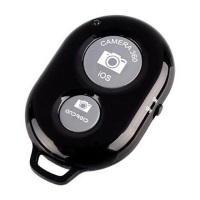
remote release by separating the housing using acoin, such
as a2pence piece.
•Remove the battery cover and insert aCR1632 battery with the correct polarity (B).
•Close the battery compartment by pushing the two housing covers back together.(B)
6. Operation
Note
•The functions described in this section areonly available for Bluetooth
®
-capable
terminal devices.
•Note that the maximum range for Bluetooth
®
is 10 metres without obstacles
such as walls, people, etc.
6.1. Bluetooth
®
pairing
Note –Pairing
•Make surethat your Bluetooth
®
-capable terminal device is on and Bluetooth
®
is activated.
•Make surethat your Bluetooth
®
-capable terminal device is visible for other
Bluetooth
®
devices.
•For moreinformation, please refer to the operating instructions of your terminal
device.
•Press and hold the on/off button (2) for approx. 3seconds to turn on the Bluetooth
®
remote release. The indicator light (1) begins to ash blue.
•This means the Bluetooth
®
remote release is searching for aBluetooth
®
connection.
•Open the Bluetooth
®
settings on your terminal device and wait until
hama Funstand57 appears in the list of Bluetooth
®
devices found.
•Select hama Funstand57 and wait until the Bluetooth
®
remote release is listed
as connected in the Bluetooth
®
settings on your terminal device. The indicator light
(1) goes out.
•You can now use the Bluetooth
®
remote release.


 To Next Page
 Loading...