2
G Operating instruction
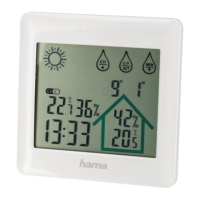
Controls and Displays
ABase station
1. LIGHT button
=activates the backlight (approx. 10 seconds) /manual
search for asignal from the wireless rain gauge
2. Display
3. Outdoor temperature
4. DCF radio symbol
5. Time
6. Day of the week
7. Day
8. Month
9. Year
10. Room temperature
11. Rainfall histogram
12. Rainfall display
13. Rain alarm symbol
14. Battery status symbol
15. Measuring station +wireless rain gauge wireless symbol
16. „ “button
=switches between °C and °F /sets the time and date
17. ‘ ’button
=increases the current set value /manual search for a
signal from the measuring station
18. ‘ ’button
=displays the stored maximum/minimum outdoor and
indoor temperaturevalues /reduces the current set value
19. ‘RAIN’ button
=rainfalldisplay (1H/24H/WEEK/MONTH/TOTAL)
20. ‘ ’button
=displays rain alarm value /sets rain alarm value
21. Rain alarm ON/OFF slide switch
=activates/deactivates the rain alarm
22. Recess for wall mounting
23. Battery compartment
24. Battery compartment release
25. Base
BMeasuring station
26. Transmission indicator light
27. Recess for wall mounting
28. Channel selection
29. Battery compartment
CWireless rain gauge
30. Rain gauge cover
31. Drill holes for ground mounting
32. Locks for the rain gauge cover
33. Spirit level
34. Rocker
35. Battery compartment
1. Explanation of Warning Symbols and Notes
Warning
This symbol is used to indicate safety instructions or to draw
your attention to specichazards and risks.
Note
This symbol is used to indicate additional information or
important notes.
2. Package Contents
•‘RAINY’ weather station with wireless rain gauge (base
station for indoors /measuring station and wireless rain
gauge for outdoors)
•4AAA Microbatteries
•2AA Mignon batteries
•These operating instructions
3. Safety Notes
•The product is intended for private, non-commercial use only.
•Use the product for its intended purpose only.
•Protect the product from dirt, moistureand overheating, and
only use it in adry environment.
•Donot use the product in the immediate vicinity of heaters
or other heat sources or in direct sunlight.
•Keep this product, as all electrical products, out of the reach
of children!
•Donot operate the product outside the power limits given in
the specications.
•Donot use the product in areas wherethe use of electronic
devices is not permitted.
•Donot use the product in moist environments and avoid
splashes.
•Donot place the product near interference elds, metal
frames, computers, TVs, etc. Electronic devices and window
frames can negatively affect the product’sfunctionality.
•Donot drop the product and do not expose it to any major
shocks.
•Donot modify the product in any way.Doing so voids the
warranty.
•Keepthe packaging material out of the reach of children due
to the risk of suffocation.
•Dispose of packaging material immediately according to
locally applicable regulations.
•Donot open the device or continue to operate it if it
becomes damaged.
•Donot attempt to service or repair the product yourself.
Leave any and all service work to qualied experts.
•Use the item only in moderate climatic conditions.
Warning –Batteries
•When inserting batteries, note the correct polarity (+ and
-markings) and insert the batteries accordingly.Failure to
do so could result in the batteries leaking or exploding.


 To Next Page