7
Installing the “Turbo Driver”
For Windows XP / Vista / 7 and Windows 8:
1. The Turbo Driver software from www.hama.com
must be downloaded beforehand.
Enter the item number in the search field at
www.hama.com. You can download the software
under Downloads.
2. Save the Turbo Driver software on a storage medium
(we recommend using a Hama USB memory stick)
and connect this to your computer. You do not need
to connect the USB 3.0 multi-card reader yet.
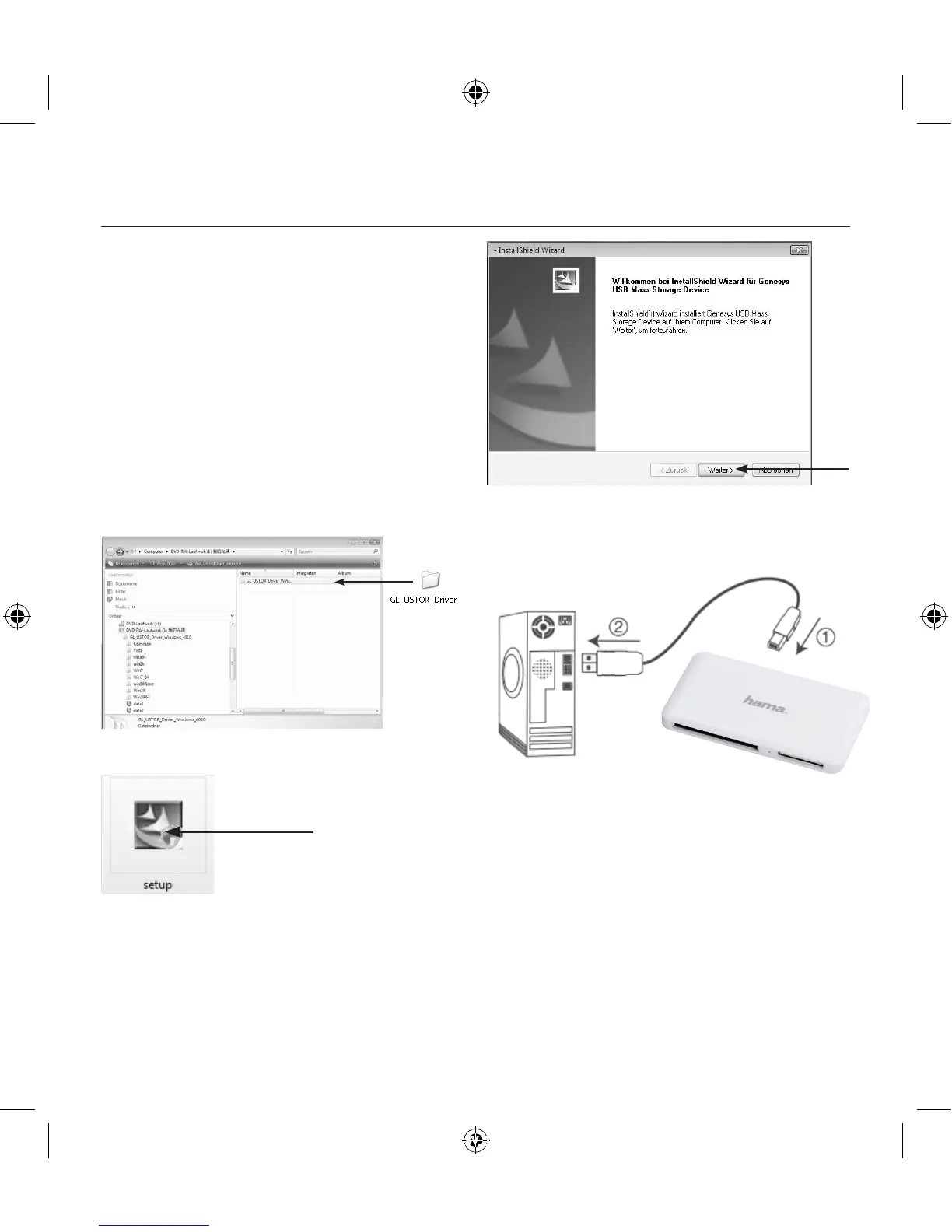
3. The software starts automatically and opens a
window. Click confirm or open the following folder:
GL_USTOR_Driver
4. Find Setup.exe. Click the setup symbol to begin.
5. The installation programme starts up when you
confirm with “Next”.
6.Duringtheinstallation,youwillberequiredto
connect the card reader to the USB 3.0 port on your
computer.
Onceyouhavecorrectlyconnectedthereader,conrm
byclickingonthe“OK”symbol.
00114836man_cs_de_el_en_es_fi_fr_hu_it_nl_pl_pt_ro_ru_sk_sv_tr.indd 7 20.06.12 16:02


 To Next Page