8.1 Inserting/changing the filter
Warning
• Make surethat the product is disconnected from the mains.
• Since the lter contains all the collected pollutants, it should only be changed outdoors and with
appropriate careagainst contact contamination (gloves/respiratory protection).
• The lter must be inserted beforethe rst start-up.
To do this, proceed as follows:
1
4
Verpackung
3
2
Filter
5
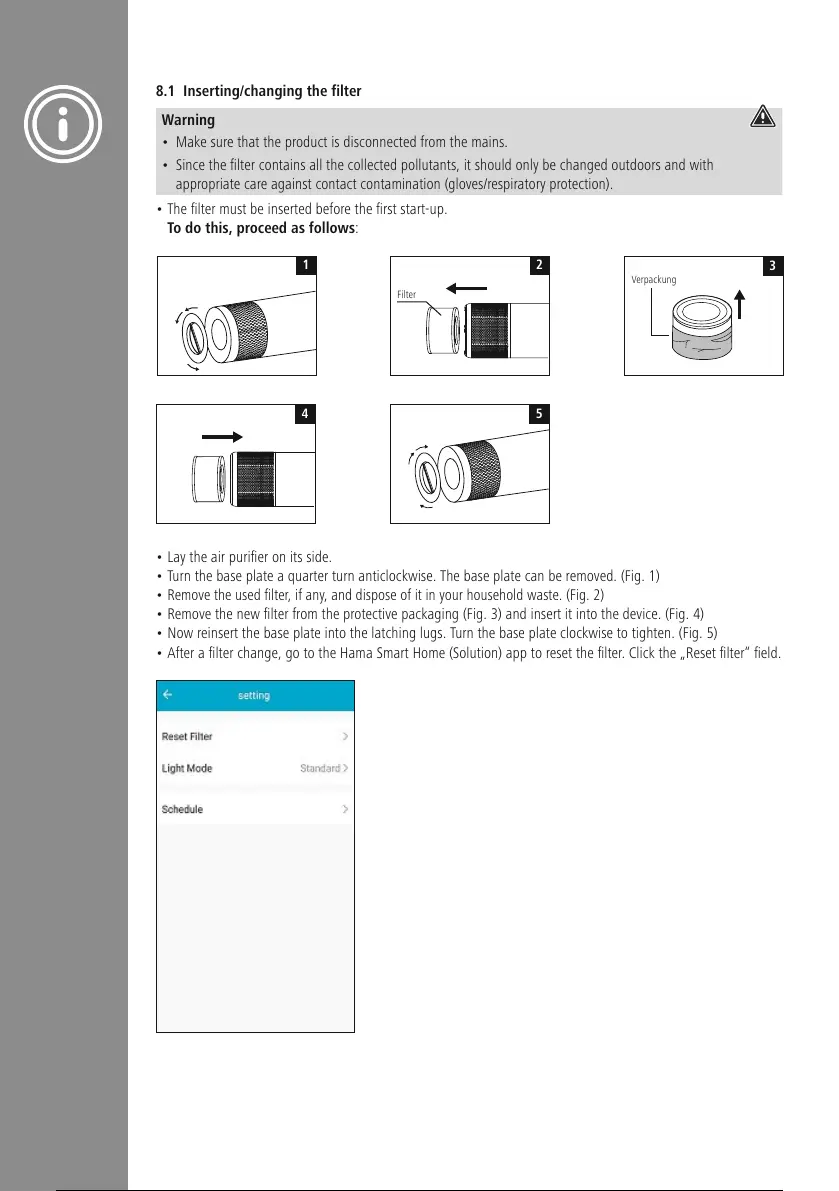
• Lay the air purier on its side.
• Turn the base plate aquarter turn anticlockwise. The base plate can be removed. (Fig. 1)
• Remove the used lter,ifany,and dispose of it in your household waste. (Fig. 2)
• Remove the new lter from the protective packaging (Fig. 3) and insert it into the device. (Fig. 4)
• Now reinsert the base plate into the latching lugs. Turn the base plate clockwise to tighten. (Fig. 5)
• After a lter change, go to the Hama Smart Home (Solution) app to reset the lter.Click the „Reset lter“ eld.


 To Next Page