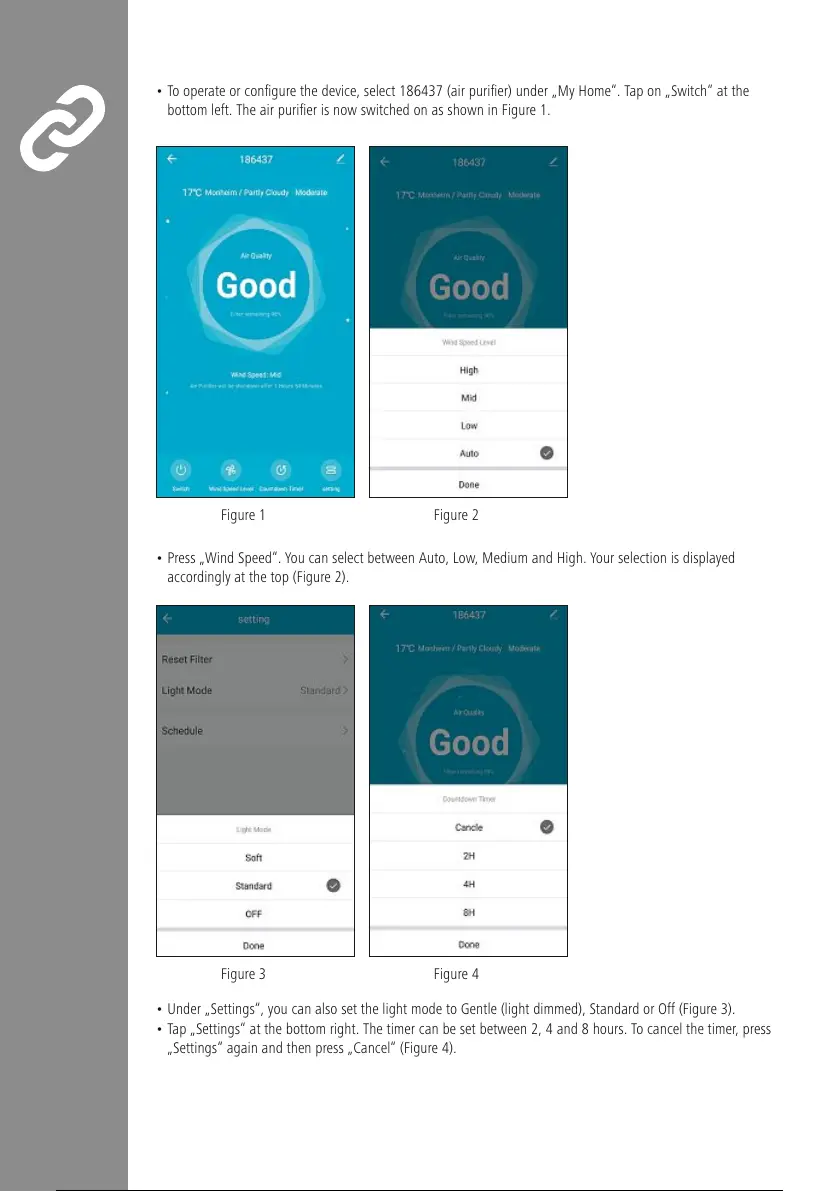
• To operate or congurethe device, select 186437 (air purier) under „My Home“. Tapon„Switch“ at the
bottom left. The air purier is now switched on as shown in Figure1.
•Press „Wind Speed“. Youcan select between Auto, Low, Medium and High. Your selection is displayed
accordingly at the top (Figure2).
Figure3 Figure4
•Under „Settings“, you can also set the light mode to Gentle (light dimmed), StandardorOff (Figure3).
• Tap„Settings“ at the bottom right. The timer can be set between 2, 4and 8hours. To cancel the timer,press
„Settings“ again and then press „Cancel“ (Figure4).
Figure1 Figure2


 To Next Page