3
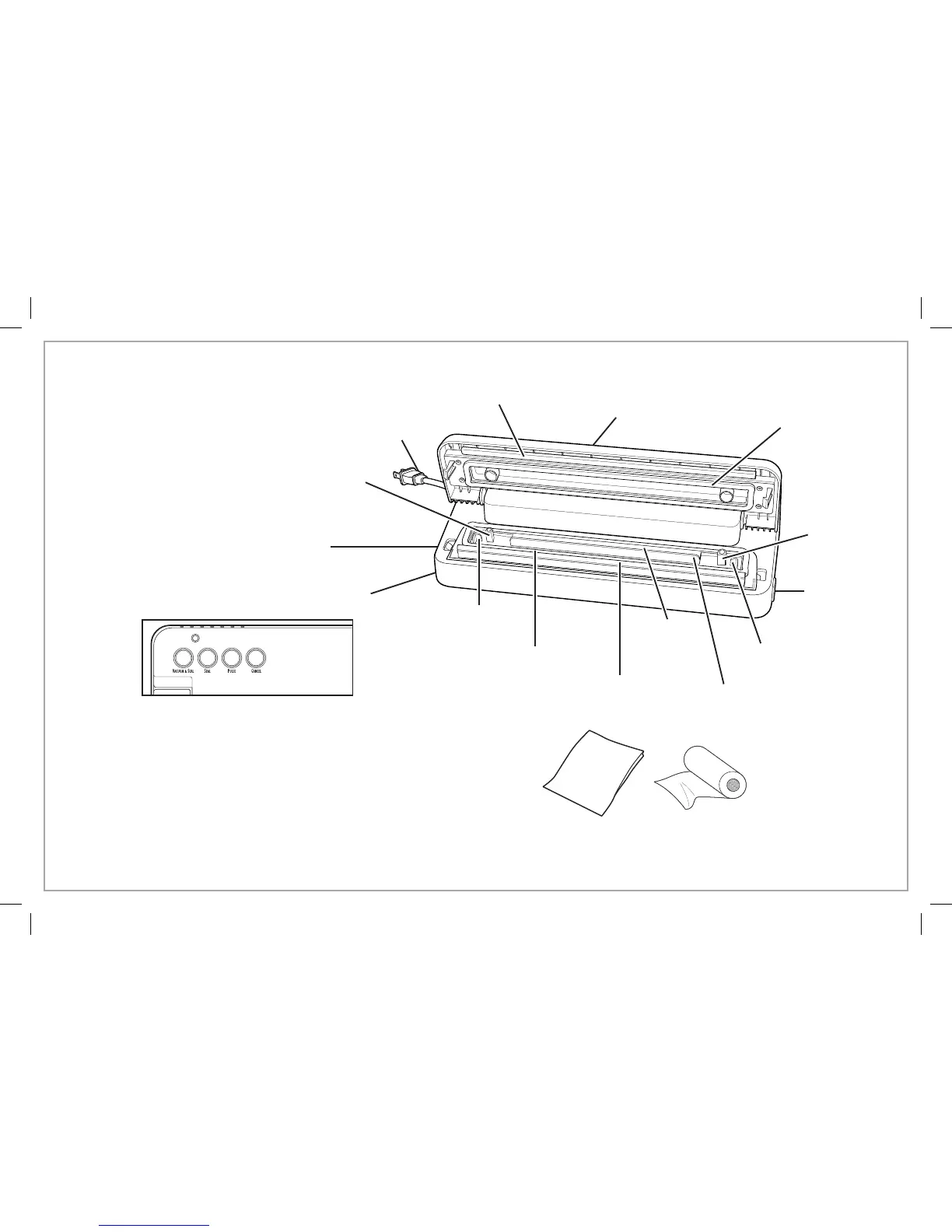
Lid
Power Cord
Base
Parts and Features
*To order parts:
US: 1.800.851.8900
www.hamiltonbeach.com
Canada: 1.800.267.2826
Mexico: 01 800 71 16 100
NOTE: Not all available
parts and accessories are
shown here. Please visit
our website or call for a
complete list.
Lower Chamber Seal*
Lock-Release
Button
Heat-Seal Bags or Roll*
(available with certain models
or purchased separately)
Bag Stop
Power Light: The power light is illuminated when the vacuum
sealer is plugged in. Power light is green when unit is ready
and red when operating.
Vacuum & Seal Button: Press button to start vacuum and seal
operation.
Seal Button: Press this button to start heat-sealing operation.
Use to make bags.
Pulse Button: Press, hold, and release to control air removal
for fragile items. Press Seal button when desired air is
removed.
Cancel Button: Press to stop at any time.
Seal Bar Insulator*
Upper
Chamber Seal*
Vacuum Port
Bag Alignment
Guide
Lock-Release
Button
Heat-Seal Strip
(do not remove tape)
Vacuum
Chamber
Bag Alignment
Guide
Vacuum Port



 To Next Page